Cette page fournit une simple interface de navigation pour trouver des entités décrites par une propriété et une valeur nommée. D’autres interfaces de recherche disponibles comprennent la page recherche de propriété, et le constructeur de requêtes ask.
Liste de résultats
- R0015291 Install Transfer Beams To Module C and E + (19/09/2025 Moved to Confluance Click [https://stuga-ltd.atlassian.net/wiki/external/NDI3MTVlZjJlMmQyNGEzYTk1MzI5YmI4YjFkZDI2ZjY Here])
- R0015293 Install Flap Sensor Beam + (19/09/2025 Moved to Confluance Click [https://stuga-ltd.atlassian.net/wiki/external/NjIyN2Y3MDJlN2JhNDliNWIwMjgwMjE3ZjQ0NTFjZTI Here])
- R0015352 Mount Buffer Beams + (19/09/2025 Moved to Confluance Click [https://stuga-ltd.atlassian.net/wiki/external/ZDVjOTgzMDhhNGZmNDNlOGEwYjQ3NDlmYzI1MTdmMjc Here]<br/>)
- R0015242 Level and Adjust Roller beds module C and E + (19/09/2025 Moved to Confluance Click [https://stuga-ltd.atlassian.net/wiki/external/OWQ1OWJjOTcyMGVhNGUyYmJlYzM3MjY1ZTA1YTVmM2M Here])
- R0015294 Fitment of wire basket and feed pipes + (19/09/2025 Moved to Confluance Click [https://stuga-ltd.atlassian.net/wiki/external/MGRmNThkNzU1OGUwNDlkY2FiYTU0NTFhYjY3NDFlYTg Here])
- R0015292 Install Cylinder Rails and Align + (19/09/2025 Moved to Confluance Click [https://stuga-ltd.atlassian.net/wiki/external/MjM0NmI0YzNjOGFhNGVlNGJmMmVjODc0MjIzODFmZTY Here])
- R0015027 Install Pneumatic Connection rail and Air Feeds + (19/09/2025 Moved to Confluance Click [https://stuga-ltd.atlassian.net/wiki/external/NWRmM2M4OGViYzg4NDU2MWE0ZGVhYWI0YTM3M2RiZWQ Here] <br/>)
- ZX5 Adjusting V Notch Depth and Position + (19/11/2025 Moved to Confluence Click [https://stuga-ltd.atlassian.net/wiki/spaces/~5570585b7bb5d1bc31430e886883cbc774c182/pages/69927040/ACC016+ZX5+Adjusting+V+Notch+Depth+and+Position here] <br/>)
- ZX5 V Notch Blade Mechanical Setup + (19/11/2025 Moved to Confluence Click [https://stuga-ltd.atlassian.net/wiki/external/ZDY2YWRmZmUyNTY5NDY4NDg2YTA0NTQ3MzA3MDUzOTY here])
- Commissioning - Off-Cut Laser Sensor + (21/08/2025 Moved to confluence [https://stuga-ltd.atlassian.net/wiki/external/NWQyMzdiNGUxZjNlNGQ5NzhmZGY2YTQ3YTRiZDMzMDM Click here])
- WinDelay for Twincat Startup + (21/08/25 Moved to Confluence Click [https://stuga-ltd.atlassian.net/wiki/external/MjVkNzJhYjMzNzRiNGQ1NjkyNzZhMGI4OGQzZjhkNGI here])
- Setting Infeed Loading Wheel + (21/08/25 Moved to confluence [https://stuga-ltd.atlassian.net/wiki/external/ZTIwZTg2MDVmN2Y1NDEyZGE0ZTQxZjJiMGZjODM5NTI Click here])
- Accessing Raw Production Data from Diagnostic SQLite Database + (23/07/2025 Moved to Confluence [https://stuga-ltd.atlassian.net/wiki/external/OWFkZjI3ZjIxNDUwNDEyYzhiZDYwMTJhNGJiMzFkMmQ Click here] <br/>)
- R0015286B Bench Assemble X axis Energy Chain + (25/09/2025 Moved to Confluance Click [https://stuga-ltd.atlassian.net/wiki/external/Mjg4YTUwMzA4MjgxNDQwZGJiZTE0NzliYzQ2OTk1Mjg Here])
- R0000572 Bench Assemble Centralise Assembly + (25/09/2025 Moved to Confluance Click [https://stuga-ltd.atlassian.net/wiki/external/MzI5NWVmMTQwMThlNGI0OWJhYWM3NDlhYTYzOWFlMTc Here] <br/>)
- R0015119 Mount Assemblies + (25/09/2025 Moved to Confluance Click [https://stuga-ltd.atlassian.net/wiki/external/Yjk0ZjM3NTNmMzNkNGViZThkMjRjZDA5MzFjZDE0Y2E Here] <br/>)
- R0000713E Bench Assemble R Axis Limit Assembly + (25/09/2025 Moved to Confluance Click [https://stuga-ltd.atlassian.net/wiki/external/NGFjMmU0MTI3YzEwNGIxNDk5ZmZlYTVmYjVjZDE0YWU Here] <br/>)
- Parts Identification Local Setup + (25/09/2025 Moved to confluence Click [https://stuga-ltd.atlassian.net/wiki/pages/resumedraft.action?draftId=35880964&draftShareId=5d2516ce-f1e4-4d00-9d08-1de52c40e590 here])
- Setting Up SageHookup Database + (25/09/2025 Moved to confluence Click [https://stuga-ltd.atlassian.net/wiki/pages/resumedraft.action?draftId=35880964&draftShareId=5d2516ce-f1e4-4d00-9d08-1de52c40e590 here])
- Determining Zero Pulse position For Beckhoff Axis + (26/08/25 Moved to Confluence [https://stuga-ltd.atlassian.net/wiki/external/ZDU5YjQwZDc3ZTZmNDEwNjhjNWMyMzM3OWQ4ODljMTU Click Here])
- R0000571 Fit and Level Cut Tables , Finalise Eject + (27/08/2025 Moved to Confluence Click [https://stuga-ltd.atlassian.net/wiki/external/MmM3NTNhNjMxMDc2NDJjZDkzNzIyYjE0Y2VhNTg4OGY Here])
- R0015121 Bench assemble Infeed arms + (27/08/2025 Moved to Confluence Click [https://stuga-ltd.atlassian.net/wiki/external/YzI3NDdiZWMyYWE0NDFiM2JjMzE4NTAxNWMwZDFlY2I Here] <br/>)
- R0015336 Pneumatic Output Testing + (27/08/2025 Moved to Confluence Click [https://stuga-ltd.atlassian.net/wiki/external/ZjJkMDQ0MDA4NWNhNGY1OGE2ODIxN2EwNmZjNGFhZjQ Here])
- R0015030B Bench assemble loader wheel + (27/08/2025 Moved to Confluence. Click [https://stuga-ltd.atlassian.net/wiki/x/EYDE Here])
- ZX5 Datum and Grip Pin Setup + (27/08/25 Moved to confluence [https://stuga-ltd.atlassian.net/wiki/external/YWEyMTA5ODU5NWE2NGY2YjhhMTlmOTI4YTM5OTVlOTI Click Here])
- R0015268 Pneumatic module Test + (28/08/2025 Moved to Confluance Click [https://stuga-ltd.atlassian.net/wiki/external/MDZkMzA2NGQzNjVhNGJjOThkYzI5MjM4ZjlkMTA2M2E Here])
- R0015078B Module A infeed arm alignment + (28/08/2025 Moved to Confluance Click [https://stuga-ltd.atlassian.net/wiki/external/NTJhZjc4MDE2MWY4NDNlNTk1NmY4OWViNGIwMTA4ZWU Here])
- R0015007 Bench Assemble Roller Tables Machining Outfeed + (28/08/2025 Moved to Confluence Click [https://stuga-ltd.atlassian.net/wiki/external/YzgxYThhYmIxM2MzNGQ4Zjg5YTliYmY5NTQ3ZjAxOGU Here])
- R0015079 Infeed extension assembly + (28/08/2025 Moved to Confluance Click [https://stuga-ltd.atlassian.net/wiki/external/ZDIwZGFjYThlNGUwNDU3ZWEzMTY1OTg3MGU5ZmMyZDI Here])
- Air Pressure Switch Setup + (28/08/25 Moved to Confluence [https://stuga-ltd.atlassian.net/wiki/external/Zjk2Nzk0MGU2Mzc3NDRiMmJhZmU4NzQ0YjMyNjkyY2M Click Here])
- Ecoline Clamp Clamp Reinstatement + (28/10/2025 Moved to Confluence Click [https://stuga-ltd.atlassian.net/wiki/external/NjgxMjFlMzQ4OGUwNGNlMzlkYTUzYzA0M2YzNzNiNWY here])
- Recording a Video Clip Using Windows 11 Snip Tool + (30/10/2025 Moved to Confluence [https://stuga-ltd.atlassian.net/wiki/pages/resumedraft.action?draftId=55803952&draftShareId=34646438-8e8d-4b90-a74a-fc9fb499173f Click here])
- R0015034B ZX5 Module B Wiring Loom installation Part 3 + (4/09/2025 Moved to Confluance Click [https://stuga-ltd.atlassian.net/wiki/external/ZDlmNDI0ZTA1ODg0NDViNDk4MDg4ZTgxMzEyZWMwZjQ Here])
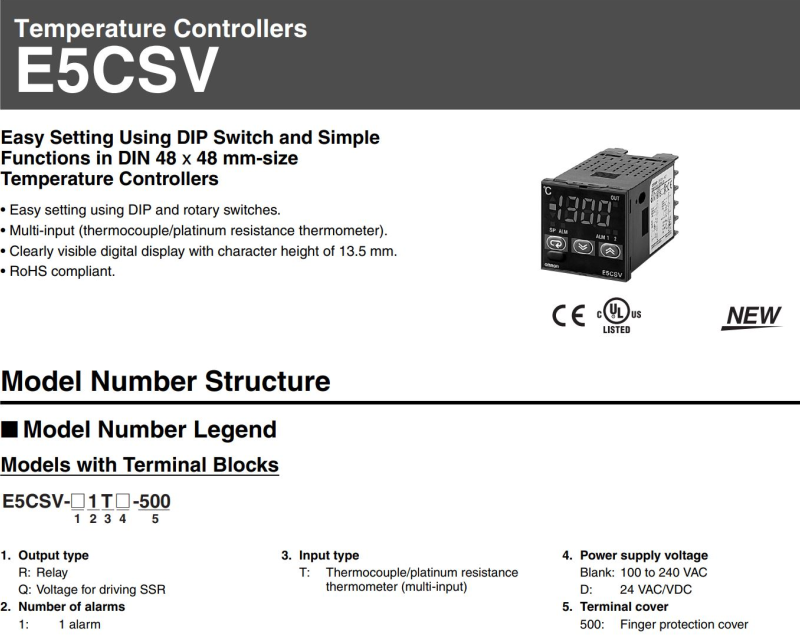
- Omron E5CVS PV Shift + (<div class="annotatedImageDiv" typeof=" …
) - Upgrading Autoflow TwinCAT2 to Win10 and TwinCAT3 + (<div class="annotatedImageDiv" typeof=" … Autoflows from A2001 to A2015 were initially produced with TwinCAT2 software. This has now been superseded with TwinCAT3 which then has the benefit of compatibility with version 6 front end software.
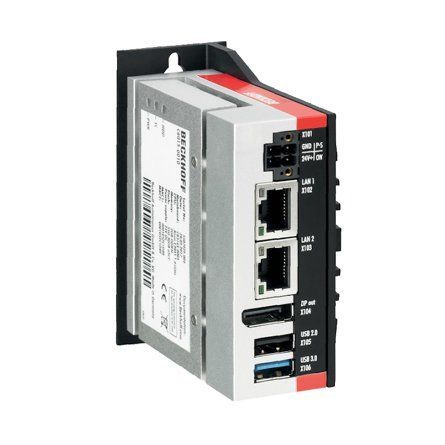
The original PC cannot be used because
*It is not powerful enough to run v6 front end
*The operating system cannot be upgraded to Windows 10
*It cannot be upgraded to TwinCAT3
The Beckhoff C6015 PC has been chosen to be the replacement PC. It is compact, yet powerful enough to run the v6 front end and TwinCAT in the same
. It has an upgrade to 1.9Ghz 4 core processor.
Because it has a limited 40Gb SSD memory, a compact 64Gb memory stick is inserted into the USB 3.0 port. This acts as a separate drive for the DDRIVE dynamic storage for all machine setup. The internat drive is for the Operating System only. This mimics the current Autoflow setup of a remote Camera PC, hence the camera PC can be retired after the upgrade
era PC, hence the camera PC can be retired after the upgrade<br/>) - OBSOLETE Installing SourceTree Version Control Software + (<div class="icon-instructions caution-i … Use this [https://stuga.dokit.app/wiki/Changing_Version_Control_to_Visual_Studio link] From Jan 2020, Sourcetree will be increasingly used to properly maintain changes to the Stuga source code. Each machine with TwinCAT3 will need the Sourcetree program installed, and a change to where and how the source code is stored This tutorial deals with installing the Sourcetree program from Atlassian code is stored This tutorial deals with installing the Sourcetree program from Atlassian)
- ZX5 Gripper Energy Chain & Tray Setup + (<div class="icon-instructions caution-i … The main problems we’ve had during commissioning with these energy chains is that if they are not positioned well enough , the chain will clip the button heads that hold the trays to the L brackets To get over this the brackets sometimes need adjusting on the slots along with possibly bending into a better shape or by adjusting the chain bracket position on the slots in the ‘finger’ bracket Things to look out for: *There should be three links which are reversed at the bracket end of the energy chain. *Servo cable and the pipes and cables from the energy chain are fixed with cable ties to the fingers on the bracket to minimise possible movement and twisting which changes where the energy chain sits in the trays, meaning it could start clipping the button heads. *Tray heights and energy chain length, there should be a consistent gap all the way along between the energy chain and the top tray (viewed from inside the tray) and when at the full travel either end the chain shouldn’t be tight hitting the fence too much at the end. *It is also worth checking if all of the links fitted are the same radius type, as we have had occasions where some have been a smaller radius meaning at certain points down the rack the radius of the bend becomes smaller and falls out from the support of the top tray, especially when the gripper is at either end of the rack. There is a code on the side of each link in the energy chain. *A last thing to be weary of is is the end corners of the trays may require bending out, there have been occasions where one chain tray has been slightly more bent in than the other meaning when the chain moves from one tray to the next it clips the corner of the next tray We normally get the gripper on a reversing cycle movement to test this through the twincat project at different speeds, starting slow and working up to higher speeds.gh the twincat project at different speeds, starting slow and working up to higher speeds.)
- ZX5 Installation Procedure + (<div class="icon-instructions caution-icon"> <div class="icon-instructions-icon"><i class="fa fa-exclamation-triangle"></i></div> <div class="icon-instructions-text">...Read the risk assessment and method statements before proceeding.</div> </div>)
- Updating winStugaSaw Software to v4 + (<div class="icon-instructions caution-i …
With the upgrade of the source code editor to Visual Studio 2017, and the associated security changes to Windows, many thing changed with the Windows .net libraries. In order to maintain the code, it needed to be upgraded.
This upgrade had major consequential effects:
# It was not compatible with windows XP any more due to security issues
# A new version of Workbench needs to be installed
any more due to security issues # A new version of Workbench needs to be installed <br/>) - TB0426 Replacement Zebra Printer Setup + (<div class="icon-instructions caution-i … [https://stuga.dokit.app/wiki/TB0452_ZD620_Zebra_Printer_Setup ZD620 Instructions]iv> [https://stuga.dokit.app/wiki/TB0452_ZD620_Zebra_Printer_Setup ZD620 Instructions])
- OBSOLETE DM - Updating Resources + (<div class="icon-instructions caution-i …
All information provided to the service engineers on Device Magic can all be linked to a single Excel document. This document provides all customer names, machine numbers, emails and employee information. Linking this document with Device Magic provides fields that make it easier for engineers to fill out the form.
used internally at Stuga and not be sent to engineers or customers in coordination with Data Protection standards.</div> </div><br/>) - Placing a TwinCAT3 Machine Under Source Control + (<div class="icon-instructions caution-i … Click [https://stuga.dokit.app/wiki/Changing_Version_Control_to_Visual_Studio here] for the latest procedure For many years, the source code for the PLCs has resided on the G:\drive and then a copy on each and every one of the PCs used to edit the code, so at least one on each machine. This is a recipe for disaster because maintaining all the copies and version numbers is incredibly difficult and adds a lot of time overhead to fixes and changes. This has worked because there has been only one developer, but this is set to change in future as more programmers will be trained and tracking versions becomes more difficult From 2020, the PLC code version control has been improved by using an industry standard source control system called "Git" along with "BitBucket" to store the PLC code in the cloud. The program "SourceTree" is used to commit, push and pull the changes [https://www.atlassian.com/git/tutorials/what-is-version-control Click here] for an introduction to version control using Git This tutorial is a step by step guide to setting up an existing machine or diagnostic PC to a standard uses on all Stuga machines to enable quick, easy and stress free version control.standard uses on all Stuga machines to enable quick, easy and stress free version control.)
- TB0409 Setting Up Windows 10 PC 2018 + (<div class="icon-instructions caution-i … Please use [[Setting Up Windows PC C0000422-KIT 2023]][[Setting Up Windows PC C0000422-KIT 2023]])
- Setting Up Windows PC C0000422-KIT 2023 + (<div class="icon-instructions idea-icon … stuga.dokit.app/wiki/Setting_Up_C0000422-KIT_-_Full_Hardware_2023</div> </div>)
- R0015342 Bench Assemble Outfeed Parts + (<nowiki>'''<u>Tools Required&l …
'''Tools Required''' gt;<br />P0001068 Valve Base: Type 41 2 Position Ø6 x 1<br /><br />P0001085 Fitting: SMC 1/4" to Ø8 Swivel Elbow x 1<br /><br />P0001163 1/4 bsp male silencer x 2<br /><br />P0001186 Valve/ 5/2 smc x 2 <br /><br />P0001198 1/8 bsp 6mm speed controller x 4<br /><br />P0000394 reed switch holder x 2<br /><br />P0000444 Reed switch pneumax x 2</nowiki>)
Standard Hex Key set
Standard spanner set
Standard screwdriver set
Bearing press
Test box for cylinder switch function
'''Parts Required'''
B0000034 Linear Bearing: Ø16 x 30 Compact (Metal Case Only) x 8
B0000236 90 Deg Grease Nipple M6 ST/ST x 4
D0004311 Side Eject Block x 2
D0004591 Side Eject Housing x 2
D0004592 Eject Housing Plate x 2
D0005200 Safety Dead Stop Block x 1
D0005201 Safety Dead Stop Backer (5357) x 1
D0005202 Safety Dead stop Yoke (5358) x 1
D0005203 Safety Slider Cap x 2
H0004626 Shaft 16mm: 275 Eject Push x 4
M0000101 Compression Spring 11 D 15 D 25 Long x 1
P0000035 Cylinder 25x160 x 2
P0000174 Fitting: Plug 1/4'' BSP (Grubscrew Type x 2
P0000201 Flow Controller 6mm x M5 Elbow x 2
P0000367 16mm bore X 125 stroke with rod end clevis x 1
P0000369 Clamp to suit P0000367 x 2
P0000327 Reed Switch: Pneumax 1580U (5.0m Lead) x 2
P0001068 Valve Base: Type 41 2 Position Ø6 x 1
P0001085 Fitting: SMC 1/4" to Ø8 Swivel Elbow x 1
P0001163 1/4 bsp male silencer x 2
P0001186 Valve/ 5/2 smc x 2
P0001198 1/8 bsp 6mm speed controller x 4
P0000394 reed switch holder x 2
P0000444 Reed switch pneumax x 2 - R0015341 Bench Assemble Electrical Cabinet with Pneumatics and controls + (<nowiki>'''<u>Tools required&l …
'''Tools required''' ;P0001070 Valve Base: Type 41 6 Position Ø6 x 2<br /><br />P0001074 Fitting: 1/4" BSP Hex Head Silencer x 8<br /><br />P0001101 Male straight 12mm to 1/4 bsp x 5 <br /><br />P0001102 Male elbow 12mm to 1/4 x 2<br /><br />P0001186 Valve 24v dc SMC x 12 <br /><br /><br /><br /><br/></nowiki>)
Tape rule
Steel rule
standard hex keys
Standard HSS drill set
Standard Tap set
Hack saw
Ball Pein hammer
Centre punch
'''Part Required'''
P0000010 Elbow Adaptor 6mm - 1/8 BSPT (Taper thread) x 3
P0000024 Fitting: Hex Nipple 1/4 BSP x 1
P0000096 Fitting: Brass Reducing Bush 1/2 - 1/4 x 2
P0000097 Fitting: Elbow Adaptor 8mm - 1/4 BSPT x 1
P0000159 Fitting: Stem Blanking Plug 6mm x 3
P0000160 Fitting: Flow Controller In Line 6mm x 2
P0000279 Female Cross 1/4'' NPT x 1
P0000297 HighLow Pressure Valve x 1
P0000419 Air Service Unit OH (P0283)x 1
P0001070 Valve Base: Type 41 6 Position Ø6 x 2
P0001074 Fitting: 1/4" BSP Hex Head Silencer x 8
P0001101 Male straight 12mm to 1/4 bsp x 5
P0001102 Male elbow 12mm to 1/4 x 2
P0001186 Valve 24v dc SMC x 12 - Autoflow Maintenance - Infeed + (<nowiki>The following preventative m …
The following preventative maintenance tasks should be carried out regularly on the machine. The frequency depends on the machine use, but as a guide: kly<br />20 Hrs/Week Monthly</pre></div><br/></nowiki>)2-3 Shifts Weekly
40 Hrs/Week Bi-Weekly
20 Hrs/Week Monthly - Autoflow Maintenance - Gripper + (<nowiki>The following preventative m …
The following preventative maintenance tasks should be carried out regularly on the machine. The frequency depends on the machine use, but as a guide: i-Weekly<br />20 Hrs/Week Monthly</pre></div></nowiki>)2-3 Shifts Weekly
40 Hrs/Week Bi-Weekly
20 Hrs/Week Monthly - R0015382 Top Spindle Blower Upgrade + (<u>'''Component List'''</u> … '''Component List''' M0001083 6mm copper tubing x 0.5 mtr P0000160 6mm inline flow reg x 1 P0000458 pilot valve x 1 P0000075 8mm Y connector x 1 P0000046 6mm y connector x 1 P0000159 6mm Blank x 1 P0000284 6mm elbow tube connector x 1 P0000007 6mm 1/8 straight connector x 1 P0000009 6mm 1/4 elbow connector x 1 P0000097 8mm 1/4 elbow connector x 1 P000005 6mm black tubing x 7 P0000365 8mm blue tubing x 1 D0001933 Single valve bracket x 1 F0000254 M5 x 12 socket cap x 2 F0000159 M5 A form washer x 2 M5 x 12 socket cap x 2 F0000159 M5 A form washer x 2)
- R0015066 Bench Assemble Saw Motor Assembly + (<u>'''Tool Required'''</u>
… '''Tool Required'''
Standard hex key set
Standard spanner set
Cutting disc
Standard hand taps
'''Parts Required'''
A0000013 32mm Conduit Adaptorx 1
A0000027 Flexible Conduit Ø32mm x 1
D0004079 Saw Motor (Modified Front Flange) x 1
D0004437 Motor Conduit Bracket x 2
D0004835 Flex conduit plate x 1
D0004997 Connector Support Block (5360) x 1
D0004999 Reed Switch Terminal Box x 1
D0005219 Turntable Nozzle x 1
D0008198 Chute Flap x 1
H0008200 Chute Flap Bracket x 1
P0000295 Elbow Adaptor 6mm - 1/8 BSPT (Metal type) x 1
1 P0000295 Elbow Adaptor 6mm - 1/8 BSPT (Metal type) x 1 <br/>) - R0015348 Fit Flexible Ducting + (<u>'''Tools Required'''</u> Utility knife Side cutters Tape measure Standard screwdriver set <u>'''Parts Required'''</u> M0000113 Flexible Ducting 125mm PVC x 10 M0000114 Jubilee Clip 110-140mm x 6 M0000036 ear defender sticker x 1)
- R0015284 Frame ancillaries + (<u>'''Tools Required'''</u> … '''Tools Required''' 115mm disc cutter Standard Hex key set Standard spanner set Standard tape measure Standard Tap set Standard HSS drill set '''Parts Required''' A0001060 Support bracket :Cable basket Tray x 5 A0001061 Retainer: Wire Basket Cable Tray x 7 A0001065 Wire cable tray 3m length x 2.5 D0015611 Reference Levelling Bracket x 2ble tray 3m length x 2.5 D0015611 Reference Levelling Bracket x 2)
- R0015274 Fit X Axis Gearbox and Motor + (<u>'''Tools Required'''</u> … '''Tools Required''' Feeler gauge set Standard hex key set Standard Tap set Torque wrench (0-50nm) Extended 4mm hex bit 1/8 drive '''Parts Require''' D0015073B x 1 C0001212 x 1 H0008301 x 1 C0001122K x 1 D0015290 x 2 M0001087 x 201212 x 1 H0008301 x 1 C0001122K x 1 D0015290 x 2 M0001087 x 2)
- R0015336 Pneumatic Output Testing Part 2 + (<u>'''Tools Required'''</u> PCL airline connection 12mm blanking ports Valve Manual over ride tool Standard screwdriver set Additional colleague when setting regulator pressures for outputs <u>'''Parts required'''</u> R0015040 completed module)
- R0015251 Bench Assemble X Axis components and Energy chain + (<u>'''Tools Required'''</u> Pipe cutters Cable / pipe markers <u>'''Parts Required'''</u> A0001077 x 5.37 A0001070 x 1 E0000439 x 2 E00001237 x 1)
- R0015286 Bench Assemble X axis Components and Energy Chain + (<u>'''Tools Required'''</u> Pipe cutters Cable / pipe markers <u>'''Parts Required'''</u> A0001077 x 5 A0001070 x 1 E0000439 x 2 E00001237 x 1)
- R0015338 Bench Assemble Serial Plate + (<u>'''Tools Required'''</u> Serial plate stamping jig Large Alphabetic and Numerical stamps Correct machine build data <u>'''Parts Required'''</u> D0000086B Universal Serial Number Plate (UKCA) x 1 <br/>)
- R0015275 Fit shafts and pinions + (<u>'''Tools Required'''</u> Standard Hex key set <u>'''Parts Required'''</u> Previously assembled parts from [[R0015287 Bench Assemble Shafts, Bearings and Pinions]] B0001100 x 12 B0001153 x 1 B0001165 x 1)
- R0015332 Mount Backfences and Align + (<u>'''Tools Required'''</u> Standard hex key set 1 Meter straight edge Feeler gauges engineers square Shim pack <u>'''Parts Required'''</u> R0000559 Bench assemble machined parts R0015326 Bench Assemble Roller Backfences <br/>)
- R0015290 Bench Assemble Top guard + (<u>'''Tools Required'''</u>
… '''Tools Required'''
Standard hex key set
Acoustic foam cutting edge and Back board
Stanley blade
Standard HSS drill set
Standard tap set
Step drill
'''Parts Required'''
D0001352 Printer Shelf TLP2844-Z x 1
D0004719E Cut Bar Guard Mk5 (5476E) x 1
E0000249 Sounder Beacon x 1
M0000002 12mm Grey Acoustic Foam with Black PVC Facing x 1
M0001127 Cable Tie Base (m6) x 1
with Black PVC Facing x 1 M0001127 Cable Tie Base (m6) x 1 <br/>) - R0008013-ECO Ecoline dipper arm clacker + (<u>'''Tools Required'''</u> 1 … '''Tools Required''' 10mm spanner 5mm punch Ball pein hammer '''Parts Required''' D0003196 Dipper Arm ( Ecoline) x 1 D0003197 Dipper Base ( Ecoline) x 1 D0003894 Flapper pivot pin x 1 M0000101 Compression Spring 11 D 15 D 25 Long x1 F0000185 M6 x 16 Hex set S/S x 1sion Spring 11 D 15 D 25 Long x1 F0000185 M6 x 16 Hex set S/S x 1)
- R000718E Stage 2 spindle assembly + (<u>'''Tools Required'''</u>
… '''Tools Required'''
0.05mm feeler gauge
Standard hex key set
Standard spanner set
Rule
6mm punch
Ball pien hammer
'''Parts Required'''
D0007990 cylinder anchor x 7
D0007648 end plate x 4
D0007649 Double slide end plate x 4
D0007686 single motor plate x 4
D0007723 Double slide motor mount x 4
D0007687 Motor mount x 4
D0007600 Cylinder anchor x 4
D0015856 hard stop x 4
t x 4 D0007600 Cylinder anchor x 4 D0015856 hard stop x 4 <br/>) - R0008013 Clacker assembly + (<u>'''Tools Required'''</u>
… '''Tools Required'''
10mm spanner
5mm punch
Ball pein hammer
'''Parts Required'''
D0008339 Gap Closer Arm x 1
D0008340 Gap Closer Base x 1
D0008496 Clacker Pins x 1
M0000101 Compression Spring 11 D 15 D 25 Long x1
F0000185 M6 x 16 Hex set S/S x 1
g 11 D 15 D 25 Long x1 F0000185 M6 x 16 Hex set S/S x 1 <br/>) - R0015327 Level Frame and quality Check + (<u>'''Tools Required'''</u> … '''Tools Required''' 2 meter straight edge 1 meter steel rule 300mm engineers level Standard spanner set Copper grease Standard tap set Tape Measure Standard ratchet/socket set '''Parts Required''' Workshop consumable floor pads D0004576e frame x 1 M12 x 100 set bolts x 4 M12 Standard nut x 4004576e frame x 1 M12 x 100 set bolts x 4 M12 Standard nut x 4)
- R0015033B ZX5 Module F Wiring Loom + (<u>'''Tools Required'''</u> Flush cutters Reed switch testing box Standard hex keys <u>'''Parts Required'''</u>)
- R0015140 Spindle energy chains and looms + (<u>'''Tools Required'''</u> Standard screw driver set Flush side cutters <u>'''Parts Required'''</u> A0000344 Energy chain bracket set x 8 A0000343 Energy chain x 4 (metres))
- R0015335 Mount Electrical Cabinet + (<u>'''Tools Required'''</u>
… '''Tools Required'''
Standard hex key set
Standard spanner set
Standard HSS drill set
Standard Tap set
'''Parts Required'''
D0004391E Left hand side sheet x 1 D0015425 Bracket: Beckhoff Box Right Angle x 1
D0015426 Mounting Plate: Airgun Assy x 1
D0015425 Beckhoff right angle mounting plate x 1
P0000020 Fitting: Plug 1/8" BSP (Grubscrew Type) x 1
P0000021 Airgun Assembly x 1
P0000142 Elbow Adaptor 8mm - 1/8 BSP x 2
P0000277 Fitting: Bulkhead Female 8mm x 1/4 BSP x 1
P0000278 Regulator 0-2 bar x 1
P0000373 Regulator fixing bracket x 1
R0015016C Electrical cabinet wiring Mod F
xing bracket x 1 R0015016C Electrical cabinet wiring Mod F <br/>) - R0015333 Fit Clamp Assembly + (<u>'''Tools Required'''</u> Standard hex key set Standard spanner set 1 meter straight edge Feeler gauges Soft hammer Engineers square <u>'''Parts Required'''</u> R0015064 Bench Assemble Clamp Assy ZX5)
- R0015324 Install pipe and cable looms + (<u>'''Tools Required'''</u>
… '''Tools Required'''
Standard hex key set
6mm black Air pipe
Pipe identification numbers
Pneumatic Pipe cutters
W0001002 cable (from consumable stock )
'''Parts Required'''
M0001127 Cable Tie Base (m6) (from consumable stock)
P0000046 Fitting: 'Y' Adaptor 6mm x 2
m consumable stock) P0000046 Fitting: 'Y' Adaptor 6mm x 2 <br/>) - R000560 Bench Assemble Spindle + (<u>'''Tools Required'''</u>
… '''Tools Required'''
Standard hex key set
Heat gun
Copper/Hide hammer
240 grit disc
Fe10 solvent
'''Parts Required'''
B0000027 Ball Bearing 30 I/D 62 O/D 16 Long + seals (Branded) x 3
B0000048 Taperlock Set SPZ 80-2 1210-24 x 1
B0000060 Double Angular Bearing 30 I/D 62 O/D 23.8 Long + seals x 1
D0004026 Bearing Housing x 1
D0004027 Saw Spindle x 1
D0004030 Lock Ring x 1
D0004031 Saw Washer x 1
D0004271 Front Saw Flange x 1
D0004272 Backing Saw Flange x 1
D0004771 Inner Bearing Spacerx 1
D0004772 Outer Bearing Spacer x 1
D0004852 Key for D4027x 1
0004772 Outer Bearing Spacer x 1 D0004852 Key for D4027x 1 <br/>) - R0015101 Bench Assemble Take Up Assembly + (<u>'''Tools Required'''</u>
… '''Tools Required'''
Standard hex key set
Standard spanner set
'''Parts Required'''
D0008281 Takeup Boss Cap x 4
D0015581 Fixed Pivot Bracket x 4
D0015584 Cylinder Trunnion Plate x 1
D0015590 Takeup Arm ZX5 x4
D0015593 Takeup Arm Pin ZX5 x 4
D0015595 Takeup Arm Washer 4mm x 4
D0015596 Takeup Bearing Block Short x 4
D0015605 Fixed Pivot Bracket End Plate x 4
D0015736 Hard Stop Backplate x 1
D0015737 Hard Stop Shaft x 1
M0001077 Rubber bump stop M6 x 1
P0000010 Elbow Adaptor 6mm - 1/8 BSPT (Taper thread) x 1
P0000049 Cylinder Spherical Bearing M10 x 1.25 x 1
P0001075 Trunnion Pin for CG1 Cylinder x 1
P0001076 Trunnion Bracket for CG1 x 1
P0001112 Cylinder 32 x 125s Locking
P0001198 Fitting: Speed Controller 1/8" x 6mm Tube
Locking P0001198 Fitting: Speed Controller 1/8" x 6mm Tube <br/>) - R000562 Bench Assemble Centralise Top Table + (<u>'''Tools Required'''</u>
… '''Tools Required'''
Standard hex key set
Consumable M8 studding
Hacksaw and file
16mm hand reamer
1 meter straight edge
'''Parts Required'''
B0000034 Linear Bearing: Ø16 x 30 Compact (Metal Case Only) x 4
D0004138 Centralising Bearing Block x 4
D0004337 Slide Bar Holder x 1
D0004338 Slide Support Bar x 1
D0004545 Slide Support End x 2
D0005235 Support Post x 2
D0005236 Support Post x 2
H0004624 Shaft 16mm: 343 Centralise x 2
6 Support Post x 2 H0004624 Shaft 16mm: 343 Centralise x 2 <br/>) - Zx5-Zx 4-Zx3-FL-S65 Saw Blade Removal and Refitting + (<u>'''Tools required'''</u> M0000055 24mm standard spanner x 1 D0005207 Flange C spanner x 1)
- TB0444 Renewing CF Card on TwinCAT2 Systems + (<u>Problem</u> These machines … Problem These machines use a CX5020 PC with a 2Gb CF card running TwinCAT2 PLC system. The CF card can fail, which is effectively the windows operating system. The CF card has a very small capacity, so needs to be created from an image. This TB outlines the steps in the process to ensure a successful conclusion. 1. Create a new CF card at stuga using the beckhoff imaging tool on a CX5020 2. Boot up with the CX5020 3. Ensure PLC is set to Enable on start-up (default is config mode) 4. Rename the PC 5. Install TeamViewer host v10 or less from a USB stick 6. If you have a copy of the version of winMulti it was running, copy this in to the c:\ multi folder. If not, a “'''''new version install'''''” will be needed so copy in data from the g:\builds\PC Installs\Autoflow\Multi folder 7. Set up and customer specific network parameters to ensure TeamViewer will work when it is plugged in on site 8. Send to customer Once on site, follow procedure A if the winMulti version is preserved, or B if it is a '''''new version install'''''eserved, or B if it is a '''''new version install''''')
- TB0449 Ecoline Clearing out Old Archived Data + (= Problem = Software takes a long period of time to find bar after scanning barcode.)
- R0015041 Bench Assemble Top Hood Assembly Part 2 + (== Introduction == '''<u>Tools Requi … == Introduction == '''Tools Required''' Standard hex key set Standard spanner set Standard Hss drill set Standard tap set Acoustic foam cutting board and straight edge Utility Blade '''Parts Required''' Pre wired light, beacon and network cable from electrical department C0001152 Camera: HikVision DS-2CD2343G0-I-2.8mm x 1 C0001239 Micro SD Card 32Gb Class 10 x 1 D0000770 Door Hinge (M0016) x 2 D0001877 Saw Top Door Mk4 x 1 D0004641 Hinge Pin Block (D7445) x 1 D0004642 Flap Counterbalance Bar x 1 D0004645 Safety Flap Hinge Pin x 1 D0004679 Flap Stiffening Bar x 1 D0004705 Flap Hinge Bar x 1 D0004747B top door screen x 1 D0004807 Flap x 1 D0007445 Hinge Pin Block OH (D4641) x 1 D0016251 Saw Hood Switch Mount Plate (Bernstein) x 1 E0000275 Button: Base Fixing 1 N/C x 1 E0001072 Emergency Stop Module Bevelled 1NO 1NC x 1 E0001569 Guard Lock Switch: Bernstein Radius Actuator (Key) x 1 H0004643 4mm Axxis Clear 145mm x 690mm x 1 M0000002 12mm Grey Acoustic Foam with Black PVC Facing x 1 (consumable stock ) M0000036 Sign - Ear Protection x 1 M0000048 Gas Spring 15mm x 100mm x 1 M0000539 Handle Black Nylon 200mm M8 Fixings x 115mm x 100mm x 1 M0000539 Handle Black Nylon 200mm M8 Fixings x 1)
- TB0398 Assembly of ZX4 Screen Cover + (== Problem == The previous design of scree … == Problem == The previous design of screen cover was susceptible to cracking and failing. The new design resolves this by having a metal hinge piece and an additional clear plastic plate, with both being joined by 3M VHB (Very High Bond) tape. Parts: D0010965 x1 D0010966 x1 M0001119 x 550mmD0010965 x1 D0010966 x1 M0001119 x 550mm)
- Using Windows to Create a Personal Hotspot + (=== Requirements: === * The PC must have '''Wi-Fi hardware''' that supports Hosted Network (most do). * You must have an active internet connection to share.)
- R0015011 Bench assemble Gripper + (==Introduction==
'''<u>Tools Require … ==Introduction==
'''Tools Required'''
External circlip pliers
Standard Hex key set
Standard spanner set
Reed switch setting box
Hammer
Standard screwdriver set
Rule
'''Parts Required'''
B0001106 x 20
D0015095 x 8
D0015096 x 2
D0015086 x 1
B0000034 x 2
D0015084 x 2
D0015083 x 1
D0015082 x 1
E0000366L x 1
B0001182 x 2
M0001182 x 2
D0015756 x 1
P0001013 x 1
P0001041 x 1
P0001128 x 1
P0001198 x 2
P0001120 x 1
D0015431 x 1
B0000437 x 1
D0015430 x 1
D0015090 x 2
D0015085 x 1
D0015102 x 2
D0015103 x 2
D0015104 x 2
D0015170 x 2
P0000049 x 1
D0015097 x 2
D0015101 x 2
D0015292 x 1
E0001069 x 1
A0001044 x 4
7 x 2 D0015101 x 2 D0015292 x 1 E0001069 x 1 A0001044 x 4<br/>) - TB0415 Method to Prevent Loosening of Saw Blade + (==Problem==
On Z063 the bolt holding the s … ==Problem==
On Z063 the bolt holding the saw blade onto the spindle has regularly been loosening during use.
==Solution==
The M16 bolt will be replaced with a stud and castle nut that can be locked with a cotter pin.
==Tool List==
Drill with Ø5.0 bit
24mm Spanner
C Spanner
= Parts List =
0000549 </td><td width="319">Split Pin 4mm x 32 </td><td width="302">1 </td></tr><tr valign="TOP"> <td width="76">F0000550 </td><td width="319">Castle Nut M16x1.5 </td><td width="302">1 </td></tr></table>)D0004031B Saw Washer 3mm 1 D0015560 Spindle Stud 1 F0000273 Spirol Pin Ø6 x 30 1 F0000549 Split Pin 4mm x 32 1 F0000550 Castle Nut M16x1.5 1 - Monday - Getting Started For Engineers + (==Why Change?==
*mHelpdesk limitations
** … ==Why Change?==
*mHelpdesk limitations
**Cludgy to use
**Slow response
**Cannot connect to other apps or emails
*Monday advantages
**Easier and more elegant to use
**More configurable
**easy to email into
**Better searching
**Expandable to whole business
**Cheaper
==Similarities to mHELPDESK==
*Monday consists of a set of user definable “Boards” that contain a list of “Pulses”.
*The “pulses” can be configured however we like.
*I have created a “Board” called “Service Jobs”
*On the Service Jobs Board, I have designed the “Pulses” to mimic the service jobs, so this will include the machine, the status, the type classification, etc
*Any pulse has associated “Updates”. These are just like the “items” on an mHelpDesk job, but is much more flexible than the plain text of mHelpdesk
*The service team will assign jobs as before
*The job should be updated by yourself during your visit
*The database of jobs is searchable so you can find the machine history
so you can find the machine history <br/>) - B0000025 B0001175 Belt Identification + (A Guide to correctly identify the variant of drive belt required for ZX5, ZX4 ,ZX3 S-65 and Flowline saw modules Belts will vary across blade sizes and Pully diameters Key indicator is pulley size, over blade size)
- TB0436 Creating a Backup Through WinMulti + (A backup zip folder of all necessary files can be created in WinMulti. By pressing the backup button (F11) and navigating to the backup’s folder (C:\multi\backup) a machine backup will be created.)
- Changing the Flowline Ops Password + (A password can be set up within FlowlineOps that limits access to the Edit Machining and Edit Profiles buttons, This tutorial will explain how to setup or change this password.)
- ZX4 Infeed Roller Reinforcement + (A plate has been designed to strengthen the installation of the first roller.)
- Setting up TwinCAT Drive Manager for AX8000 Drives + (AX8000 drives require a Measurement projec … AX8000 drives require a Measurement project to be added which gives you a specialised drive manager screen for these drives This needs to be installed separately form a file that can be downloaded from Beckhoff or is in g:\design\TwinCAt3 TE5950-TC3-Drive-Manager-2.zipn\TwinCAt3 TE5950-TC3-Drive-Manager-2.zip)
- Saje uPVC Unloading Process + (Access for machinery is limited at the Saj … Access for machinery is limited at the Saje factory.
The machine will be delivered in the following modules, that should be unloaded from the lorry in this order
#Electrical Cabinet
#Machining centre base module (1.8 x 2.2m)
#Infeed module (2.4 x 9.0m)
x 2.2m) #Infeed module (2.4 x 9.0m) <br/>) - Correcting Linearity with Rack Offset File + (Accuracy problem on A2001 was traced to a … Accuracy problem on A2001 was traced to a non-linear rack. This tutorial demonstrates how to test the linearity of a rack and the systems in place to correct the linearity. machine in the 20 year history that has needed these alterations</div> </div>)
- ZX5 - ZX3 Hepco alignment Module E Saw Infeed + (Alignment and check procedure for mounting … Alignment and check procedure for mounting of hepco rail To main frame Parts required B0001102 hepco rail D0015492 5 off vertical adjustment plate D0015493 5 off Lateral adjustment plate D0015072 1 off Carriage Plate B0000184 journal wiper 4 off B0000185 journal 2 off B0000186 journal 2off Hepco Levelling Jig Hepco rail v block jigs Hepco rail Drive rack pitching jigk jigs Hepco rail Drive rack pitching jig)
- ZX5 Production R0015040 Module F to R0015001B Module E alignment + (Alignment criteria and steps for correct machine installation)
- ZX5 Production R0015139 Module B to R0015000B Module C alignment + (Alignment details and level settings for correct alignment of module B to module C)
- Accessing Zebra Printer Settings Via Web Browser + (All Zebra printers used by Stuga have a web page interface. This is used to access all the printer settings)
- Monday - Obtaining Customer or Machine Address from a Job + (All machines in the Monday database have their locations stored to make it easy for an engineer to navigate to site using the map features in Android or Apple phones However, it is not intuitively clear how to get to this information)
- VM Upgrade Software + (As an alternative to having a separate camera PC. Adding a VM (Virtual Machine) to the Front end allows access to the BE and cameras without interrupting the operator.)
- R0000728 R0000729 Stroke Assembly Dismantling + (Assemblies fitted to MK1 ZX4 will require … Assemblies fitted to MK1 ZX4 will require refurbishment at some point of life cycle.
The following instructions should be followed to ensure that correct assembly and setting are performed
'''Tools Required'''
Standard hex key set
Standard spanner set
Double pin saw flange spanner
Drifts and punches
Ballpein hammer
Soft hammer
Degreasing bath
pein hammer Soft hammer Degreasing bath <br/>) - Updating Zebra Firmware on ZD620 model + (Auto calibration upon Power up on the ZD620 printers only works with V84.20.20Z or above, for this reason we may need to check the firmware version on the Printer.)
- Autocut Taking A Backup + (Backing up is vital to ensure your data is safe in case there is a failure of the PC or Hard Disk Drive)
- Saw Module - Axis of Rotation Alignment + (Basic Steps: # Use blade up and rotation of axis to determine centre of rotation and aligne saw saw beds accordingly # Align rabbit teeth to centre of rotation - adjust in Y direction with maytec clamp mounting bar,in X axis along clamp bar)
- Upgrading Visual Studio to Beckhoff TCXAEShell + (Because this upgrade is normally done to include source control directly in the project, you will have to also upgrade the Git Credential manager, as the one installed as party of the TcXAEShell has a bug in it)
- Saw machining centre alignment and level check points + (Bullet pointed checks to determine correct alignment of key components within Sawing unit)

- R0000164 Spindle Build + (Clear build instructions for the assembly of R0000164 spindle assembly)
- Commissioning - Z-Block Calibration + (Commonly used during sawing on Z transoms, … Commonly used during sawing on Z transoms, the Z block operation is used to fasten the profile, making sure it does not move during sawing. There are 6 possible states the z block can be in. Each of these can have a different length of protrusion for different profiles. 12 x M8 Screws 12 x M8 Nuts 12 x wire numbers 1 - 6ws 12 x M8 Nuts 12 x wire numbers 1 - 6)
- ZX5 Installation Procedure 2023 Pneumatic connections + (Connection details for pneumatics on installation)
- R0000711 Rotary Base Assembly REV2 + (Detailed steps to correctly install rotary … Detailed steps to correctly install rotary gear and journals Checks for correct installation of oil feed system Tolerance limits and requirements '''Tools Required''' Standard hex key set 0-25mm micrometer Ring support blocks for assembly Work Table Mag Base and D.T.I Hepco flat spanner 17mm socket Torque Wrench '''Parts required''' D0006423-2mod Drive ring x 1 D0007651 Face plate x 1 B0000185 journal x 6 B0000186journal x 2 D0006503 Journal washer x 8 D00007692 wiper x 4 D0006521 x2 D0007693 x 2 D0007713 rotary ring cap x 1iper x 4 D0006521 x2 D0007693 x 2 D0007713 rotary ring cap x 1)
- ZX5 Production R0015122 Module A to R0015139 Module B alignment + (Details and steps for correct alignment of Module A to Module B '''<u>Tools Required</u>''' Laser Level 300mm rule 1 meter yellow level 24mm spanner Permanent marker Pipe cutters Ring main connection equipment)
- Device Magic Clearing Android RAM and Cache + (Device magic has been know to get stuck de … Device magic has been know to get stuck delivering finished forms. Symptoms will be - -Once a form is completed it gets moved to the 'submissions' section. Once there it can take hours or days for it to finally upload. -Unless you manually go into submissions it all seems like it has uploaded ok as it gets moved from 'drafts', but it hasn't. -This happens whether on 4g+ or fibre optic WiFi at home -I eventually give up or forget to keep refreshing it on the submissions page, then if I go back on the app a few days later that is sometimes when it finally sendser that is sometimes when it finally sends)
- Z Transom Width Measurement + (Difficulty can be had when trying to accurately measure the width of a Z transom profile section. This guide will show you how to accurately measure the width of the Z section to within 0.1mm which is required when setting up Y notching accurately)
- Downloading AMI Motor Safety Project + (Downloading the safety project to an AMI Motor If the Safety project is not yet installed, see [[Adding TwinSAFE projects to AMI Motors]] <br/>)
- R0019264 Autoflow Mk 4,1 Infeed Safe moving equipment + (Due to unbalanced nature of Autoflow 4.1 infeed frame, The following Guidance is for use of supplied parts within Assembly R0019264 for allowing safe movement of Infeed frame)
- Make Backup Image of CNC PC + (Each CNC PC comes with a USB Backup Stick. This is for those machines that have an Extra disk (D:) (normally used for the Virtual PC))
- R0000204 Notching gear boxes assembly + (For longevity and correct running , it is … For longevity and correct running , it is imperative these units are assembled to the correct tolerances and assembled in the way detailed by this procedure
Tools required
Standard Hex Key Set
Castle nut spanner
Loctite 243 thread lock
Loctite 641 bearing fit
Mandrel jig
Grease applicator
Fe10 solvent spray
ease applicator Fe10 solvent spray <br/>) - Installation Procedure - Autoflow Mk4 + (General Procedure is * Prepare Area * Unload from Transport * Locate and level infeed table * Locate, level and align machining module * Locate, level and align outfeed table * Fix to floor * Locate waste conveyor system * Guard fencing assembly)
- TEST JAMIE B + (How To Change A Nappy......Without Further A-Poo Lets Skid Right In)
- ZX5 Fit X axis Gearbox and Gripper + (How to assemble and set x axis drive assem … How to assemble and set x axis drive assembly How to mount gripper assembly Parts Required R0015001B Assembled Gripper From assembly R0015029b C0001122 servo motor 1 off C0001001 gearbox 1 off D0015073B Motor adapter plate 1 off D0008301 Drive pinion 1 offr plate 1 off D0008301 Drive pinion 1 off)
- Correct Adjustment of Saw Anaconda Rotation + (How to correctly Adjust the Saw conduit to prevent it hitting the guard locking device)
- Stowing Stuertz Infeed Table + (How to ensure the gripper arm and other movements are correctly fixed to prevent damage in transit)
- Stuertz Welder - Setting Barcode Reader + (How to set up a VSM welder and barcode reader)
- Upgrading Project File on TwinCAT2 System + (How to upgrade the .pro file (project) on … How to upgrade the .pro file (project) on a Beckhoff TwinCAT2 system
ram called "TwinCAT PLC Control" to download the PLC project</div> </div><br/>) - Full Version Upgrade TwinCAT3 WinMulti + (If a PC fails on a machine in the field an … If a PC fails on a machine in the field and the hard drive data cannot be recovered, it is necessary to replace the PC. This may create a version conflict, as the new PC will have later versions of twinCAT installed than the original
This tutorial outlines the steps required to bring all the machine systems up to the latest level to ensure compatibility
ions-text">...This is a one-way process that cannot be reversed</div> </div><br/>) - Ecoline - Disabling V axis To Swap Faulty Drive + (If a drive fails on an Ecoline, the V axis … If a drive fails on an Ecoline, the V axis can be utilised to enable the Ecoline to still run as a machining centre, albeit with V notching now disabled. This is a better situation than no machining at all, as all factories have V notching capability in addition to an Ecolineching capability in addition to an Ecoline)
- Hotswap Beckhoff PLC with Licence Slice Installed + (If a machine is set up with an EL6070 Lice … If a machine is set up with an EL6070 Licence Slice, the PLC can be swapped freely and the TwinCAT licence remains on the slice in the machine '''Note: Beckhoff PCs involved are''' Windows 10 versions order code C0001182 ill need to be exchanged from the non functional PC to the new PC</div> </div>)
- Disabling a Tool Home or Tool Out Sensor + (If there is a failure of a tool out or too … If there is a failure of a tool out or tool home sensor on the Stuga spindle ring, it is important to be able to quickly disable the input so the machine can continue production until the problem can be properly resolved. The software has an inbuilt functionality to do this - this tutorial takes you through the necessary stepsrial takes you through the necessary steps)
- Create a TwinCAT Project from Existing Project + (If you are confident and proficient in usi … If you are confident and proficient in using the Visual Studio editor to create TwinCAT projects, you can shortcut a lot of the data inputting by copying and modifying an existing project. This will keep the naming conventions and links exactly the same
ne has exactly the same EtherCAT box, drive and module setup</div> </div><br/>) - Changing Version Control to Visual Studio + (In March 2022 the password policy of the s … In March 2022 the password policy of the system behind SourceTree / Bitbucket and Atlassian changed - [https://community.atlassian.com/t5/Bitbucket-articles/Announcement-Bitbucket-Cloud-account-password-usage-for-Git-over/ba-p/1948231 link]. This meant all machine would need a complex password login change for the SourceTree program used for version control of the PLC code. This was not straight-forward to resolve, so the decision was made to change the version control system to the one that is packaged with the Visual Studio system by default. This is a better method anyway, but it needs the "TcXaeShell" installed. Visual Studio that includes Source control, rebadged for TwinCAT3</div> </div>)
- J0001000H Autoflow Mk4 Mechanical installation-Alignment + (Information to clarify correct process for installation of J0001000H Autoflow Mk4 Levelling tolerance of 0.004" /0.1mm over 300mm (1 division on engineers level) must be adhered to)
- Ecoline Site Installation Guide + (Installation of an Ecoline is quite straig … Installation of an Ecoline is quite straight-forward as all of the main levelling and alignment is taken care of inside the main module housing. Installation involves 3 steps # Levelling main module # Attaching and Levelling Infeed Frame # Refitting Infeed coverling Infeed Frame # Refitting Infeed cover)
- TB450 - CMOS Battery replacement + (Internal CMOS batteries are used in PCs to … Internal CMOS batteries are used in PCs to keep a constant power supply to BIOS memory while the main power supply is switched off. These batteries should last up to 5 years when a PC has been left idle. Sometimes these batteries can fall flat before this time either due to being low when sent out or extended use on older machines. The main symptom of a CMOS battery faulting on a Stuga machine is the PC not booting up when mains power is switched on which will be indicated by a “No Signal Detected” message being displayed on the screen. This is due to the BIOS setting “Restore AC Power Loss” going back to its default value of OFF due to the battery faulting. Restoring the BIOS to its original settings is a temporary fix in this situation as it is most likely this will happen again a couple of months down the line (See TB 376 or 213). The battery required is a '''CR2032'''. In the case of the Antec PC, and most commonly, the battery is held in an open housing that can be pushed to release and easily replaced. In PCs such as the Acer Revo the battery needs to be pre-wired with a plug but still easily unclipped and replacedug but still easily unclipped and replaced)
- Monday - Putting Customer Machines On Stop + (It is important that everyone does this th … It is important that everyone does this the same way or confusion and frustration will follow. It is also important to understand how the relationship between a Machine and it’s contract works * Each machine on the “Machine” board needs to link to a “Contract” on the “Service Contracts” board * This allows multiple Machines to have the same “Contract” – eg Customade group contract * The “Contract” is the electronic version or equivalent to the bit of paper that the customer has signed, and contains the start and end dates, etc * For machines that have no contract, I have set up some other “General” contract types. These General Types are not machine specific – ** PAYG – General Pay as you go ** OnStop – Customer is on stop and nothing should be supplied ** AskFirst – Ask KG or management first before supplying goods and services ** Proforma – Payment required before supply of goods and services ** PreDelivery – Before warranty startses ** PreDelivery – Before warranty starts)
- Stuertz Infeed - Check GY Position Parallelism + (It is important that the parallelism of th … It is important that the parallelism of the GY axis to the backfence is set and maintained along the length of the rack. This tutorial describes how to check this parallelism without the need for measuring equipment
'''General Procedure'''
#Find range of adjustment required
#Zero GY axis to ensure range adjustment can be met
#Move to straight edge resting points, Adjust rollers at these points
#Use straight edge between resting points to adjust the other rollers to a fixed datum
'''Potential Symptoms of a problem'''
*Gripper cannot pick up offcuts
*Gripper /profile end forced away from backfence
*Accuracy problems
*Gripper wobbles after it has released profile
Use the laptop to enable you to control the Service screen whilst inside the infeed table
The gripper setting jig is used to give an accurate and reliable zero to locate the gripper jaw to. Any piece of aluminium reinforcing box section will also work
the gripper jaw to. Any piece of aluminium reinforcing box section will also work <br/>) - Setting Motor Overload Relays + (It is important to set the Motor Overload … It is important to set the Motor Overload Relays to the correct values according to the motor as if the current is set too low, the motor will continually trip the MCB and if it set too high then the motor will not trip the MCB under fault conditions, leading to the motor burning out.ditions, leading to the motor burning out.)
- IP Camera Viewer exe Setup + (It is useful to be able to see a quick vie … It is useful to be able to see a quick view of all cameras on a machine at once. A freeware program is available to do this IP Camera Viewer.exe
Ensure you have the IP address of the cameras to hand, and that the cameras are active and setup to [[Hikvision Camera Setup]].
The cameras should have a fixed IP address
ras should have a fixed IP address <br/>) - Setting Gripper Nose + (It is very important to ensure the gripper nose and heel is correctly set up. This assembly is subject to a lot of wear and tear and maintenance is very important. Incorrect setting or play in this assembly is a major cause of accuracy issues)
- ZX5 Installation Procedure 2023 Part 2 + (Key data for installation of ZX5 Dokit to generate consistency of installation Quality checks for installation Manufacturing data supply)
- ZX5 Installation Procedure 2023 Part 3 Guarding Conformity checks + (Key data for installation of ZX5 Dokit to generate consistency of installation Quality checks for installation Manufacturing data supply)
- ZX5 Installation Procedure 2023 + (Key data for installation of ZX5 Dokit to generate consistency of installation Quality checks for installation Manufacturing data supply)
- Autocut Piece Jammed + (Let's say a small piece has become wedged … Let's say a small piece has become wedged between the eject table and the outfeed table frame.
ach into the machine until it is safe to do so - Press ESTOP</div> </div><br/>) - Autoflow Safety Circuit Fault Finding + (Link to technical documentation Monday.com board: https://stugaltd.monday.com/boards/3338864598)
- Ecoline Safety Circuit Fault Finding + (Link to technical documentation Monday.com board: https://stugaltd.monday.com/boards/3338864598)
- Flowline Safety Circuit Fault Finding + (Link to technical documentation Monday.com board: https://stugaltd.monday.com/boards/3338864598)
- Microline Safety Circuit Fault Finding + (Link to technical documentation Monday.com board: https://stugaltd.monday.com/boards/3338864598)
- Standalone Saw Safety Circuit Fault Finding + (Link to technical documentation Monday.com board: https://stugaltd.monday.com/boards/3338864598)
- Assembly - R0000377B Mk11 Gripper + (Mk11 Gripper was designed to give a variab … Mk11 Gripper was designed to give a variable stop height position for the Mk10 gripper assembly. This is needed on systems with multiple chambers, where there is no "sweet spot" for the open grip position to suit all chambers. A Somatec turret stop is used to provide different stop heights
The design details are here [https://stugaltd.monday.com/boards/315478853/pulses/640717084 Design Notes]
853/pulses/640717084 Design Notes] <br/>) - Monday - Emails to Updates + (Mondays has changed the way it deals with … Mondays has changed the way it deals with the way it writes updates via email, in a very useful way for us. This will save a lot of time cutting and pasting information from emails. Simply put, * when you send an email, cc: the unique email address for the item in your email you are sending. This is standard practice to get your email into Mondays. * When your contact replies (with reply all) * their reply will now magically appear in the Monday update for the item. * It even strips out the email trail, leaving just the important reply It used to be the case that only members of Stuga.co.uk could send an email directly to an update, but this has now changed…ly to an update, but this has now changed…)
- Setting Ultrasonic Sensor - Vertical + (Move to Confluence 15/12/2025 [https://stuga-ltd.atlassian.net/wiki/spaces/~5570585b7bb5d1bc31430e886883cbc774c182/pages/87162885/Setting+Ultrasonic+Sensor+-+Vertical Setting Ultra Sonic Sensor - Vertical]<br/>)
- TM017 Setting Cut Length on Saw + (Moved to Confluence 11/12/2025 [https://stuga-ltd.atlassian.net/wiki/spaces/~5570585b7bb5d1bc31430e886883cbc774c182/pages/82542638/ACC018+-+Adjusting+Saw+Cut+Lengths+on+ZX5-S+and+ZX5-E Setting saw Cut Lengths])
- Recovery of Bar Queue following winMulti Crash + (Moved to Confluence 11/12/2025 [https://stuga-ltd.atlassian.net/wiki/spaces/~5570585b7bb5d1bc31430e886883cbc774c182/pages/84607023/Recovery+of+Bar+Queue+following+winMulti+Crash Recovery of Bar Que] <br/>)
- Setting Arrow Heads on ZX5 or ZX5-E + (Moved to Confluence 11/12/2025 <br/>[https://stuga-ltd.atlassian.net/wiki/spaces/~5570585b7bb5d1bc31430e886883cbc774c182/pages/82706473/ACC017+-+Arrow+Head+Adjustment+on+Saw+with+SY+Axis Setting Arrowheads])
- Safety Circuit Principles + (Moved to Confluence 13/12/2025 [https://stuga-ltd.atlassian.net/wiki/spaces/~5570585b7bb5d1bc31430e886883cbc774c182/pages/86442039/Safety+Circuit+Principles Safety Circuit Principles])
- TB0447 ZX5 Setup - X Axis Beam Calibration + (Moved to Confluence 17/12/2025 [https://stuga-ltd.atlassian.net/wiki/spaces/~5570585b7bb5d1bc31430e886883cbc774c182/pages/89423875/TB0447+ZX5+Setup+-+X+Axis+Beam+Calibration ZX5 Setup - X Axis Beam Calibration] <br/>)
- TM016 Arrow Head Adjustment on Saw + (Moved to Confluence 27/11/2025 [https://stuga-ltd.atlassian.net/wiki/spaces/~5570585b7bb5d1bc31430e886883cbc774c182/pages/75268141/TM016+Arrow+Head+Adjustment+on+Saw Here]<br/>)
- Setting Ultrasonic Sensor - Horizontal + (Moved to Conlfuence 15/12/2025 [https://stuga-ltd.atlassian.net/wiki/spaces/~5570585b7bb5d1bc31430e886883cbc774c182/pages/85524503/Setting+Ultrasonic+Sensor+-+Horizontal Setting Ultrasonic Sensor - Horizontal])
- Ensuring Mapped Drives Connect Every Time on Startup + (Never found out why but seems Windows tries to manage the Mapped Drives before The Network Service is up and running)
- TB0451 CX5120 Beckhoff PC Setup + (OBSOLETE - C6015 PC Now in Confluence - click [https://stuga-ltd.atlassian.net/wiki/spaces/~5570585b7bb5d1bc31430e886883cbc774c182/pages/7372802/Beckhoff+PC+Setup+-+C6015?atlOrigin=eyJpIjoiYzcyNjhlMDc2YjU3NDcxZjkzNzkwYmRiYjMyODE3M2EiLCJwIjoiYyJ9 here])
- R0000164 Spindle Disassemble for Required parts + (Obsoletion of main pcb tooling holder shaf … Obsoletion of main pcb tooling holder shaft has created inability to supply replacement spindle units that have failed on site. This procedure will extract required parts from failed units to provide a supply of parts required to create exchange units for R0000164 spindles
xchange units for R0000164 spindles <br/>) - Updating Teamviewer Host + (Older versions of Teamviewer are being pha … Older versions of Teamviewer are being phased out by the Teamviewer company from September 15th 2021. The advice on the website suggests you need to upgrade to version 15. However, v15 is not compatible with the older Windows XP machines in the field. The latest XP compatible downloadable version of the Host program is 13.2 and is available [https://download.teamviewer.com/download/version_13x/TeamViewer_Host_Setup.exe here] Regrettably, the update process on older versions is not simple, and frustratingly cannot be done remotely. It needs intervention from an operator at the machine with a small amount of technical know-how with a small amount of technical know-how)
- TB0301 Autoflow Saw Head Reinforcement - Additional Enhancements + (On Autoflow 2 Sawing Centres following 5 y … On Autoflow 2 Sawing Centres following 5 years of use., it has been found that the internal saw centre framework can lose its rigidity. this is probably due to "bruising" or denting of the aluminium joints introducing a slight amount of play. This is exacerbated by the design where it is attached and driven on from the base up A retrofit kit of parts has previously been created to allow additional reinforcement to be introduced within the structural framework. This kit builds upon the first kit to provide further accuracy enhancements by #Adding left right stability with additional slide rails at the top of the subframe #Adding front / back stability by moving the SY axis leadscrew to the same height as the saw table ====Parts required: ==== R0010272 Kit: Saw Frame Rigidity Pt 2 This kit consists of 2 carriage assemblies, specifically designed to provide further rigidity to the top of the Saw Head Assembly. In addition, 2 mounting blocks required to relocate the Saw Y Axis Assembly are also included. This allows the Saw Y Axis Assembly to continue to operate accurately, but improves the life of associated components. See also [[TB0259 Autoflow Saw Head Reinforcement]][[TB0259 Autoflow Saw Head Reinforcement]])
- Move SR Datum Sensor to Higher Level R0019217 + (On a Mk4 Autoflow, The SR axis daum sensor … On a Mk4 Autoflow, The SR axis daum sensor is originally located at the rear and to the base of the SR axis. This area is prone to offcuts, so a new location has been designed at the top, with the following design parameters
*Easy to retrofit
*Sensor is protected in a case
*Short distance to connection box
*Uses existing mounting holes
*Easy to adjust and maintain
*Sensing end location should be vertical onto a plate, not horizontal on to a radiused surface
*Can use E0000336 2mm range sensor reliably
*Incorporate a front fence to help deflect offcuts down the chute and to protect the sensor
The parts are supplied in Kit R0019217B
illustrated here are from a Right to Left feed machine. Parts are unhanded so can be fitted to either hand machine</div> </div><br/>) - Updating Realtime Drivers for EtherCAT + (On the 6015 PC, it is often supplied without EtherCAT drivers. This tutorial describes how to install the drivers on a specific port to allow a "Device" to be found when scanning in a Visual Studio Project)
- Device Magic - Adding a Device Email Address + (PM service and service call reports will b … PM service and service call reports will be sent to the engineer's own email address automatically, but '''''only if''''' the device "Email" property is set up correctly.
This needs to be done separately using a device magic account.
's device is renewed or needs to be re-added in Device Magic</div> </div><br/>) - CX5120 Replacement + (Replacement of Beckhoff CX5120 Skill Lev … Replacement of Beckhoff CX5120 Skill Level: Experience with Twincat & Visual Studio n’t Switch CF cards around. Keep them in the CX5120’s they came with.</div> </div>)
- StuertzCloud - Creating Local SQL Database + (See [[StuertzCloud - Setup Overview]] … See [[StuertzCloud - Setup Overview]] for an overview of the setup.
This tutorial covers the setup of the Local SQL Express database instance and creating a "ProOpt" database structure on it.
*This database installed on the 'Location' local network. *The 'Machines' write their production data to it *The 'Gateway' software uploads this data to the StuertzCloud server See Also [https://stuga.dokit.app/wiki/StuertzCloud_-_Installing_Gateway StuertzCloud - Installing Gateway] [https://stuga.dokit.app/wiki/StuertzCloud_-_Setting_up_Stuga_Machine_to_Write_Production_Data StuertzCloud - Setting up Stuga Machine to Write Production Data] [https://stuga.dokit.app/wiki/StuertzCloud_-_Creating_a_Customer_Location StuertzCloud - Creating a Customer Location]
SQL Server Management Studio (SSMS) installed to manage the databases</div> </div> <br/>) - Setting Profile Detection Laser Sensor + (Setting the profile sensor correctly is im … Setting the profile sensor correctly is important as it will lead to incorrect offcut measurement.
ensure the sensor is set for the range of different colours</div> </div><br/>) - TB0425 Lenovo Tablet Setup + (Setting up all apps for the engineers Lenovo tablets.)
- Updating Baldor ESB Firmware 2022 + (Since 2022 ABB have removed the simple lin … Since 2022 ABB have removed the simple link from workbench to allow firmware download. This makes it trickier to upgrade an ESB unit on a saw side of a flowline to allow CANopen communication. This is needed on a Windows update. The procedure demonstrates where to find the firmware file and how to download to the ESB manuallyle and how to download to the ESB manually)
- ZX5 Transfer Table Setup + (Sometimes the mesh between all the parts i … Sometimes the mesh between all the parts is too tight and left with no adjustment. This causes too much pressure on the moving parts, especially the delrin rollers which are not designed to take heavy loads. Any excess force on them leads to excessive wear and premature failure.s to excessive wear and premature failure.)
- 500mm Saw Blade Upgrade + (Step by step guide of how to carry out the … Step by step guide of how to carry out the 400mm to 500mm saw blade upgrade including long reach clamps. Time to complete is very dependant on condition of the machine, ie rusted or rounded off bolts which may need to be drilled out and holes re-tapped. Replace all screws with Loctite except grub screws on taper lock pulleys, grub screws for shafts on clamp pads and slit strip retaining screws or where a locking nut is used on cylinder rods.re a locking nut is used on cylinder rods.)
- Changing Main Saw Blade + (Stuga recommends this blade be changed aft … Stuga recommends this blade be changed after 1-2 weeks of cutting - symptoms to determine if the blade needs changing:
* Awful cutting sound / smell
* Profile dragging (sizes too short)
* Brown burnt swarf
* Smoke coming out of profile end while cutting
p and can be awkward to manouver out of the saw, please be careful</div> </div><br/>) - Installing VNC Server and Viewer + (Teamviewer are withdrawing support and are … Teamviewer are withdrawing support and are very dismissive of helping out with teamviewer issues for older operating systems. Sometimes the problem just has to be solved, so there are other tools that can be used to "piggy back" onto a teamviewer connection to an office PC. A reliable, free and simple method is to use VNC. This involves #Installing VNC Server on the old PC that you want to control #Installing VNC Viewer on the Piggy-back PC VNC Viewer can be downloaded [https://archive.realvnc.com/download/get/786/eula/ here] VNC Server can be downloaded [https://archive.realvnc.com/download/get/775/eula/ here]e.realvnc.com/download/get/775/eula/ here])
- Setting Delrin Transfer Table Wheel Tension + (The "Delrin" or "Oozenest" system used on … The "Delrin" or "Oozenest" system used on the transfer table rails is a simple, compact and low friction solution for linear transport. However, it can be susceptible to premature failure if the journals are under too much tension. This tension forces the V shaped journals apart. If unchecked, and the journal fails, the aluminium rail will then be worn away.the aluminium rail will then be worn away.)
- ACEpc Changing IP address using netedit + (The ACEpcs use two different systems for c … The ACEpcs use two different systems for connecting a network #NETBeui - this was used on earlier machines but reliability depends on the customer network setup. Reconfiguration after initial setup is difficult #IP addressing - A setup system was written using IP addresses to connect. This is a little harder to set up, but is easier to change later. A special program called netedit was written which updates all the correct files in the backgroundes all the correct files in the background)
- Adding TwinSAFE projects to AMI Motors + (The AMI8xxx-3100 motor series is a TwinSAF … The AMI8xxx-3100 motor series is a TwinSAFE enabled motor. To enable this motor to work with a non-TwinSAFE system, a TWINSAFE project needs to be placed into the Safety Logic circuit on board the motor. This dokit describes this process.
====Prerequisites==== *TwinCAT machine project connected, scanned and debugged *Drive Manager 2 Project installed *AMI motors connected and powered up *Latest Device Description (ESI) updates - see Updating Device Description Tables *AMI Motor TwinSAFE Project from [https://stugaltd.monday.com/boards/4881973586 Software Versions Board] For instructions on how to create the AMI Motor twinSAFE project from scratch, see [[AMI TwinSAFE Workaround - Safety Project Creation]]
[[AMI TwinSAFE Workaround - Safety Project Creation]]<br/>) - Decommissioning - Autoflow Mk4 1 + (The Autoflow Mk4.1 machine has been design … The Autoflow Mk4.1 machine has been designed to separate into modules for safe transport
The '''infeed table''' gripper carriage and conveyor split into two sections
The '''machining head''' and '''saw''' split apart like a cam shell. They are joined with a dowel system in joining blocks at the base
The '''outfeed''' splits in to a rear bed and front tray
See Also [[Safe Moving of Top Heavy Machine Modules]]
[[Safe Moving of Top Heavy Machine Modules]]<br/>) - R0019228 Autoflow R Axis Ring Seal Protection + (The Autoflow R axis uses a slewing ring which has a seal that is subject to ingress of swarf. Over time, this seal can become dislodged, resulting in a major failure of the machine.)
- Replacing Baldor Microflex Drive with RS Automation + (The Baldor Microflex drive with Beckhoff m … The Baldor Microflex drive with Beckhoff motor was a drive system combination that has now been superseded with a better performance system using an RS Automation Drive and motor combination The Part number for the upgrade is R0019052X Kit: X Axis Replacement using RS Automationit: X Axis Replacement using RS Automation)
- Convert TC2 Project to TC3 + (The Beckhoff system provides a system for upgrading to TC3 from a TC2 project. This tutorial goes through the steps required to ensure the links and setup of the original TC2 project are copied through to TC3.)
- Guide to Fitting Eject Push Sensors on ZX Machines + (The Eject Push bar on the Saw Outfeed on t … The Eject Push bar on the Saw Outfeed on the ZX machines does not have sensors fitted to monitor the position of the cylinders. This causes an issue when the bar is obstructed and either does not fully extend or not fully extract. The cycle is not aware of the position of the cylinders and the machine will continue to run, often resulting in a collision. Not having sensors fitted also means that the Eject Push cycle is run via a timer. However, using a timer means that the system does not know the actual position of the cylinders. Having sensors fitted to the cylinders will allow us to have a cycle that monitors the position of the cylinders and we can determine the cycle has finished before allowing another operation to proceed. We can also use the sensors as feedback to stop the machine if the cycle fails. This will result in fewer collisions and damage to parts or products.
s and damage to parts or products. <br/>) - Beckhoff AX8000 Flowline Upgrade + (The Flowline range (Mk3, ZX3, ZX4) are Stu … The Flowline range (Mk3, ZX3, ZX4) are Stuga built and designed machines for prepping and cutting uPVC windows and doors. The Flowline is the first machine of the Stuga 'U' shaped machines which has prepping and cutting working in the same machine package. The Flowline is still a fantastic machine for the industry, however, due to the age of the machines and older control systems becoming obsolescent, we have had to find an upgrade route that does not only keep the machine going, but also provides improvements from the original model and up-to-date technology to future proof the machine. The upgrade that we have developed for the Flowline is supplied from an automation supplier named Beckhoff. We also use Beckhoff on our new build machines. This gives us better lead times, more understanding of the products and better diagnostics/ support for our customers. The drive system that we use is called the AX8000 series. These drives are a compact multi axis servo system that use an EtherCAT interface and STO safety functions. These servo drives, coupled with Beckhoff AM8*** series OCT servo motors provide quicker installations and all round performance increases from any system we have previously used. To drive all of the new system, we are using a Beckhoff IPC controller that runs TwinCAT 3. This links into the system via EtherCAT. All of the machine can now link together via EtherCAT to provide quick and stable communications. This tutorial will give you step by step guides on the physical upgrade requirements needed when upgrading a Flowline Mk3 to a Flowline Mk3 with Beckhoff AX8000 Control. Each step will provide you with written information and pictures to guide you through the upgrade. Each step will contain necessary information which will also provide you with rationale for the design and an idea of the benefits over using different methods. Please always feel free to provide Stuga with any feedback on this document or its contents.feedback on this document or its contents.)
- GE Control Components Changeover + (The GE control components are now obsolete … The GE control components are now obsolete and we have had to find a new manufacture to use. We have decided to go with Eaton control equipment for this. We are using the same supplier for these products and we have the added benefit if the supplier holding these parts in there stores. We had a choice to use either ABB, Eaton or Schneider components. Although all of the individual Eaton components are a direct replacement for the GE components, there are certain situation that we may be tripped up. This includes times when we need to change a motor breaker that has an auxiliary block connected to it. We can change the breaker but the GE auxiliary block will not fit on the new Eaton one. This means that the Eaton components need to have different part numbers to the GE components. This document will layout the new part numbers and what they relate to and instructions on how they are added and changed in the Sage system. are added and changed in the Sage system.)
- ZX5 MH Infeed Basic IO Test and Setup + (The MH infeed on a ZX5 is a module which c … The MH infeed on a ZX5 is a module which can be tested individually away from the fully installed machine. Once build stage is complete, to be able to test individually, the Infeed Module needs: - To be connected to mains power & be powered on - An air supply to the main blue line - Network connection (Network Cube) - HDMI & Keyboard dongle to be plugged into the Beckhoff PLC inside the cabinet. Input and output activation when testing the sole module is done through the Twincat project rather than through WinMulti The above is only required If the Machine is not fully installed and connected with power air and network already. The below guide is specifically for a fully installed and connected infeed.ically for a fully installed and connected infeed.)
- Autoflow Maintenance - Machining Centre + (The Machine has many moving parts, all which need regular maintenance. Below outlines what items need particular attention:)
- Autoflow Maintenance - Sawing Centre + (The Machine has many moving parts, all which need regular maintenance. Below outlines what items need particular attention)
- Autoflow Maintenance - Outfeed Table + (The Machine has many moving parts, all which need regular maintenance. Below outlines what items need particular attention)
- PC Recovery Process + (The PCs are now shipped with a memory stick that includes a full recovery image. If the system fails in future, this allows a full recovery of the initial setup of the entire drive. Mouse and Keyboard are required for recovery process.)
- Programming RS Automation Servo Drive Parameters + (The RS Automation drives are used on refurb Stuga machines to drive axes. They are set up electronically for each axis using a software tool called RSWare and programmed with a USB cable)
- How To Change the D-Sub Support Stands on a SMC Valve Bank + (The SMC valve banks that have a built on d … The SMC valve banks that have a built on d-sub connector (P0001209 and P0001210) are supplied with m2.6 threaded upstands with an m3 stud as standard. The d-sub cables and d-sub etherCAT boxes that we use are UNC4-40 threads and are not compatible with the SMC valve bank. UNC4-40 upstands with an m3 stud (F0000625) have been sourced and are required to be used to make the SMC valve bank compatible with the other d-sub components that are used. the other d-sub components that are used.)
- Stuga Product Database - Edit Product Data + (The Stuga website has a parts database, much like a shop front for helping identify Stuga Machine parts. Keeping the data updated and logging nuggets of useful information is invaluable in helping identify parts on machines)
- Phantom Estops + (The TweinCat system is linked together by … The TweinCat system is linked together by remote modules throughout themachine. If any one of these modules loses coms or power it can show up in a n Estop/safety circuit/spindle fault. If not familiar with the system this can lead to lots of time wasted checking for the above faults when it could be a simple dropped voltage caused by a loose or damaged connection, or indeed a faulty network connection between modules. This guide will show how to use TwinCat to point you in the right direction, rather than crawling about on your hands and knees looking for blinking lights. Thanks Glenn and Joel for stepping me through this enough times to make it eventually stick @darrenCtimes to make it eventually stick @darrenC)
- Updating Beckhoff TwinCAT3 Backend Version + (The TwinCAT3 beckhoff systems have a speci … The TwinCAT3 beckhoff systems have a special version of TwinCAT installed - the "Runtime" version XAR (eXtended Automation Runtime). This differs from the full "Engineering version XAE that is installed in the front end and camera PCs in that it is the bare bones of TwinCAT for machine running purposes. '''It does not have the Visual Studio editor in it.''' The runtime version may need updating to 3.4024.xx to allow the latest front end and PLC code to work the latest front end and PLC code to work)
- Upgrade ZX Machine to Beckhoff Drives and Control + (The ZX3 and ZX4 machines that have control … The ZX3 and ZX4 machines that have control systems that pre-date the Beckhoff hardware now have an upgrade available. The upgrade will bring up-to-date hardware to the machines control system and drives. The control system and drives will be changed to Beckhoff. TwinCAT 3 PLC and AX8000 series drives.f. TwinCAT 3 PLC and AX8000 series drives.)
- ZX5 Alignment Check + (The ZX5 machine can be tricky to align as there are many adjustments designed into the table to offset manufacturing tolerances. This step by step guide follows the correct protocol to ensure the starting point and sequence of alignment is correct)
- Repairing R axis datum pin + (The datum pin on the old ZX4 at Sidey was … The datum pin on the old ZX4 at Sidey was recommended to be changed at my last service visit. Unfortunately there are quite a few different datum spindle plates and we were having problems tracking down the correct one so it was decided that I would be sent out the new replaceable datum pin carrier as Sidey have a small machine shop I could use to modify the existing plate to make it fit. Unfortunately the mounting holes of the new carrier interfered with the mounting holes of the pneumatic cylinder so it couldn't be used. After taking dimensions of the existing plate for identification I realised there was actually a very small and quick repair that could be carried out until the correct parts were identified. All you need is a cordless drill, a 2.5 and a 3.1mm drill, M3 tap and an M3 x 15mm cap head screw.l, M3 tap and an M3 x 15mm cap head screw.)
- TM018B Microline and ZX3 V Notch Blade Setup + (The engineer will need a reasonable mechan … The engineer will need a reasonable mechanical knowledge, and a working knowledge of the operation of the machine. You will need callipers (+/-0.05mm) and an accurate rule The setting of the V notch blades on a ZX3 Ring revolves around the setting of two groups of parameters: *V and W axis positions *Blade offsets for each blade The rough position of V and W axes is set first, then the individual blade offsets are set, and finally a test is run to tweak the accuracy to gain perfection. There are two “tweaking” parameters for each blade. The two parameters are: *Depth offset – how deep into the bar *X axis offset – position of point of blade relative to the spindle centrelinef blade relative to the spindle centreline)
- TB0422 Commissioning ZX5 Software 2018 + (The first step in commissioning a new mach … The first step in commissioning a new machine is to get the basic software setup correctly installed. Because the software is designed to be very flexible across many machine types, the simplest way to do this is to copy from a recently built similar machine.opy from a recently built similar machine.)
- Autoflow Mk1-Mk3 Daily Maintenance + (The following areas should be attended to daily This routine should take no more than 15 minutes)
- R0000299 Stroke assembly rebuild Part 2 + (The following instructions should be follo … The following instructions should be followed to ensure that correct assembly and setting are performed '''Tools / consumables Required''' Standard hex key set Standard spanner set Large adjustable spanner Drifts and punches Ballpein hammer Soft hammer FE10 Solvent Hylomar Gasket '''Parts Required''' Kit R0000299 containing B0000043 Double Angular bearing 15 I?D 35 O?D 15.9 long rubber seal 3 x 2 B0000105 Double Angular Bearing 15 I/D 35 O/D 15.9 Long x 1 B0000335 3ph Brake motor 2 pole 3000rpm x 1 B0000380 Double Angular Bearing 25 I/D 52 O/D 20.6 Long + rubber seal x 2 D0000059 Damper Bridge x 1 D0000062 Damper Bridge Boss x 2 D0007730 ZX4 V Notch Mk1 Spindle Shaft x1 D0007867 Bevel Gear (Left) x 1 D0007868 Bevel Gear (Right ) x 1 D0007873 Motor Gear x 1 D0007874 Pinion Gear x 1 D0007875 Pinion Shaft x 1 P0000165 damper x 174 Pinion Gear x 1 D0007875 Pinion Shaft x 1 P0000165 damper x 1)
- TB0383 Mint and RS Automation Drive Setup + (The following will show how to setup a mint controller i.e. NextMove ESB-2 with an RS Automation Drive and servo motor but to act as a stepper motor and being controlled from the ESB-2 as a stepper.)
- Training Laser on Ecoline + (The laser needs to be focused on the work area and not the receiver The smaller the dot for the profile to break/make the more accurate the laser)
- Dokit - Renaming a Page + (The name of a document cannot actually be changed once it is saved. However a similar result is gained by using the "Move" command, which creates a copy of the page and adds a forwarding link from the old to the new)
- Upgrade - R0000173 Conveyor Motor + (The original style of conveyor is used on many machines, but the motor that powers it is no longer available. This guide will allow a different motor/gearbox to be used.)
- X252 Forward Clamp Out Sensor Setup Stuertz Infeed + (The out sensor used for the vorlaufwagen c … The out sensor used for the vorlaufwagen cannot be a standard reed switch because the cylinder that drives this output is a telescoping version. It is impossible to detect the out position. Therefore, a sensor is fitted that must be programmed to set a high output when it detects the full range has been reached The sensor is a [https://www.pepperl-fuchs.com/global/en/classid_53.htm?view=productdetails&prodid=42559#overview Pepperl+Fuchs VDM28-8-L] Datasheet can be downloaded [https://files.pepperl-fuchs.com/webcat/navi/productInfo/45/452859n.pdf?v=20220926110229 here] '''Function''' The distance measurement device contains one transmitter and one receiver incorporated into a single housing. The transmitter light is reflected back to the receiver from a target. The sensor determines the distance to the target and triggers a switching function or supplies the relevant measured value for processing. '''Assembly instructions''' The sensor can be mounted by means of through holes or by using a mounting bracket or mounting clamp Ensure that the surface is level in order to prevent the housing from becoming distorted when the fittings are tightened. It is advisable to secure the nuts and screws using spring washers in order to prevent the sensor from being incorrectly adjusted. '''Connection''' Connect the device in accordance with the connection diagram in the datasheet. '''Adjustment''' The green LED lights up when the operating voltage is switched on. Adjust the sensor so that the laser point is on the gripper bodyso that the laser point is on the gripper body)
- Stuertz Infeed - Align and dowel GX rack + (The rack on a Stuertz infeed is a helical … The rack on a Stuertz infeed is a helical type and is supplied unpinned, as the motor is not connected before delivery to Stuga The alignment must be checked then dowelled with 5mm roll pins The racks are already located in the "Y" direction with location pins, this procedure is purely to align the racks to each other in the GX directionhe racks to each other in the GX direction)
 Français
 English
 Deutsch
 Español
 Italiano
 Português