Cette page fournit une simple interface de navigation pour trouver des entités décrites par une propriété et une valeur nommée. D’autres interfaces de recherche disponibles comprennent la page recherche de propriété, et le constructeur de requêtes ask.
Liste de résultats
- R0015293 Install Flap Sensor Beam + (19/09/2025 Moved to Confluance Click [https://stuga-ltd.atlassian.net/wiki/external/NjIyN2Y3MDJlN2JhNDliNWIwMjgwMjE3ZjQ0NTFjZTI Here])
- R0015291 Install Transfer Beams To Module C and E + (19/09/2025 Moved to Confluance Click [https://stuga-ltd.atlassian.net/wiki/external/NDI3MTVlZjJlMmQyNGEzYTk1MzI5YmI4YjFkZDI2ZjY Here])
- R0015292 Install Cylinder Rails and Align + (19/09/2025 Moved to Confluance Click [https://stuga-ltd.atlassian.net/wiki/external/MjM0NmI0YzNjOGFhNGVlNGJmMmVjODc0MjIzODFmZTY Here])
- R0015027 Install Pneumatic Connection rail and Air Feeds + (19/09/2025 Moved to Confluance Click [https://stuga-ltd.atlassian.net/wiki/external/NWRmM2M4OGViYzg4NDU2MWE0ZGVhYWI0YTM3M2RiZWQ Here] <br/>)
- ZX5 Adjusting V Notch Depth and Position + (19/11/2025 Moved to Confluence Click [https://stuga-ltd.atlassian.net/wiki/spaces/~5570585b7bb5d1bc31430e886883cbc774c182/pages/69927040/ACC016+ZX5+Adjusting+V+Notch+Depth+and+Position here] <br/>)
- ZX5 V Notch Blade Mechanical Setup + (19/11/2025 Moved to Confluence Click [https://stuga-ltd.atlassian.net/wiki/external/ZDY2YWRmZmUyNTY5NDY4NDg2YTA0NTQ3MzA3MDUzOTY here])
- Commissioning - Off-Cut Laser Sensor + (21/08/2025 Moved to confluence [https://stuga-ltd.atlassian.net/wiki/external/NWQyMzdiNGUxZjNlNGQ5NzhmZGY2YTQ3YTRiZDMzMDM Click here])
- WinDelay for Twincat Startup + (21/08/25 Moved to Confluence Click [https://stuga-ltd.atlassian.net/wiki/external/MjVkNzJhYjMzNzRiNGQ1NjkyNzZhMGI4OGQzZjhkNGI here])
- Setting Infeed Loading Wheel + (21/08/25 Moved to confluence [https://stuga-ltd.atlassian.net/wiki/external/ZTIwZTg2MDVmN2Y1NDEyZGE0ZTQxZjJiMGZjODM5NTI Click here])
- Accessing Raw Production Data from Diagnostic SQLite Database + (23/07/2025 Moved to Confluence [https://stuga-ltd.atlassian.net/wiki/external/OWFkZjI3ZjIxNDUwNDEyYzhiZDYwMTJhNGJiMzFkMmQ Click here] <br/>)
- R0015119 Mount Assemblies + (25/09/2025 Moved to Confluance Click [https://stuga-ltd.atlassian.net/wiki/external/Yjk0ZjM3NTNmMzNkNGViZThkMjRjZDA5MzFjZDE0Y2E Here] <br/>)
- R0000572 Bench Assemble Centralise Assembly + (25/09/2025 Moved to Confluance Click [https://stuga-ltd.atlassian.net/wiki/external/MzI5NWVmMTQwMThlNGI0OWJhYWM3NDlhYTYzOWFlMTc Here] <br/>)
- R0015286B Bench Assemble X axis Energy Chain + (25/09/2025 Moved to Confluance Click [https://stuga-ltd.atlassian.net/wiki/external/Mjg4YTUwMzA4MjgxNDQwZGJiZTE0NzliYzQ2OTk1Mjg Here])
- R0000713E Bench Assemble R Axis Limit Assembly + (25/09/2025 Moved to Confluance Click [https://stuga-ltd.atlassian.net/wiki/external/NGFjMmU0MTI3YzEwNGIxNDk5ZmZlYTVmYjVjZDE0YWU Here] <br/>)
- Setting Up SageHookup Database + (25/09/2025 Moved to confluence Click [https://stuga-ltd.atlassian.net/wiki/pages/resumedraft.action?draftId=35880964&draftShareId=5d2516ce-f1e4-4d00-9d08-1de52c40e590 here])
- Parts Identification Local Setup + (25/09/2025 Moved to confluence Click [https://stuga-ltd.atlassian.net/wiki/pages/resumedraft.action?draftId=35880964&draftShareId=5d2516ce-f1e4-4d00-9d08-1de52c40e590 here])
- Determining Zero Pulse position For Beckhoff Axis + (26/08/25 Moved to Confluence [https://stuga-ltd.atlassian.net/wiki/external/ZDU5YjQwZDc3ZTZmNDEwNjhjNWMyMzM3OWQ4ODljMTU Click Here])
- R0015121 Bench assemble Infeed arms + (27/08/2025 Moved to Confluence Click [https://stuga-ltd.atlassian.net/wiki/external/YzI3NDdiZWMyYWE0NDFiM2JjMzE4NTAxNWMwZDFlY2I Here] <br/>)
- R0000571 Fit and Level Cut Tables , Finalise Eject + (27/08/2025 Moved to Confluence Click [https://stuga-ltd.atlassian.net/wiki/external/MmM3NTNhNjMxMDc2NDJjZDkzNzIyYjE0Y2VhNTg4OGY Here])
- R0015030B Bench assemble loader wheel + (27/08/2025 Moved to Confluence. Click [https://stuga-ltd.atlassian.net/wiki/x/EYDE Here])
- ZX5 Datum and Grip Pin Setup + (27/08/25 Moved to confluence [https://stuga-ltd.atlassian.net/wiki/external/YWEyMTA5ODU5NWE2NGY2YjhhMTlmOTI4YTM5OTVlOTI Click Here])
- R0015268 Pneumatic module Test + (28/08/2025 Moved to Confluance Click [https://stuga-ltd.atlassian.net/wiki/external/MDZkMzA2NGQzNjVhNGJjOThkYzI5MjM4ZjlkMTA2M2E Here])
- R0015078B Module A infeed arm alignment + (28/08/2025 Moved to Confluance Click [https://stuga-ltd.atlassian.net/wiki/external/NTJhZjc4MDE2MWY4NDNlNTk1NmY4OWViNGIwMTA4ZWU Here])
- R0015007 Bench Assemble Roller Tables Machining Outfeed + (28/08/2025 Moved to Confluence Click [https://stuga-ltd.atlassian.net/wiki/external/YzgxYThhYmIxM2MzNGQ4Zjg5YTliYmY5NTQ3ZjAxOGU Here])
- R0015079 Infeed extension assembly + (28/08/2025 Moved to Confluance Click [https://stuga-ltd.atlassian.net/wiki/external/ZDIwZGFjYThlNGUwNDU3ZWEzMTY1OTg3MGU5ZmMyZDI Here])
- Air Pressure Switch Setup + (28/08/25 Moved to Confluence [https://stuga-ltd.atlassian.net/wiki/external/Zjk2Nzk0MGU2Mzc3NDRiMmJhZmU4NzQ0YjMyNjkyY2M Click Here])
- Ecoline Clamp Clamp Reinstatement + (28/10/2025 Moved to Confluence Click [https://stuga-ltd.atlassian.net/wiki/external/NjgxMjFlMzQ4OGUwNGNlMzlkYTUzYzA0M2YzNzNiNWY here])
- Recording a Video Clip Using Windows 11 Snip Tool + (30/10/2025 Moved to Confluence [https://stuga-ltd.atlassian.net/wiki/pages/resumedraft.action?draftId=55803952&draftShareId=34646438-8e8d-4b90-a74a-fc9fb499173f Click here])
- OBSOLETE DM - Updating Resources + (<div class="icon-instructions caution-i …
All information provided to the service engineers on Device Magic can all be linked to a single Excel document. This document provides all customer names, machine numbers, emails and employee information. Linking this document with Device Magic provides fields that make it easier for engineers to fill out the form.
used internally at Stuga and not be sent to engineers or customers in coordination with Data Protection standards.</div> </div><br/>) - OBSOLETE Installing SourceTree Version Control Software + (<div class="icon-instructions caution-i … Use this [https://stuga.dokit.app/wiki/Changing_Version_Control_to_Visual_Studio link] From Jan 2020, Sourcetree will be increasingly used to properly maintain changes to the Stuga source code. Each machine with TwinCAT3 will need the Sourcetree program installed, and a change to where and how the source code is stored This tutorial deals with installing the Sourcetree program from Atlassian code is stored This tutorial deals with installing the Sourcetree program from Atlassian)
- TB0426 Replacement Zebra Printer Setup + (<div class="icon-instructions caution-i … [https://stuga.dokit.app/wiki/TB0452_ZD620_Zebra_Printer_Setup ZD620 Instructions]iv> [https://stuga.dokit.app/wiki/TB0452_ZD620_Zebra_Printer_Setup ZD620 Instructions])
- Setting Up Windows PC C0000422-KIT 2023 + (<div class="icon-instructions idea-icon … stuga.dokit.app/wiki/Setting_Up_C0000422-KIT_-_Full_Hardware_2023</div> </div>)
- R0015338 Bench Assemble Serial Plate + (<u>'''Tools Required'''</u> Serial plate stamping jig Large Alphabetic and Numerical stamps Correct machine build data <u>'''Parts Required'''</u> D0000086B Universal Serial Number Plate (UKCA) x 1 <br/>)
- R0015011 Bench assemble Gripper + (==Introduction==
'''<u>Tools Require … ==Introduction==
'''Tools Required'''
External circlip pliers
Standard Hex key set
Standard spanner set
Reed switch setting box
Hammer
Standard screwdriver set
Rule
'''Parts Required'''
B0001106 x 20
D0015095 x 8
D0015096 x 2
D0015086 x 1
B0000034 x 2
D0015084 x 2
D0015083 x 1
D0015082 x 1
E0000366L x 1
B0001182 x 2
M0001182 x 2
D0015756 x 1
P0001013 x 1
P0001041 x 1
P0001128 x 1
P0001198 x 2
P0001120 x 1
D0015431 x 1
B0000437 x 1
D0015430 x 1
D0015090 x 2
D0015085 x 1
D0015102 x 2
D0015103 x 2
D0015104 x 2
D0015170 x 2
P0000049 x 1
D0015097 x 2
D0015101 x 2
D0015292 x 1
E0001069 x 1
A0001044 x 4
7 x 2 D0015101 x 2 D0015292 x 1 E0001069 x 1 A0001044 x 4<br/>) - Monday - Getting Started For Engineers + (==Why Change?==
*mHelpdesk limitations
** … ==Why Change?==
*mHelpdesk limitations
**Cludgy to use
**Slow response
**Cannot connect to other apps or emails
*Monday advantages
**Easier and more elegant to use
**More configurable
**easy to email into
**Better searching
**Expandable to whole business
**Cheaper
==Similarities to mHELPDESK==
*Monday consists of a set of user definable “Boards” that contain a list of “Pulses”.
*The “pulses” can be configured however we like.
*I have created a “Board” called “Service Jobs”
*On the Service Jobs Board, I have designed the “Pulses” to mimic the service jobs, so this will include the machine, the status, the type classification, etc
*Any pulse has associated “Updates”. These are just like the “items” on an mHelpDesk job, but is much more flexible than the plain text of mHelpdesk
*The service team will assign jobs as before
*The job should be updated by yourself during your visit
*The database of jobs is searchable so you can find the machine history
so you can find the machine history <br/>) - TB0436 Creating a Backup Through WinMulti + (A backup zip folder of all necessary files can be created in WinMulti. By pressing the backup button (F11) and navigating to the backup’s folder (C:\multi\backup) a machine backup will be created.)
- Setting up TwinCAT Drive Manager for AX8000 Drives + (AX8000 drives require a Measurement projec … AX8000 drives require a Measurement project to be added which gives you a specialised drive manager screen for these drives This needs to be installed separately form a file that can be downloaded from Beckhoff or is in g:\design\TwinCAt3 TE5950-TC3-Drive-Manager-2.zipn\TwinCAt3 TE5950-TC3-Drive-Manager-2.zip)
- Saje uPVC Unloading Process + (Access for machinery is limited at the Saj … Access for machinery is limited at the Saje factory.
The machine will be delivered in the following modules, that should be unloaded from the lorry in this order
#Electrical Cabinet
#Machining centre base module (1.8 x 2.2m)
#Infeed module (2.4 x 9.0m)
x 2.2m) #Infeed module (2.4 x 9.0m) <br/>) - Correcting Linearity with Rack Offset File + (Accuracy problem on A2001 was traced to a … Accuracy problem on A2001 was traced to a non-linear rack. This tutorial demonstrates how to test the linearity of a rack and the systems in place to correct the linearity. machine in the 20 year history that has needed these alterations</div> </div>)
- ZX5 Production R0015040 Module F to R0015001B Module E alignment + (Alignment criteria and steps for correct machine installation)
- VM Upgrade Software + (As an alternative to having a separate camera PC. Adding a VM (Virtual Machine) to the Front end allows access to the BE and cameras without interrupting the operator.)
- Upgrading Visual Studio to Beckhoff TCXAEShell + (Because this upgrade is normally done to include source control directly in the project, you will have to also upgrade the Git Credential manager, as the one installed as party of the TcXAEShell has a bug in it)
- Downloading AMI Motor Safety Project + (Downloading the safety project to an AMI Motor If the Safety project is not yet installed, see [[Adding TwinSAFE projects to AMI Motors]] <br/>)
- Placing a TwinCAT3 Machine Under Source Control + (<div class="icon-instructions caution-i … Click [https://stuga.dokit.app/wiki/Changing_Version_Control_to_Visual_Studio here] for the latest procedure For many years, the source code for the PLCs has resided on the G:\drive and then a copy on each and every one of the PCs used to edit the code, so at least one on each machine. This is a recipe for disaster because maintaining all the copies and version numbers is incredibly difficult and adds a lot of time overhead to fixes and changes. This has worked because there has been only one developer, but this is set to change in future as more programmers will be trained and tracking versions becomes more difficult From 2020, the PLC code version control has been improved by using an industry standard source control system called "Git" along with "BitBucket" to store the PLC code in the cloud. The program "SourceTree" is used to commit, push and pull the changes [https://www.atlassian.com/git/tutorials/what-is-version-control Click here] for an introduction to version control using Git This tutorial is a step by step guide to setting up an existing machine or diagnostic PC to a standard uses on all Stuga machines to enable quick, easy and stress free version control.standard uses on all Stuga machines to enable quick, easy and stress free version control.)
- Upgrading Project File on TwinCAT2 System + (How to upgrade the .pro file (project) on … How to upgrade the .pro file (project) on a Beckhoff TwinCAT2 system
ram called "TwinCAT PLC Control" to download the PLC project</div> </div><br/>) - Hotswap Beckhoff PLC with Licence Slice Installed + (If a machine is set up with an EL6070 Lice … If a machine is set up with an EL6070 Licence Slice, the PLC can be swapped freely and the TwinCAT licence remains on the slice in the machine '''Note: Beckhoff PCs involved are''' Windows 10 versions order code C0001182 ill need to be exchanged from the non functional PC to the new PC</div> </div>)
- Disabling a Tool Home or Tool Out Sensor + (If there is a failure of a tool out or too … If there is a failure of a tool out or tool home sensor on the Stuga spindle ring, it is important to be able to quickly disable the input so the machine can continue production until the problem can be properly resolved. The software has an inbuilt functionality to do this - this tutorial takes you through the necessary stepsrial takes you through the necessary steps)
- Changing Version Control to Visual Studio + (In March 2022 the password policy of the s … In March 2022 the password policy of the system behind SourceTree / Bitbucket and Atlassian changed - [https://community.atlassian.com/t5/Bitbucket-articles/Announcement-Bitbucket-Cloud-account-password-usage-for-Git-over/ba-p/1948231 link]. This meant all machine would need a complex password login change for the SourceTree program used for version control of the PLC code. This was not straight-forward to resolve, so the decision was made to change the version control system to the one that is packaged with the Visual Studio system by default. This is a better method anyway, but it needs the "TcXaeShell" installed. Visual Studio that includes Source control, rebadged for TwinCAT3</div> </div>)
- TB450 - CMOS Battery replacement + (Internal CMOS batteries are used in PCs to … Internal CMOS batteries are used in PCs to keep a constant power supply to BIOS memory while the main power supply is switched off. These batteries should last up to 5 years when a PC has been left idle. Sometimes these batteries can fall flat before this time either due to being low when sent out or extended use on older machines. The main symptom of a CMOS battery faulting on a Stuga machine is the PC not booting up when mains power is switched on which will be indicated by a “No Signal Detected” message being displayed on the screen. This is due to the BIOS setting “Restore AC Power Loss” going back to its default value of OFF due to the battery faulting. Restoring the BIOS to its original settings is a temporary fix in this situation as it is most likely this will happen again a couple of months down the line (See TB 376 or 213). The battery required is a '''CR2032'''. In the case of the Antec PC, and most commonly, the battery is held in an open housing that can be pushed to release and easily replaced. In PCs such as the Acer Revo the battery needs to be pre-wired with a plug but still easily unclipped and replacedug but still easily unclipped and replaced)
- Monday - Putting Customer Machines On Stop + (It is important that everyone does this th … It is important that everyone does this the same way or confusion and frustration will follow. It is also important to understand how the relationship between a Machine and it’s contract works * Each machine on the “Machine” board needs to link to a “Contract” on the “Service Contracts” board * This allows multiple Machines to have the same “Contract” – eg Customade group contract * The “Contract” is the electronic version or equivalent to the bit of paper that the customer has signed, and contains the start and end dates, etc * For machines that have no contract, I have set up some other “General” contract types. These General Types are not machine specific – ** PAYG – General Pay as you go ** OnStop – Customer is on stop and nothing should be supplied ** AskFirst – Ask KG or management first before supplying goods and services ** Proforma – Payment required before supply of goods and services ** PreDelivery – Before warranty startses ** PreDelivery – Before warranty starts)
- Stuertz Infeed - Check GY Position Parallelism + (It is important that the parallelism of th … It is important that the parallelism of the GY axis to the backfence is set and maintained along the length of the rack. This tutorial describes how to check this parallelism without the need for measuring equipment
'''General Procedure'''
#Find range of adjustment required
#Zero GY axis to ensure range adjustment can be met
#Move to straight edge resting points, Adjust rollers at these points
#Use straight edge between resting points to adjust the other rollers to a fixed datum
'''Potential Symptoms of a problem'''
*Gripper cannot pick up offcuts
*Gripper /profile end forced away from backfence
*Accuracy problems
*Gripper wobbles after it has released profile
Use the laptop to enable you to control the Service screen whilst inside the infeed table
The gripper setting jig is used to give an accurate and reliable zero to locate the gripper jaw to. Any piece of aluminium reinforcing box section will also work
the gripper jaw to. Any piece of aluminium reinforcing box section will also work <br/>) - IP Camera Viewer exe Setup + (It is useful to be able to see a quick vie … It is useful to be able to see a quick view of all cameras on a machine at once. A freeware program is available to do this IP Camera Viewer.exe
Ensure you have the IP address of the cameras to hand, and that the cameras are active and setup to [[Hikvision Camera Setup]].
The cameras should have a fixed IP address
ras should have a fixed IP address <br/>) - Autocut Piece Jammed + (Let's say a small piece has become wedged … Let's say a small piece has become wedged between the eject table and the outfeed table frame.
ach into the machine until it is safe to do so - Press ESTOP</div> </div><br/>) - Monday - Emails to Updates + (Mondays has changed the way it deals with … Mondays has changed the way it deals with the way it writes updates via email, in a very useful way for us. This will save a lot of time cutting and pasting information from emails. Simply put, * when you send an email, cc: the unique email address for the item in your email you are sending. This is standard practice to get your email into Mondays. * When your contact replies (with reply all) * their reply will now magically appear in the Monday update for the item. * It even strips out the email trail, leaving just the important reply It used to be the case that only members of Stuga.co.uk could send an email directly to an update, but this has now changed…ly to an update, but this has now changed…)
- Setting Arrow Heads on ZX5 or ZX5-E + (Moved to Confluence 11/12/2025 <br/>[https://stuga-ltd.atlassian.net/wiki/spaces/~5570585b7bb5d1bc31430e886883cbc774c182/pages/82706473/ACC017+-+Arrow+Head+Adjustment+on+Saw+with+SY+Axis Setting Arrowheads])
- Recovery of Bar Queue following winMulti Crash + (Moved to Confluence 11/12/2025 [https://stuga-ltd.atlassian.net/wiki/spaces/~5570585b7bb5d1bc31430e886883cbc774c182/pages/84607023/Recovery+of+Bar+Queue+following+winMulti+Crash Recovery of Bar Que] <br/>)
- TM017 Setting Cut Length on Saw + (Moved to Confluence 11/12/2025 [https://stuga-ltd.atlassian.net/wiki/spaces/~5570585b7bb5d1bc31430e886883cbc774c182/pages/82542638/ACC018+-+Adjusting+Saw+Cut+Lengths+on+ZX5-S+and+ZX5-E Setting saw Cut Lengths])
- TB0447 ZX5 Setup - X Axis Beam Calibration + (Moved to Confluence 17/12/2025 [https://stuga-ltd.atlassian.net/wiki/spaces/~5570585b7bb5d1bc31430e886883cbc774c182/pages/89423875/TB0447+ZX5+Setup+-+X+Axis+Beam+Calibration ZX5 Setup - X Axis Beam Calibration] <br/>)
- TM016 Arrow Head Adjustment on Saw + (Moved to Confluence 27/11/2025 [https://stuga-ltd.atlassian.net/wiki/spaces/~5570585b7bb5d1bc31430e886883cbc774c182/pages/75268141/TM016+Arrow+Head+Adjustment+on+Saw Here]<br/>)
- Setting Ultrasonic Sensor - Horizontal + (Moved to Conlfuence 15/12/2025 [https://stuga-ltd.atlassian.net/wiki/spaces/~5570585b7bb5d1bc31430e886883cbc774c182/pages/85524503/Setting+Ultrasonic+Sensor+-+Horizontal Setting Ultrasonic Sensor - Horizontal])
- Updating Teamviewer Host + (Older versions of Teamviewer are being pha … Older versions of Teamviewer are being phased out by the Teamviewer company from September 15th 2021. The advice on the website suggests you need to upgrade to version 15. However, v15 is not compatible with the older Windows XP machines in the field. The latest XP compatible downloadable version of the Host program is 13.2 and is available [https://download.teamviewer.com/download/version_13x/TeamViewer_Host_Setup.exe here] Regrettably, the update process on older versions is not simple, and frustratingly cannot be done remotely. It needs intervention from an operator at the machine with a small amount of technical know-how with a small amount of technical know-how)
- Move SR Datum Sensor to Higher Level R0019217 + (On a Mk4 Autoflow, The SR axis daum sensor … On a Mk4 Autoflow, The SR axis daum sensor is originally located at the rear and to the base of the SR axis. This area is prone to offcuts, so a new location has been designed at the top, with the following design parameters
*Easy to retrofit
*Sensor is protected in a case
*Short distance to connection box
*Uses existing mounting holes
*Easy to adjust and maintain
*Sensing end location should be vertical onto a plate, not horizontal on to a radiused surface
*Can use E0000336 2mm range sensor reliably
*Incorporate a front fence to help deflect offcuts down the chute and to protect the sensor
The parts are supplied in Kit R0019217B
illustrated here are from a Right to Left feed machine. Parts are unhanded so can be fitted to either hand machine</div> </div><br/>) - CX5120 Replacement + (Replacement of Beckhoff CX5120 Skill Lev … Replacement of Beckhoff CX5120 Skill Level: Experience with Twincat & Visual Studio n’t Switch CF cards around. Keep them in the CX5120’s they came with.</div> </div>)
- StuertzCloud - Creating Local SQL Database + (See [[StuertzCloud - Setup Overview]] … See [[StuertzCloud - Setup Overview]] for an overview of the setup.
This tutorial covers the setup of the Local SQL Express database instance and creating a "ProOpt" database structure on it.
*This database installed on the 'Location' local network. *The 'Machines' write their production data to it *The 'Gateway' software uploads this data to the StuertzCloud server See Also [https://stuga.dokit.app/wiki/StuertzCloud_-_Installing_Gateway StuertzCloud - Installing Gateway] [https://stuga.dokit.app/wiki/StuertzCloud_-_Setting_up_Stuga_Machine_to_Write_Production_Data StuertzCloud - Setting up Stuga Machine to Write Production Data] [https://stuga.dokit.app/wiki/StuertzCloud_-_Creating_a_Customer_Location StuertzCloud - Creating a Customer Location]
SQL Server Management Studio (SSMS) installed to manage the databases</div> </div> <br/>) - 500mm Saw Blade Upgrade + (Step by step guide of how to carry out the … Step by step guide of how to carry out the 400mm to 500mm saw blade upgrade including long reach clamps. Time to complete is very dependant on condition of the machine, ie rusted or rounded off bolts which may need to be drilled out and holes re-tapped. Replace all screws with Loctite except grub screws on taper lock pulleys, grub screws for shafts on clamp pads and slit strip retaining screws or where a locking nut is used on cylinder rods.re a locking nut is used on cylinder rods.)
- Changing Main Saw Blade + (Stuga recommends this blade be changed aft … Stuga recommends this blade be changed after 1-2 weeks of cutting - symptoms to determine if the blade needs changing:
* Awful cutting sound / smell
* Profile dragging (sizes too short)
* Brown burnt swarf
* Smoke coming out of profile end while cutting
p and can be awkward to manouver out of the saw, please be careful</div> </div><br/>) - Decommissioning - Autoflow Mk4 1 + (The Autoflow Mk4.1 machine has been design … The Autoflow Mk4.1 machine has been designed to separate into modules for safe transport
The '''infeed table''' gripper carriage and conveyor split into two sections
The '''machining head''' and '''saw''' split apart like a cam shell. They are joined with a dowel system in joining blocks at the base
The '''outfeed''' splits in to a rear bed and front tray
See Also [[Safe Moving of Top Heavy Machine Modules]]
[[Safe Moving of Top Heavy Machine Modules]]<br/>) - R0019228 Autoflow R Axis Ring Seal Protection + (The Autoflow R axis uses a slewing ring which has a seal that is subject to ingress of swarf. Over time, this seal can become dislodged, resulting in a major failure of the machine.)
- Convert TC2 Project to TC3 + (The Beckhoff system provides a system for upgrading to TC3 from a TC2 project. This tutorial goes through the steps required to ensure the links and setup of the original TC2 project are copied through to TC3.)
- Guide to Fitting Eject Push Sensors on ZX Machines + (The Eject Push bar on the Saw Outfeed on t … The Eject Push bar on the Saw Outfeed on the ZX machines does not have sensors fitted to monitor the position of the cylinders. This causes an issue when the bar is obstructed and either does not fully extend or not fully extract. The cycle is not aware of the position of the cylinders and the machine will continue to run, often resulting in a collision. Not having sensors fitted also means that the Eject Push cycle is run via a timer. However, using a timer means that the system does not know the actual position of the cylinders. Having sensors fitted to the cylinders will allow us to have a cycle that monitors the position of the cylinders and we can determine the cycle has finished before allowing another operation to proceed. We can also use the sensors as feedback to stop the machine if the cycle fails. This will result in fewer collisions and damage to parts or products.
s and damage to parts or products. <br/>) - Beckhoff AX8000 Flowline Upgrade + (The Flowline range (Mk3, ZX3, ZX4) are Stu … The Flowline range (Mk3, ZX3, ZX4) are Stuga built and designed machines for prepping and cutting uPVC windows and doors. The Flowline is the first machine of the Stuga 'U' shaped machines which has prepping and cutting working in the same machine package. The Flowline is still a fantastic machine for the industry, however, due to the age of the machines and older control systems becoming obsolescent, we have had to find an upgrade route that does not only keep the machine going, but also provides improvements from the original model and up-to-date technology to future proof the machine. The upgrade that we have developed for the Flowline is supplied from an automation supplier named Beckhoff. We also use Beckhoff on our new build machines. This gives us better lead times, more understanding of the products and better diagnostics/ support for our customers. The drive system that we use is called the AX8000 series. These drives are a compact multi axis servo system that use an EtherCAT interface and STO safety functions. These servo drives, coupled with Beckhoff AM8*** series OCT servo motors provide quicker installations and all round performance increases from any system we have previously used. To drive all of the new system, we are using a Beckhoff IPC controller that runs TwinCAT 3. This links into the system via EtherCAT. All of the machine can now link together via EtherCAT to provide quick and stable communications. This tutorial will give you step by step guides on the physical upgrade requirements needed when upgrading a Flowline Mk3 to a Flowline Mk3 with Beckhoff AX8000 Control. Each step will provide you with written information and pictures to guide you through the upgrade. Each step will contain necessary information which will also provide you with rationale for the design and an idea of the benefits over using different methods. Please always feel free to provide Stuga with any feedback on this document or its contents.feedback on this document or its contents.)
- ZX5 MH Infeed Basic IO Test and Setup + (The MH infeed on a ZX5 is a module which c … The MH infeed on a ZX5 is a module which can be tested individually away from the fully installed machine. Once build stage is complete, to be able to test individually, the Infeed Module needs: - To be connected to mains power & be powered on - An air supply to the main blue line - Network connection (Network Cube) - HDMI & Keyboard dongle to be plugged into the Beckhoff PLC inside the cabinet. Input and output activation when testing the sole module is done through the Twincat project rather than through WinMulti The above is only required If the Machine is not fully installed and connected with power air and network already. The below guide is specifically for a fully installed and connected infeed.ically for a fully installed and connected infeed.)
- Autoflow Maintenance - Outfeed Table + (The Machine has many moving parts, all which need regular maintenance. Below outlines what items need particular attention)
- Autoflow Maintenance - Sawing Centre + (The Machine has many moving parts, all which need regular maintenance. Below outlines what items need particular attention)
- Autoflow Maintenance - Machining Centre + (The Machine has many moving parts, all which need regular maintenance. Below outlines what items need particular attention:)
- Stuga Product Database - Edit Product Data + (The Stuga website has a parts database, much like a shop front for helping identify Stuga Machine parts. Keeping the data updated and logging nuggets of useful information is invaluable in helping identify parts on machines)
- Updating Beckhoff TwinCAT3 Backend Version + (The TwinCAT3 beckhoff systems have a speci … The TwinCAT3 beckhoff systems have a special version of TwinCAT installed - the "Runtime" version XAR (eXtended Automation Runtime). This differs from the full "Engineering version XAE that is installed in the front end and camera PCs in that it is the bare bones of TwinCAT for machine running purposes. '''It does not have the Visual Studio editor in it.''' The runtime version may need updating to 3.4024.xx to allow the latest front end and PLC code to work the latest front end and PLC code to work)
- Upgrade ZX Machine to Beckhoff Drives and Control + (The ZX3 and ZX4 machines that have control … The ZX3 and ZX4 machines that have control systems that pre-date the Beckhoff hardware now have an upgrade available. The upgrade will bring up-to-date hardware to the machines control system and drives. The control system and drives will be changed to Beckhoff. TwinCAT 3 PLC and AX8000 series drives.f. TwinCAT 3 PLC and AX8000 series drives.)
- ZX5 Alignment Check + (The ZX5 machine can be tricky to align as there are many adjustments designed into the table to offset manufacturing tolerances. This step by step guide follows the correct protocol to ensure the starting point and sequence of alignment is correct)
- Repairing R axis datum pin + (The datum pin on the old ZX4 at Sidey was … The datum pin on the old ZX4 at Sidey was recommended to be changed at my last service visit. Unfortunately there are quite a few different datum spindle plates and we were having problems tracking down the correct one so it was decided that I would be sent out the new replaceable datum pin carrier as Sidey have a small machine shop I could use to modify the existing plate to make it fit. Unfortunately the mounting holes of the new carrier interfered with the mounting holes of the pneumatic cylinder so it couldn't be used. After taking dimensions of the existing plate for identification I realised there was actually a very small and quick repair that could be carried out until the correct parts were identified. All you need is a cordless drill, a 2.5 and a 3.1mm drill, M3 tap and an M3 x 15mm cap head screw.l, M3 tap and an M3 x 15mm cap head screw.)
- TM018B Microline and ZX3 V Notch Blade Setup + (The engineer will need a reasonable mechan … The engineer will need a reasonable mechanical knowledge, and a working knowledge of the operation of the machine. You will need callipers (+/-0.05mm) and an accurate rule The setting of the V notch blades on a ZX3 Ring revolves around the setting of two groups of parameters: *V and W axis positions *Blade offsets for each blade The rough position of V and W axes is set first, then the individual blade offsets are set, and finally a test is run to tweak the accuracy to gain perfection. There are two “tweaking” parameters for each blade. The two parameters are: *Depth offset – how deep into the bar *X axis offset – position of point of blade relative to the spindle centrelinef blade relative to the spindle centreline)
- TB0422 Commissioning ZX5 Software 2018 + (The first step in commissioning a new mach … The first step in commissioning a new machine is to get the basic software setup correctly installed. Because the software is designed to be very flexible across many machine types, the simplest way to do this is to copy from a recently built similar machine.opy from a recently built similar machine.)
- ZX5 Gripper Energy Chain & Tray Setup + (<div class="icon-instructions caution-i … The main problems we’ve had during commissioning with these energy chains is that if they are not positioned well enough , the chain will clip the button heads that hold the trays to the L brackets To get over this the brackets sometimes need adjusting on the slots along with possibly bending into a better shape or by adjusting the chain bracket position on the slots in the ‘finger’ bracket Things to look out for: *There should be three links which are reversed at the bracket end of the energy chain. *Servo cable and the pipes and cables from the energy chain are fixed with cable ties to the fingers on the bracket to minimise possible movement and twisting which changes where the energy chain sits in the trays, meaning it could start clipping the button heads. *Tray heights and energy chain length, there should be a consistent gap all the way along between the energy chain and the top tray (viewed from inside the tray) and when at the full travel either end the chain shouldn’t be tight hitting the fence too much at the end. *It is also worth checking if all of the links fitted are the same radius type, as we have had occasions where some have been a smaller radius meaning at certain points down the rack the radius of the bend becomes smaller and falls out from the support of the top tray, especially when the gripper is at either end of the rack. There is a code on the side of each link in the energy chain. *A last thing to be weary of is is the end corners of the trays may require bending out, there have been occasions where one chain tray has been slightly more bent in than the other meaning when the chain moves from one tray to the next it clips the corner of the next tray We normally get the gripper on a reversing cycle movement to test this through the twincat project at different speeds, starting slow and working up to higher speeds.gh the twincat project at different speeds, starting slow and working up to higher speeds.)
- VM Upgrade Hardware + (The upgrade is to prep the machine ready for adding a Virtual Mahine (VM) to the setup.)
- Gripper Push Speed on Flowline and ZX + (There is a cylinder called Grip push, when … There is a cylinder called Grip push, when bar is moved to its unload position the Gripper Comes OFF then Grip push is activated to push the profile of the gripper to clear ready for the Eject push onto transfer Table. The video shows what happens if the grip push is set too fast. The speed of the cylinder is Far too Fast and is Throwing/punching back down machine. -- This needs to be slowed Down. machine. -- This needs to be slowed Down.)
- PLC Source Control - Adding a Repository + (These instructions give details of how to … These instructions give details of how to set up a repository so that any changes made to the core project will be tracked. For the git source control to work it is important that GIT has been chosen as the source control program. see Prerequisits. The instructions start from : The project has been created and PLC code has been loaded in to the TwinCAT Xae Shell program.oaded in to the TwinCAT Xae Shell program.)
- PLC Source Control - Working with GIT and TcXaeShell + (These steps outline typical actions that make up a development cycle for changing code on a machine, saving changes locally and saving to the cloud repository using Git as the Source control tool.)
- Ecoline - Setting V Notches on winMulti Software + (This is the full setup procedure for V not … This is the full setup procedure for V notches on an Ecoline. This should only be needed on initial commissioning or if the shape of the notch has changed due to some physical intervention, for example -
- Blade Change
- Blade buckled
here is no sense carrying on because you cannot complete this setup unless the machine is consistent and reliable</div> </div> <br/>) - Importing Picking List from Sage To Monday + (This procedure demonstrates how to use the … This procedure demonstrates how to use the "Sage Hooks" MS Access database to grab the data created in Sage and exort to a spreadsheet. The spreadsheet is then imported into a new Monday board, then copied across to the correct Picking List for the machine build.
Picking List for the machine build. <br/>) - Safety Circuit Principles + (Moved to Confluence 13/12/2025 [https://stuga-ltd.atlassian.net/wiki/spaces/~5570585b7bb5d1bc31430e886883cbc774c182/pages/86442039/Safety+Circuit+Principles Safety Circuit Principles])
- Fitting Zx5 Crank Upgrade + (This upgrade replaces the crank arm assemb … This upgrade replaces the crank arm assemblies on Z065, Z066 and Z067 with a direct drive system to improve reliability
This procedure involves mechanical fitting, electrical wiring and help from a TwinCAT3 competent engineer at HQ for software changes
></div> <div class="icon-instructions-text">...Motors must be rewired for Delta and NOT Star</div> </div> <br/>) - B0000082b Motor replacement For Obsolete part B0000082 + (To rectify the obsoletion of B0000082 driv … To rectify the obsoletion of B0000082 drive motor, the following replacement kit has been designed to enable continued support of older assemblies within stuga machines . The kit consists of a new motor and appropriate gearbox, adapter plate and new fasteners . Also details are included here for a small modification to enable the upgrade to function correctly Following parts are required for this upgrade B0000082b load motor and gearbox 1 off D0008225b adapter plate F0000189 M6 x 25 set bolts 4 off F0000058 A form washer 4 off F0000190 M8 x 40 set bolts 2 off F0000007 M5 x 16 cap head bolt 4 off off F0000007 M5 x 16 cap head bolt 4 off)
- Replacing Beckhoff PC + (To replace a broken PLC requires the installation of the original project. This project needs to be made aware of the new hardware, along with the Stuga software)
- PLC Source Control - Selecting GIT as the source control Plug-in + (TwinCAT3 can use different source control programs for source control. These instructions show how to select Git as the source control Plug-in.)
- Upgrade Autoflow to Windows 11 + ('''Update 2024''' - Upgrades now consist o … '''Update 2024''' - Upgrades now consist of a new Windows 11 PC with VM for the front end and a C6017 PC for the back end.
Upgrading an Autoflow to Windows 11 involves upgrading two PCS
#The Beckhoff control PC - replaced with a C0001225-KIT
#The Camera PC - replaced with a C0000422-KIT with a VM setup. this now becomes the front end PC
===For Historical reference, these are the pre-2024 notes: === ''Upgrading an Autoflow to Windows 10 on site involves upgrading two PCS'' #''The Beckhoff control PC'' #''The Camera PC'' ''
'' The Beckhoff PC is not upgradable so needs to be completely replaced. We use the miniature [https://www.beckhoff.com/english.asp?industrial_pc/c6017.htm Beckhoff C6017] for this ''It is not cost effective to upgrade and old camera PC, so a new one is supplied'' ===''Notes''=== *''The Beckhoff PC is now powerful enough to run the front end and back end.'' *''The camera PC is there to replace the camera PC on site and contains the storage for the machine cameras'' *''Because the Beckhoff PC has limited hard drive space, the DDRIVE will be on the cameraPC''hard drive space, the DDRIVE will be on the cameraPC'') - TwinCat Connection Faults + (We are quite often faced with multiple Axi … We are quite often faced with multiple Axis/Door Open/ Estop faults all being reported at the same time. More often than not this is caused by a bad connection on the TwinCat system somewhere. If there is any dropout of connection at any point in the system it will result in this error. You could spend some time crawling about on your hands and knees, opening electrical cabinets and trying to find the fault manualy, but by using TwinCat we can save some time and effort, and pinpoint the cause almost immediately.and pinpoint the cause almost immediately.)
- Ecoline - Datum and MitreOffset Tests + (When an Ecoline is commissioned, the posit … When an Ecoline is commissioned, the positional accuracy needs to be set up.
These are also useful tests to check if the machine is maintaining positional accuracy
tent, repeatable results before making any parameter changes</div> </div><br/>)
- Create a TwinCAT Project from Scratch + (05/08/25 Converted to confluence See [https://stuga-ltd.atlassian.net/wiki/external/N2E0YjlkNzUyNzc5NDY1NThiOTY1NzcxYmNmNmJkNTU COM01-04 Create TwinCAT Project from Scratch on Virtual Machine])
- Omron E5CVS PV Shift + (<div class="annotatedImageDiv" typeof=" …
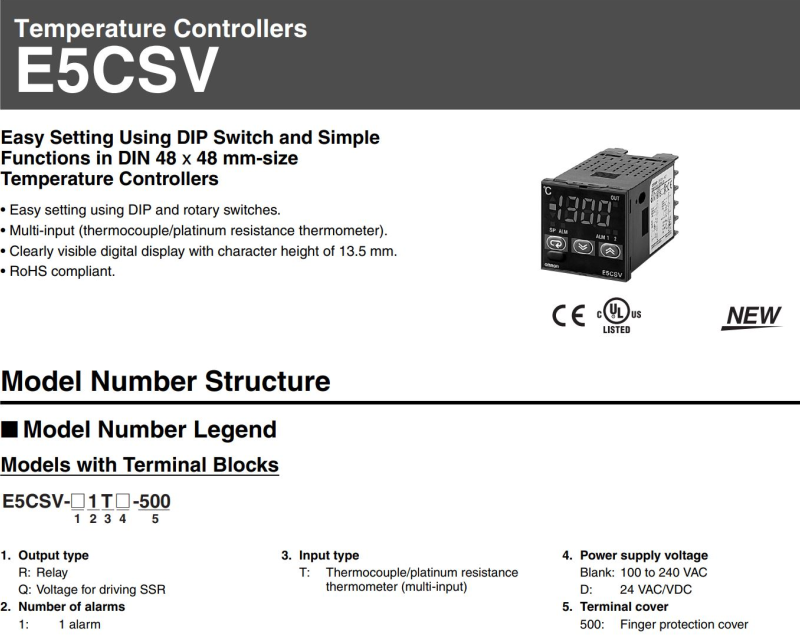
) - Upgrading Autoflow TwinCAT2 to Win10 and TwinCAT3 + (<div class="annotatedImageDiv" typeof=" … Autoflows from A2001 to A2015 were initially produced with TwinCAT2 software. This has now been superseded with TwinCAT3 which then has the benefit of compatibility with version 6 front end software.
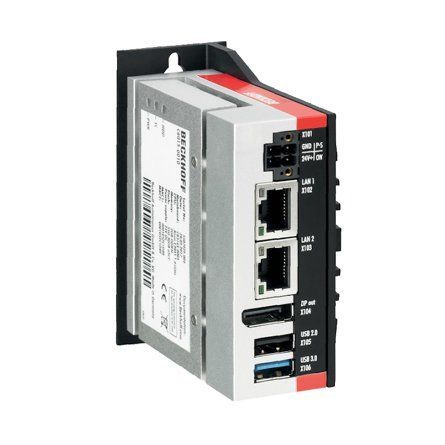
The original PC cannot be used because
*It is not powerful enough to run v6 front end
*The operating system cannot be upgraded to Windows 10
*It cannot be upgraded to TwinCAT3
The Beckhoff C6015 PC has been chosen to be the replacement PC. It is compact, yet powerful enough to run the v6 front end and TwinCAT in the same
. It has an upgrade to 1.9Ghz 4 core processor.
Because it has a limited 40Gb SSD memory, a compact 64Gb memory stick is inserted into the USB 3.0 port. This acts as a separate drive for the DDRIVE dynamic storage for all machine setup. The internat drive is for the Operating System only. This mimics the current Autoflow setup of a remote Camera PC, hence the camera PC can be retired after the upgrade
era PC, hence the camera PC can be retired after the upgrade<br/>) - Autoflow Maintenance - Gripper + (<nowiki>The following preventative m …
The following preventative maintenance tasks should be carried out regularly on the machine. The frequency depends on the machine use, but as a guide: i-Weekly<br />20 Hrs/Week Monthly</pre></div></nowiki>)2-3 Shifts Weekly
40 Hrs/Week Bi-Weekly
20 Hrs/Week Monthly - Autoflow Maintenance - Infeed + (<nowiki>The following preventative m …
The following preventative maintenance tasks should be carried out regularly on the machine. The frequency depends on the machine use, but as a guide: kly<br />20 Hrs/Week Monthly</pre></div><br/></nowiki>)2-3 Shifts Weekly
40 Hrs/Week Bi-Weekly
20 Hrs/Week Monthly - R0015096 (e) Bench Assemble Transfer Drive Assembly + ('''<u>Tools Required</u>''' … '''Tools Required''' External circlip pliers Internal circlip pliers Standard hex key set Standard spanner set '''Parts Required''' H0007576 x 1 B0000139 x 1 D0007577 x 1 D0015626 x 1 D0015561 x 1 D0015562 x 1 B0001167 x 1 D0015024 x 1 B0001100 x 3 B0001166 x 1 B0000229 x 1 D0015610 x 2015024 x 1 B0001100 x 3 B0001166 x 1 B0000229 x 1 D0015610 x 2)
- R0015095 Bench Assemble Infeed Support Arms + ('''<u>Tools Required</u>''' … '''Tools Required''' Standard hex key set Standard tap sete Setting jigs '''Parts required''' B0001170 Spacer 180 off B0001155 open rail 18 off D0015553 Transfer Support arm R/H (right to left machine ) OR D0015552 Transfer Support Arm L/H ( Left to Right machine) D0015554 x 18 M8 x 20 button hex fastener x 18 M5 x 25 socket cap x 180 M5 A form washer x 180ex fastener x 18 M5 x 25 socket cap x 180 M5 A form washer x 180)
- R0015004 Bench Assemble Gripper + ('''<u>Tools Required</u>''' E … '''Tools Required''' External circlip pliers Standard Hex key set Standard spanner set Reed switch setting box Hammer Standard screwdriver set Rule '''Parts Required''' B0001106 x 20 D0015095 x 8 D0015096 x 2 D0015086 x 1 B0000034 x 2 D0015084 x 2 D0015083 x 1 D0015082 x 1 E0000366L x 1 B0001182 x 2 M0001182 x 2 D0015756 x 1 P0001013 x 1 P0001041 x 1 P0001128 x 1 P0001198 x 2 P0001120 x 1 D0015431 x 1 B0000437 x 1 D0015430 x 1 D0015090 x 2 D0015085 x 1 D0015102 x 2 D0015103 x 2 D0015104 x 2 D0015170 x 2 P0000049 x 1 D0015097 x 2 D0015100 x 2 D0015292 x 1 E0000336 x 1 E0001069 x 1 A0001044 x 4015100 x 2 D0015292 x 1 E0000336 x 1 E0001069 x 1 A0001044 x 4)
- R0015064 Bench Assemble Clamp Assembly Part 2 + ('''<u>Tools Required</u>''' S … '''Tools Required''' Standard hex key set Standard spanner set External circlip pliers 20mm bearing dolly Reduced shank 5mm hex key '''Parts Required''' B0000033 Linear Bearing: Ø20 x 30 Compact (Metal Case Only) x 8 B0000034 Linear Bearing: Ø16 x 30 Compact (Metal Case Only) x 8 B0000200 Circlip 8mm External x 12 B0000346 Ball Bearing 8 D 22 D 7 Long + seals x 6 D0004331 Clamp Head (D7450) x 1 D0004332 Clamp Mount Block (D7449) x 1 D0004333 Pillar x 2 D0004358 Clamp Head Bracket (D7447) x 1 D0004359 Clamp Head Cylinder Bar (D7446) x 2 D0004550 Clamp Insert x 2 D0004808 Slide Stop x 2 D0005191 Bearing Protective Washer x 4 D0005425 Clamp block Right (5625) x 1 D0005566 Clamp block left - Roller style (5567) x 1 D0005568 Clamp block left roller shaft x 3 D0007447 Clamp Head Bracket OH (D4358) x 1 D0007449 Clamp Mount Block OH (D4332) x 1 D0007450 Clamp Head OH (D4331) x 1 D0015266 Shaft 38.7mm: 440mm ZX Saw Top Clamp BZP x 2 D0015299 Shaft 16mm: 320mm Chip Deflector ZX5 x 1 D0015446B Chip Deflector Mounting Plate (Tapped) x 1 D0015447B Chip Deflector Probe Ø50 (Tapped) x 2 D0015454 Chip Deflector Rod (M16) x 2 H0004625 Shaft 16mm: 150 Saw Clamp x 2 H0004626 Shaft 16mm: 275 Eject Push x 1 H0004627 Shaft 20mm: 210 Saw Inner Clamp x 2 H0004628 Shaft 20mm: 245 Saw Outer clampx 2 M0001194 Kipp clamp handle x 2 P0000007 Straight Adaptor 6mm - 1/8 BSP tapered thread x 1 P0000054 Cylinder Ø32 x 50 (PIS32A50) x 1 P0000064 Pneumax microcylinder 25bore x 80stroke x 2 P0000295 Elbow Adaptor 6mm - 1/8 BSPT (Metal type) x 3 P0001143 cylinder 32 x 175mm stroke ISO x 1BSPT (Metal type) x 3 P0001143 cylinder 32 x 175mm stroke ISO x 1)
- R0000971E Bench Assemble R Axis Gearbox + (03/09/2025 Moved to Confluance Click [https://stuga-ltd.atlassian.net/wiki/external/NDE2NGQzYjdiNzhlNDBiOTg2ZGUyMzg0MWMyNWM0MzU Here] <br/>)
- R0015064 Bench Assemble Clamp Assembly + ('''<u>Tools Required</u>'''
… '''Tools Required'''
Standard hex key set
Standard spanner set
External circlip pliers
20mm bearing dolly
Reduced shank 5mm hex key
'''Parts Required'''
B0000033 Linear Bearing: Ø20 x 30 Compact (Metal Case Only) x 8
B0000034 Linear Bearing: Ø16 x 30 Compact (Metal Case Only) x 8
B0000200 Circlip 8mm External x 12
B0000346 Ball Bearing 8 D 22 D 7 Long + seals x 6
D0004331 Clamp Head (D7450) x 1
D0004332 Clamp Mount Block (D7449) x 1
D0004333 Pillar x 2
D0004358 Clamp Head Bracket (D7447) x 1
D0004359 Clamp Head Cylinder Bar (D7446) x 2
D0004550 Clamp Insert x 2
D0004808 Slide Stop x 2
D0005191 Bearing Protective Washer x 4
D0005425 Clamp block Right (5625) x 1
D0005566 Clamp block left - Roller style (5567) x 1
D0005568 Clamp block left roller shaft x 3
D0007447 Clamp Head Bracket OH (D4358) x 1
D0007449 Clamp Mount Block OH (D4332) x 1
D0007450 Clamp Head OH (D4331) x 1
D0015266 Shaft 38.7mm: 440mm ZX Saw Top Clamp BZP x 2
D0015299 Shaft 16mm: 320mm Chip Deflector ZX5 x 1
D0015446B Chip Deflector Mounting Plate (Tapped) x 1
D0015447B Chip Deflector Probe Ø50 (Tapped) x 2
D0015454 Chip Deflector Rod (M16) x 2
H0004625 Shaft 16mm: 150 Saw Clamp x 2
H0004626 Shaft 16mm: 275 Eject Push x 1
H0004627 Shaft 20mm: 210 Saw Inner Clamp x 2
H0004628 Shaft 20mm: 245 Saw Outer clampx 2
M0001194 Kipp clamp handle x 2
P0000007 Straight Adaptor 6mm - 1/8 BSP tapered thread x 1
P0000054 Cylinder Ø32 x 50 (PIS32A50) x 1
P0000064 Pneumax microcylinder 25bore x 80stroke x 2
P0000295 Elbow Adaptor 6mm - 1/8 BSPT (Metal type) x 3
P0001143 cylinder 32 x 175mm stroke ISO x 1
etal type) x 3 P0001143 cylinder 32 x 175mm stroke ISO x 1 <br/>) - R0015337 Bench Assemble Guarding Components + ('''<u>Tools Required</u>'''
… '''Tools Required'''
Standard hex key set
Standard spanner set
Standard HSS drill set
Acoustic mat cutting board and straight edge
Utility blade
'''Parts Required'''
D0000770 Door Hinge (M0016) x 2
D0001886 Front Door Saw Mk 4 x 1
M0000002 12mm Grey Acoustic Foam with Black PVC Facing x 1
M0000539 Handle Black Nylon 200mm M8 Fixings x 1
M0000031 panel edging ( consumable stock )
M0000150 Stuga sticker clear x 1
M0000154 Stuga service sticker x 1
uga sticker clear x 1 M0000154 Stuga service sticker x 1 <br/>) - Stuertz Infeed - Freeing Roller under Gripper Arm + ('''Applies to: A2026-A2030 Autoflow Mk4 wi … '''Applies to: A2026-A2030 Autoflow Mk4 with Jetta Locking motors'''
In certain circumstances, the forward clamp roller arm has stuck itself under the gripper arm. Freeing from this situation requires a set process because the GZ axis motor is braked and probably in an overload condition
nfident in using TwinCAT on the VM machine to navigate to settings</div> </div><br/>) - R0015265 Mount Infeed arm covers and End guards + (01/09/2025 Moved to Confluance Click [https://stuga-ltd.atlassian.net/wiki/external/ZmU3ZjE0NzY1MWFiNGNkMGE1OWM2ZDA1OTIwMmYzMjg Here])
- R0015351 Mount monitor to Frame + (01/09/2025 Moved to Confluance Click [https://stuga-ltd.atlassian.net/wiki/external/NzkzNzUzZWIyZjk4NGRlMWIzYTI0NDZlMDdmZWYzNDU Here])
- R0015259 Mount roller beds to mainframe + (01/09/2025 Moved to Confluance Click [https://stuga-ltd.atlassian.net/wiki/external/MTY2ZWNjZWUzOTIwNDRlODlkZGNlODI4MDUxMTEzY2Y Here])
- R0015356 Assemble Pneumatics on to electrical cabinet + (01/09/2025 Moved to Confluance Click [https://stuga-ltd.atlassian.net/wiki/external/NjZiNGYxNzJhMTgzNDU1OTllZDBhMTY5NTMxMzY2NjI Here]<br/>)
- R0015086 Pneumatic connections + (01/09/2025 Moved to Confluance Cleck [https://stuga-ltd.atlassian.net/wiki/external/ZGRiZGYzYTJlNDI1NDVlNGI3N2MyM2NiNzIwN2U4YWM Here])
- R0015267 Assemble Backfences, Fit and Align + (01/09/2025 Moved to Confluance Click [https://stuga-ltd.atlassian.net/wiki/external/NjA2NjcxYjc1ZDk1NDYyY2FmMTFkZGYyMzBlYTNkOGM Here]<br/>)
- R0015081 Bench Assemble Single Roller Table + (01/09/2025 Moved to Confluance Click [https://stuga-ltd.atlassian.net/wiki/external/ZmJiZjg2OTVmZmY4NDNhZTk3MWUxNjFkODkwOGE2MTU Here])
- R0015266B mount completed assemblies + (01/09/2025 Moved to Confluance Click [https://stuga-ltd.atlassian.net/wiki/external/ZmVjY2VjZTA2ZGM0NDAwYjgyNjU5NzU4YzZhNzExNWU Here])
- R0015270 Bench assemble Shafts, bearings and sprockets + (01/09/2025 Moved to Confluance Click [https://stuga-ltd.atlassian.net/wiki/external/MTgxYmRhYTZmN2NhNGMyMGJjM2JkOTBiZTMyZWRhZjI Here])
- R0015262 Drive shaft fitting + (01/09/2025 Moved to Confluance Click [https://stuga-ltd.atlassian.net/wiki/external/ZGNjNDNmZTNmNjc2NDU1ZDhlNjAxMGI5Y2NmMzVmMWE Here]<br/>)
- R0015269 Fit Frame ancillaries + (01/09/2025 Moved to Confluance Click [https://stuga-ltd.atlassian.net/wiki/external/MGFkOGQ2ZWFkODU4NDdhOWFhMDUxYzc5YTk2YjlmODU Here])
- R0015263 Mount drive motor for load shaft + (01/09/2025 Moved to Confluance Click [https://stuga-ltd.atlassian.net/wiki/external/ZDVlZjFhN2Y4NmM1NGRkNGJiMmUwNDY5ZmYxN2JkZWI Here])
- R0015264 Fit Loader chains to arms + (01/09/2025 Moved to Confluance Click [https://stuga-ltd.atlassian.net/wiki/external/OTM0MjJkMmRiMmM4NDQxYjgzMzRmZTQ2NmJlMTI0ZDA Here])
- R0000738 Pneumatic Installation Part 3 + (02/09/2025 Moved to Confluance Click [https://stuga-ltd.atlassian.net/wiki/external/OTliMTMwZmVmMDViNGJiMjlhNzgzYjJiNmViMDBhYTc Here])
- R0000699B Bench Assemble Drive chains + (02/09/2025 Moved to Confluance Click [https://stuga-ltd.atlassian.net/wiki/external/N2YyYmU0ODg2OTI4NDM1YjkzZjU3NTNlMTBmZDRjN2U Here])
- R0000738 Pneumatic Installation + (02/09/2025 Moved to Confluance Click [https://stuga-ltd.atlassian.net/wiki/external/OTliMTMwZmVmMDViNGJiMjlhNzgzYjJiNmViMDBhYTc Here]<br/>)
- R0000706 Bench assemble Infeed Datum rollers + (02/09/2025 Moved to Confluance Click [https://stuga-ltd.atlassian.net/wiki/external/ZWEwNjliYjNlYTBiNDgxMTkwMWQ3NGFmNDIxMTYyMmI Here])
- R0000738 Pneumatic Installation Part 2 + (02/09/2025 Moved to Confluance Click [https://stuga-ltd.atlassian.net/wiki/external/OTliMTMwZmVmMDViNGJiMjlhNzgzYjJiNmViMDBhYTc Here<br/>])
- R0002794E Mount Width sensor + (03/09/2025 Moved to Confluance Click [https://stuga-ltd.atlassian.net/wiki/external/NDJiNTI4ZTJiYmU1NDU5MGE2MmZkMDM4MGM0NWU0Mzc Here])
- R0015034B ZX5 Module B Wiring Loom installation + (04/09/2025 Moved to Confluance Click [https://stuga-ltd.atlassian.net/wiki/external/ZDlmNDI0ZTA1ODg0NDViNDk4MDg4ZTgxMzEyZWMwZjQ Here])
- R0015035 Bench Assemble V Notch Components + (04/09/2025 Moved to Confluance Click [https://stuga-ltd.atlassian.net/wiki/external/NmFjMzQxNTBmODgxNDllY2EzODE5ZTNjOTU4ODRlMjA Here])
- R0015034B ZX5 Module B Wiring Loom installation Part 2 + (04/09/2025 Moved to Confluance Click [https://stuga-ltd.atlassian.net/wiki/external/ZDlmNDI0ZTA1ODg0NDViNDk4MDg4ZTgxMzEyZWMwZjQ Here])
- R0002913E Install and Align Rotary head Subframe + (04/09/2025 Moved to Confluance Click [https://stuga-ltd.atlassian.net/wiki/external/YmUzNjU5YzI3NzdmNDE2YmE0MTdjN2M3ZmNhZGY4NzY Here]<br/>)
- R0010260 Bench Assemble Tool Break Sensor + (04/09/2025 Moved to Confluance Click [https://stuga-ltd.atlassian.net/wiki/external/NjNlNDFmN2YyNGU3NDhlZTk1OWYzMTMwYjMxZjJjZmI Here])
- TB0428 Connecting To Yaskawa with Silex USB + (04/12/2025 Moved to confluence [https://stuga-ltd.atlassian.net/wiki/external/Mzk5NGY2Y2NiY2VjNGJkODkyMjVkZDIzMGIzYzFmNzY Click here])
- R0015334 Fit Centralise Front Table + (07/08/2025 Moved to Confluence Click [https://stuga-ltd.atlassian.net/wiki/external/MzdmYjYzYTM2NTE0NGI5ZmJlNzg1MmU2MDAxMGE5NmY Here])
- Commissioning a Beckhoff Axis + (07/08/25 Moved to [https://stuga-ltd.atlas … 07/08/25 Moved to [https://stuga-ltd.atlassian.net/wiki/external/MDUwNjIyY2UyZDcxNGRjMjk1NTI3ZDFkMDE4NjRmMmY Confluence]er motor drives will need the EP7041 drive to be programmed first</div> </div>)
- R0015298 Bench Assemble V notch Clamps + (09/09/2025 Moved to Confluance Click [https://stuga-ltd.atlassian.net/wiki/external/ZGEyYjE5MTFmMjczNDI0MGIwYTgwMjExOTE0M2M4ODI Here] <br/>)
- R0015042 Install Infeed Datum Rollers + (09/09/2025 Moved to Confluance Click [https://stuga-ltd.atlassian.net/wiki/external/YTRiMDU5MTdmMDVhNDA3NGExODAwNzVhOTg5ZjQyYzg Here])
- R0015038 Bench Assemble V notch Datum Rollers + (09/09/2025 Moved to Confluance Click [https://stuga-ltd.atlassian.net/wiki/external/NGRhNzQ4MTViOGU3NGNmOGFmYWY3MGZhM2ZiMWMxOGE Here] <br/>)
- R0015046 Bench Assemble Infeed Clamps + (09/09/2025 Moved to Confluance Click [https://stuga-ltd.atlassian.net/wiki/external/YTEzZTdkZmZjMjc0NGE2NDkxNDNlOTk5MzA5MmNhODM Here] <br/>)
- R0015084 Bench assemble and Drill Off Swarf chutes + (09/09/2025 Moved to Confluance Click [https://stuga-ltd.atlassian.net/wiki/external/MjJmN2I4N2VhNWE0NGI3ZWE5NzFkN2RlZmJmN2NjNzg Here])
- R0015346 Conveyor blower system + (10/09/2025 Moved to Confluance Click [https://stuga-ltd.atlassian.net/wiki/external/YzRhMjQ5YTQ5OTRiNDU0Njg0YjAwYmYzMzBkNTUxYjc Here] <br/>)
- R0015343 Waste Guidance Installation + (10/09/2025 Moved to Confluance Click [https://stuga-ltd.atlassian.net/wiki/external/M2I0ZmNhMjRhZDcyNDkwOWI5MzJmOTNmZTQ5MDQ3MDk Here]<br/>)
- R0015358 Conveyor chassis + (10/09/2025 Moved to Confluance Click [https://stuga-ltd.atlassian.net/wiki/external/YzI4OWNiOWM2ZWMwNDU0YWFiNzY5ZDJhODg4YTFhZDg Here])
- R0015345 Conveyor Mounting Brackets + (10/09/2025 Moved to Confluance Click [https://stuga-ltd.atlassian.net/wiki/external/OWVjMjQwYWM2NDc5NGFiZjhjZTc4YTM2Yzk0ODg0YzY Here])
- R0015310 Install V Notch Subframe + (11/09/2025 Moved to Confluance Click [https://stuga-ltd.atlassian.net/wiki/external/MDQ1OWQzZTNlNGE2NDExYTgzMTE5MjdhMTc3MTQzMzY Here])
- R0015028D ZX5 Hepco Beam Alignment Module C part 2 + (11/09/2025 Moved to Confluance Click [https://stuga-ltd.atlassian.net/wiki/external/Mzc1ZTdlODZiYjFiNGE5MGFjYzlmNjlmYWQyOWRiODU Here])
- R0015347 Bench Assemble Duplex extraction unit + (11/09/2025 Moved to Confluance Click [https://stuga-ltd.atlassian.net/wiki/external/MWNmY2NkOTYyMDFmNDU3ZmI2OTUzOGE2OTExZWMwZjI Here]<br/>)
- R0015029D Hepco Beam Alignment + (11/09/2025 Moved to Confluance Click [https://stuga-ltd.atlassian.net/wiki/external/ZGFlNmNhNDc3YTJlNDRiMzk1NDMxMGRhYWZkODFkMTE Here])
- R0015029D Hepco Beam Alignment Part 2 + (11/09/2025 Moved to Confluance Click [https://stuga-ltd.atlassian.net/wiki/external/ZGFlNmNhNDc3YTJlNDRiMzk1NDMxMGRhYWZkODFkMTE Here])
- R0015028D ZX5 Hepco Beam Alignment Module C + (11/09/2025 Moved to Conluance Click [https://stuga-ltd.atlassian.net/wiki/external/Mzc1ZTdlODZiYjFiNGE5MGFjYzlmNjlmYWQyOWRiODU Here])
- Diagnosing EtherCAT Issues - Advanced + (11/11/2025 Moved to Confluence [https://stuga-ltd.atlassian.net/wiki/external/OTE4YTQ5MzQyYzViNDJjZTg4MjVkNDYzYTgxNGI5Y2Q Click here])
- SR Axis Torque Adjustment + (14/08/25 Moved to Confluence Click [https://stuga-ltd.atlassian.net/wiki/external/YzFiODc3ODY3NjVlNDZmZjg1ODJhOGJkZTQzZWU1MjA here])
- R0015322 Remove Electrical Control Cabinet Assembly + (15/09/2025 Moved to Confluance Click [https://stuga-ltd.atlassian.net/wiki/external/OTc4ZmEyZmZlZmFjNDhlNTk0Y2NhYjFmNDAwYTE5Mjk Here])
- R0015315 Fit Y Axis Drive components + (15/09/2025 Moved to Confluance Click [https://stuga-ltd.atlassian.net/wiki/external/ZDU5ZWQ2ODgyOGE3NDcyZDljNTRlZWJjMzI2NjZhZTY Here]<br/>)
- R0015114 Bench Assemble Valve Banks and Regulators + (15/09/2025 Moved to Confluance Click [https://stuga-ltd.atlassian.net/wiki/external/OGM5MzI3NDQ3NDM0NGQxZThiMTEwNGExNTFlZGEzNzI Here])
- R0015319 Fit Guards and Doors + (15/09/2025 Moved to Confluance Click [https://stuga-ltd.atlassian.net/wiki/external/OTc1M2UzNWE1ZWY0NGZkNWFkZTA4ZDgyZTEwYWE5NjU Here])
- R0015317 Install Rotary Ring + (15/09/2025 Moved to Confluance Click [https://stuga-ltd.atlassian.net/wiki/external/NjEwOWI1NDZhZWQwNDcxNmFmYTdkZjA5YzBiOGNjYjc Here] <br/>)
- R0015311 Install and Align Datum rollers + (15/09/2025 Moved to Confluance Click [https://stuga-ltd.atlassian.net/wiki/external/OTg5YmU5YTczZTM1NGU1NTliNDQyZDdjMzIwZTE5YmY Here])
- R0015320 Pneumatic Output Test + (15/09/2025 Moved to Confluance Click [https://stuga-ltd.atlassian.net/wiki/external/YTRmMjYyZjA3MGVmNDYzMDk1ZDdlNTM0Y2VlMzk0Y2Q Here])
- R0015321 Bench Assemble Guards and Doors + (15/09/2025 Moved to Confluance Click [https://stuga-ltd.atlassian.net/wiki/external/Njk2YmQ5ZjRlNmYwNGJlYjk4YmZkMjNhNDc3YzlkYWY Here] <br/>)
- R0015313 Material Clamp Alignment + (15/09/2025 Moved to Confluance Click [https://stuga-ltd.atlassian.net/wiki/external/ODYzMTQ2ODRlNzc2NDdmMWI3MDVkZDcwNTk1NDY3Mjg Here])
- R0015340 Drill, Assemble and Mount Electrical Cabinet + (15/09/2025 Moved to Confluance Click [https://stuga-ltd.atlassian.net/wiki/external/OTFlYWE1OGE4ZGJhNDE0MWI4ZDkwODlhMjBmNmJhMTE Here]<br/>)
- R0015316 V notch Final Assembly + (15/09/2025 Moved to Confluance Click [https://stuga-ltd.atlassian.net/wiki/external/NTcwZDVkYWY1NWI0NGQwM2IyZTQ0ZTQ4NjQ3OWYzMDE Here] <br/>)
- R0015314 Fit Z Axis Drive components + (15/09/2025 Moved to Confluance Click [https://stuga-ltd.atlassian.net/wiki/external/NTJiNzE1OThmZWVjNDRhNmIzZDQyNDE1MjU3ZDUwOWY Here])
- R0015323 Mount Electrical Cabinet + (15/09/2025 Moved to Confluance Click [https://stuga-ltd.atlassian.net/wiki/external/MGNmYWQ3NTZiMzY4NGJkNWJiYWNjNjY1ZDBkNzU4ZGE Here] <br/>)
- R0015318 Fit Swarf Chutes + (15/09/2025 Moved to Confluance Click [https://stuga-ltd.atlassian.net/wiki/external/M2FlZTMxNDdkODdkNGYyOWIzNmY2MGMxOTM5OTE4MTM Here])
- R0015325 Mount Infeed Clamp + (15/09/2025 Moved to Confluance Click [https://stuga-ltd.atlassian.net/wiki/external/OTZmMWM0OTU2ZmVlNDMxNTgzNDliZWFlNWI2Yzk4Y2Y Here])
- R0015312 Finalise V Notch Subframe + (15/09/29025 Moved to Confluance Click [https://stuga-ltd.atlassian.net/wiki/external/OGFkMjk1YThiNjQwNGNhZjgxOTc0ZmIxMzUzNzJjYzU Here])
- TB0442 Removing Slot Overrun on Beckhoff AX8000 Drives + (15/10/2025 Moved to [https://stuga-ltd.atl … 15/10/2025 Moved to [https://stuga-ltd.atlassian.net/wiki/spaces/~5570585b7bb5d1bc31430e886883cbc774c182/pages/7373002/COM01-06+Specialised+Settings+for+Beckhoff+Drives?atlOrigin=eyJpIjoiM2ZmM2ExNTFiYzBkNDU4MzgxMTliOGNjYjA1ZGFmMmMiLCJwIjoiYyJ9 Confluence] Click [https://stuga-ltd.atlassian.net/wiki/external/MGFhZTU3Njg1MTEzNDQ0YzkxNzQzNTczZDdlYzJlODI here]3Njg1MTEzNDQ0YzkxNzQzNTczZDdlYzJlODI here])
- R0015094 Fit shafts and Pinions + (16/09/2025 Moved to Confluance Click [https://stuga-ltd.atlassian.net/wiki/external/NTNiNjVjNGU1YjU3NDI3N2JjZDQzOTAzM2EzZmRmYjI Here])
- R0015251B Bench Assemble X Axis Energy chain + (16/09/2025 Moved to Confluance Click [https://stuga-ltd.atlassian.net/wiki/external/NTg5NzFiMjUxOWVjNDg2YTkxMjI3NTI0MDA5MTJhNGM Here]<br/>)
- R0015245 Module C support arm alignment + (16/09/2025 Moved to Confluance Click [https://stuga-ltd.atlassian.net/wiki/external/MzUyYmEzOTU0YWNiNDY4Njk0Yjc4NzcxMmY1ZmI3MjY Here]<br/>)
- R0015096 (c) Bench Assemble Transfer Drive Assembly + (16/09/2025 Moved to Confluance Click [https://stuga-ltd.atlassian.net/wiki/external/YjQ2YTYyOTkxYzNhNGY5OTgxNjI0YTJlYWNlMWNjNjY Here])
- R0015071 Bench Assemble Pneumatics Rail + (16/09/2025 Moved to Confluance Click [https://stuga-ltd.atlassian.net/wiki/external/MjMzNmUxNDU1NWRhNDEzMjhjMDUzNzBiMjgyODdhNDk Here])
- R0015244 Frame ancillaries Fitting + (16/09/2025 Moved to Confluance Click [https://stuga-ltd.atlassian.net/wiki/external/NGYzMGFhNGExYTkxNGE0OThmNmU3N2YzYmFhNDk0ZWM Here])
- R0015248 Line up slider units and mesh racks + (16/09/2025 Moved to confluance Click [https://stuga-ltd.atlassian.net/wiki/external/YzU4Njg5ODQ4NmQyNGQ1ZDgwM2E1ZDhiNjFjMTVlOTI Here] <br/>)
- R0015246 Fit Hepco Drive Beam Cylinder + (16/09/2025 Moved to confluance Click [https://stuga-ltd.atlassian.net/wiki/external/MDdlYTdjMTM3NjIyNDI5Zjg4ODVmMGM0OTViNGQyNzQ Here])
- R0015247 Fit X axis gearbox and Motor + (16/09/2025 Moved to confluance Click [https://stuga-ltd.atlassian.net/wiki/external/ZmM5OWU4NDM1YTZiNDY4MWI0MDBlYzU1MWMzN2FmYzA Here])
- R0015288 Bench Assemble Transfer slider units and Cylinder Rails + (17/09/2025 Moved to Confluance Click [https://stuga-ltd.atlassian.net/wiki/external/MGQ1ZWMxY2I2ZjFkNDVlMTkyNzk4Yzc1NDA1ODU1M2E Here])
- R0015257 Module C Pneumatic Tests + (17/09/2025 Moved to Confluance Click [https://stuga-ltd.atlassian.net/wiki/external/MjUyZDc0MGM1MzExNGU2NjgyNTk1NDc0NDg2ZDYwNDg Here])
- R0015254 Bench Assemble shafts, Bearings and Pinions + (17/09/2025 Moved to Confluance Click [https://stuga-ltd.atlassian.net/wiki/external/MDlkOTdkODljYThlNGM2ZDg2ZWY1NWRmNGUxN2E1ZDY Here] <br/>)
- R0015249 Set drive pinions in position + (17/09/2025 Moved to Confluance Click [https://stuga-ltd.atlassian.net/wiki/external/Y2JmMjcyODZiYzVmNGI2N2IzYmVjMjNjMmE2NWFlMWI Here])
- R0015256 Pneumatic Connections + (17/09/2025 Moved to Confluance Click [https://stuga-ltd.atlassian.net/wiki/external/MGY1YjdjNjhjNmZlNDNmYWI2NjhhM2QxNjE2MmI0Mzg Here])
- R0015252 Bench Assemble Slider units + (17/09/2025 Moved to Confluance Click [https://stuga-ltd.atlassian.net/wiki/external/NWQ1ODlmMDlkYWIxNGI2ZDg4M2Y1ZGVmMjY0ZDE4ZTE Here])
- R0015060 Bench Assemble Flapper Beam + (17/09/2025 Moved to Confluance Click [https://stuga-ltd.atlassian.net/wiki/external/NGUzYjA1NWQ5Y2UxNDUwM2E2YjYxNzNjMjEwMDZmMzU Here])
- R0015093 Bench Assemble Transfer Beam + (17/09/2025 Moved to Confluance Click [https://stuga-ltd.atlassian.net/wiki/external/MTY4NWZhNWRlZDRjNDBiNTg2NGVhMzQ2YjFkMDA2Nzc Here] <br/>)
- R0015279 Align Backfences + (17/09/2025 Moved to Confluance Click [https://stuga-ltd.atlassian.net/wiki/external/YTM4MDMyYWE3YjM3NDZiODg4ZGI0MDE4MzZkNTQ0MGE Here])
- R0015250 Bench Assemble Support Arms + (17/09/2025 Moved to Confluance Click [https://stuga-ltd.atlassian.net/wiki/external/MGQ4ODQyMGU5Y2YwNDViN2FjOThlOWFhOTAwODQzZjI Here]<br/>)
- Autoflow Hepco Slewing Ring - Journal Adjustment + (17/11/2025 Moved To Confluence [https://stuga-ltd.atlassian.net/wiki/external/YjQxZjBjYzg1N2QzNGYxN2E3ZjUyOTQ2M2I5NDhiYTg Click Here])
- R0019207 Upgrade SR Axis Spigot + (18/08/25 Moved to Confluence Click [https://stuga-ltd.atlassian.net/wiki/external/NjhhNjdiYTAwZTQzNDI4Y2E4OTkxODUxMmNkYmRjMDI Here])
- TB0390 Fitting SR Datum Sensor + (18/08/25 Moved to confluence Click [https://stuga-ltd.atlassian.net/wiki/external/ZTBjZDc3MDE5OTZmNGUxN2IwMjlhZjg2YjkzNzhlNGQ here])
- R0015289 Bench Assemble Pipe Connection Rail + (18/09/2025 Moved to Confluance Click [https://stuga-ltd.atlassian.net/wiki/external/OGZjNGZmZTYyNjU3NDMzNTg3YzFkMmQ4ZmY5MmU2NmI Here])
- ZX5 Clamp and Gripper Height Changes for Tall Profile + (18/11/2025 Moved to Confluence [https://stuga-ltd.atlassian.net/wiki/external/ZTAwYjJjMGQ3NGM3NGFjNjhjMWZiYzI2MDlkZTg0YzI Click here])
- R0015080 Bench Assemble Sensor Rail + (18/8/2025 Moved to confluence Click [https://stuga-ltd.atlassian.net/wiki/external/YjFlYzk5ZTIwODM3NGE5ZDliZmJiNDcxZWQ2YzkxOTg here])
- TB0445 ZX5 Setup - Infeed Measure Sensor Calibration + (19/08 Moved to confluence click [https://stuga-ltd.atlassian.net/wiki/external/MzkwNGI2NDYzNzMwNDdhMjhhZDQxYWI1MDNkNjg5ODY here])
- R0015292 Install Cylinder Rails and Align + (19/09/2025 Moved to Confluance Click [https://stuga-ltd.atlassian.net/wiki/external/MjM0NmI0YzNjOGFhNGVlNGJmMmVjODc0MjIzODFmZTY Here])

 Français
 English
 Deutsch
 Español
 Italiano
 Português