Cette page fournit une simple interface de navigation pour trouver des entités décrites par une propriété et une valeur nommée. D’autres interfaces de recherche disponibles comprennent la page recherche de propriété, et le constructeur de requêtes ask.
Liste de résultats
- PLC Source Control - Selecting GIT as the source control Plug-in + (TwinCAT3 can use different source control programs for source control. These instructions show how to select Git as the source control Plug-in.)
- Upgrading Autoflow TwinCAT2 to Win10 and TwinCAT3 + (<div class="annotatedImageDiv" typeof=" … Autoflows from A2001 to A2015 were initially produced with TwinCAT2 software. This has now been superseded with TwinCAT3 which then has the benefit of compatibility with version 6 front end software.
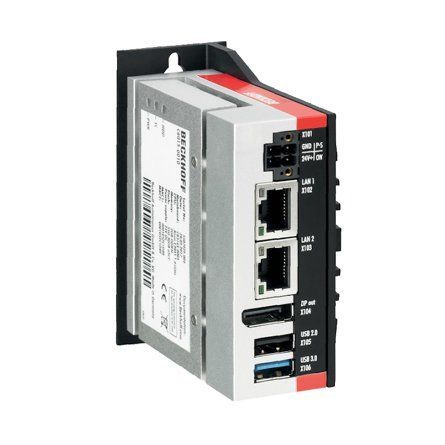
The original PC cannot be used because
*It is not powerful enough to run v6 front end
*The operating system cannot be upgraded to Windows 10
*It cannot be upgraded to TwinCAT3
The Beckhoff C6015 PC has been chosen to be the replacement PC. It is compact, yet powerful enough to run the v6 front end and TwinCAT in the same
. It has an upgrade to 1.9Ghz 4 core processor.
Because it has a limited 40Gb SSD memory, a compact 64Gb memory stick is inserted into the USB 3.0 port. This acts as a separate drive for the DDRIVE dynamic storage for all machine setup. The internat drive is for the Operating System only. This mimics the current Autoflow setup of a remote Camera PC, hence the camera PC can be retired after the upgrade
era PC, hence the camera PC can be retired after the upgrade<br/>) - R0015316 V notch Final Assembly Part 2 + (15/09/2025 Moved to Confluance Click [https://stuga-ltd.atlassian.net/wiki/external/NTcwZDVkYWY1NWI0NGQwM2IyZTQ0ZTQ4NjQ3OWYzMDE Here])
- R0015342 Bench Assemble Outfeed Parts + (<nowiki>'''<u>Tools Required&l …
'''Tools Required''' gt;<br />P0001068 Valve Base: Type 41 2 Position Ø6 x 1<br /><br />P0001085 Fitting: SMC 1/4" to Ø8 Swivel Elbow x 1<br /><br />P0001163 1/4 bsp male silencer x 2<br /><br />P0001186 Valve/ 5/2 smc x 2 <br /><br />P0001198 1/8 bsp 6mm speed controller x 4<br /><br />P0000394 reed switch holder x 2<br /><br />P0000444 Reed switch pneumax x 2</nowiki>)
Standard Hex Key set
Standard spanner set
Standard screwdriver set
Bearing press
Test box for cylinder switch function
'''Parts Required'''
B0000034 Linear Bearing: Ø16 x 30 Compact (Metal Case Only) x 8
B0000236 90 Deg Grease Nipple M6 ST/ST x 4
D0004311 Side Eject Block x 2
D0004591 Side Eject Housing x 2
D0004592 Eject Housing Plate x 2
D0005200 Safety Dead Stop Block x 1
D0005201 Safety Dead Stop Backer (5357) x 1
D0005202 Safety Dead stop Yoke (5358) x 1
D0005203 Safety Slider Cap x 2
H0004626 Shaft 16mm: 275 Eject Push x 4
M0000101 Compression Spring 11 D 15 D 25 Long x 1
P0000035 Cylinder 25x160 x 2
P0000174 Fitting: Plug 1/4'' BSP (Grubscrew Type x 2
P0000201 Flow Controller 6mm x M5 Elbow x 2
P0000367 16mm bore X 125 stroke with rod end clevis x 1
P0000369 Clamp to suit P0000367 x 2
P0000327 Reed Switch: Pneumax 1580U (5.0m Lead) x 2
P0001068 Valve Base: Type 41 2 Position Ø6 x 1
P0001085 Fitting: SMC 1/4" to Ø8 Swivel Elbow x 1
P0001163 1/4 bsp male silencer x 2
P0001186 Valve/ 5/2 smc x 2
P0001198 1/8 bsp 6mm speed controller x 4
P0000394 reed switch holder x 2
P0000444 Reed switch pneumax x 2 - R0015341 Bench Assemble Electrical Cabinet with Pneumatics and controls + (<nowiki>'''<u>Tools required&l …
'''Tools required''' ;P0001070 Valve Base: Type 41 6 Position Ø6 x 2<br /><br />P0001074 Fitting: 1/4" BSP Hex Head Silencer x 8<br /><br />P0001101 Male straight 12mm to 1/4 bsp x 5 <br /><br />P0001102 Male elbow 12mm to 1/4 x 2<br /><br />P0001186 Valve 24v dc SMC x 12 <br /><br /><br /><br /><br/></nowiki>)
Tape rule
Steel rule
standard hex keys
Standard HSS drill set
Standard Tap set
Hack saw
Ball Pein hammer
Centre punch
'''Part Required'''
P0000010 Elbow Adaptor 6mm - 1/8 BSPT (Taper thread) x 3
P0000024 Fitting: Hex Nipple 1/4 BSP x 1
P0000096 Fitting: Brass Reducing Bush 1/2 - 1/4 x 2
P0000097 Fitting: Elbow Adaptor 8mm - 1/4 BSPT x 1
P0000159 Fitting: Stem Blanking Plug 6mm x 3
P0000160 Fitting: Flow Controller In Line 6mm x 2
P0000279 Female Cross 1/4'' NPT x 1
P0000297 HighLow Pressure Valve x 1
P0000419 Air Service Unit OH (P0283)x 1
P0001070 Valve Base: Type 41 6 Position Ø6 x 2
P0001074 Fitting: 1/4" BSP Hex Head Silencer x 8
P0001101 Male straight 12mm to 1/4 bsp x 5
P0001102 Male elbow 12mm to 1/4 x 2
P0001186 Valve 24v dc SMC x 12 - R0000712E Rotary Trunking + ('''<u>Tools Required</u>''' … '''Tools Required''' Standard set Hex keys Standard socket set Countersink bit and drill Copper/hide hammer Standard hss drill set '''Parts Required''' D0006210 pre assembled energy chain D0003929 Access panel D0003930 Circular guide D0003985 Upper circular guard D0007817 Circular guard D0001171 plug bracket P0001023 6mm y adapter x 9 P0000401 non return valveug bracket P0001023 6mm y adapter x 9 P0000401 non return valve)
- R0000712F Rotary Trunking + ('''<u>Tools Required</u>'''
S … '''Tools Required'''
Standard set Hex keys
Standard socket set
Countersink bit and drill
Copper/hide hammer
Standard hss drill set
Hack saw
File
'''Parts Required'''
D0006210 pre assembled energy chain
D0003929 Access panel
D0003930 Circular guide
D0003985 Upper circular guard
D0007817 Circular guard
D0001171 plug bracket
cular guard D0007817 Circular guard D0001171 plug bracket <br/>) - Stuertz Infeed - Freeing Roller under Gripper Arm + ('''Applies to: A2026-A2030 Autoflow Mk4 wi … '''Applies to: A2026-A2030 Autoflow Mk4 with Jetta Locking motors'''
In certain circumstances, the forward clamp roller arm has stuck itself under the gripper arm. Freeing from this situation requires a set process because the GZ axis motor is braked and probably in an overload condition
nfident in using TwinCAT on the VM machine to navigate to settings</div> </div><br/>) - GY GZ axis setup with Jetter Motors + ('''WARNING:''' '''The Jetter motor on th … '''WARNING:''' '''The Jetter motor on the GZ axis has a brake. Releasing the brake without control could be harmful/dangerous.''' '''Use the Air Counterbalance rig to assist if necessary.''' This assumes that the motors are connected to the Beckhoff drive and are free to move.o the Beckhoff drive and are free to move.)
- Create a TwinCAT Project from Scratch + (05/08/25 Converted to confluence See [https://stuga-ltd.atlassian.net/wiki/external/N2E0YjlkNzUyNzc5NDY1NThiOTY1NzcxYmNmNmJkNTU COM01-04 Create TwinCAT Project from Scratch on Virtual Machine])
- Commissioning a Beckhoff Axis + (07/08/25 Moved to [https://stuga-ltd.atlas … 07/08/25 Moved to [https://stuga-ltd.atlassian.net/wiki/external/MDUwNjIyY2UyZDcxNGRjMjk1NTI3ZDFkMDE4NjRmMmY Confluence]er motor drives will need the EP7041 drive to be programmed first</div> </div>)
- OBSOLETE DM - Updating Resources + (<div class="icon-instructions caution-i …
All information provided to the service engineers on Device Magic can all be linked to a single Excel document. This document provides all customer names, machine numbers, emails and employee information. Linking this document with Device Magic provides fields that make it easier for engineers to fill out the form.
used internally at Stuga and not be sent to engineers or customers in coordination with Data Protection standards.</div> </div><br/>) - TB0409 Setting Up Windows 10 PC 2018 + (<div class="icon-instructions caution-i … Please use [[Setting Up Windows PC C0000422-KIT 2023]][[Setting Up Windows PC C0000422-KIT 2023]])
- TB0426 Replacement Zebra Printer Setup + (<div class="icon-instructions caution-i … [https://stuga.dokit.app/wiki/TB0452_ZD620_Zebra_Printer_Setup ZD620 Instructions]iv> [https://stuga.dokit.app/wiki/TB0452_ZD620_Zebra_Printer_Setup ZD620 Instructions])
- OBSOLETE Installing SourceTree Version Control Software + (<div class="icon-instructions caution-i … Use this [https://stuga.dokit.app/wiki/Changing_Version_Control_to_Visual_Studio link] From Jan 2020, Sourcetree will be increasingly used to properly maintain changes to the Stuga source code. Each machine with TwinCAT3 will need the Sourcetree program installed, and a change to where and how the source code is stored This tutorial deals with installing the Sourcetree program from Atlassian code is stored This tutorial deals with installing the Sourcetree program from Atlassian)
- Updating winStugaSaw Software to v4 + (<div class="icon-instructions caution-i …
With the upgrade of the source code editor to Visual Studio 2017, and the associated security changes to Windows, many thing changed with the Windows .net libraries. In order to maintain the code, it needed to be upgraded.
This upgrade had major consequential effects:
# It was not compatible with windows XP any more due to security issues
# A new version of Workbench needs to be installed
any more due to security issues # A new version of Workbench needs to be installed <br/>) - ZX5 Installation Procedure + (<div class="icon-instructions caution-icon"> <div class="icon-instructions-icon"><i class="fa fa-exclamation-triangle"></i></div> <div class="icon-instructions-text">...Read the risk assessment and method statements before proceeding.</div> </div>)
- Setting Up Windows PC C0000422-KIT 2023 + (<div class="icon-instructions idea-icon … stuga.dokit.app/wiki/Setting_Up_C0000422-KIT_-_Full_Hardware_2023</div> </div>)
- R0015335 Mount Electrical Cabinet + (<u>'''Tools Required'''</u>
… '''Tools Required'''
Standard hex key set
Standard spanner set
Standard HSS drill set
Standard Tap set
'''Parts Required'''
D0004391E Left hand side sheet x 1 D0015425 Bracket: Beckhoff Box Right Angle x 1
D0015426 Mounting Plate: Airgun Assy x 1
D0015425 Beckhoff right angle mounting plate x 1
P0000020 Fitting: Plug 1/8" BSP (Grubscrew Type) x 1
P0000021 Airgun Assembly x 1
P0000142 Elbow Adaptor 8mm - 1/8 BSP x 2
P0000277 Fitting: Bulkhead Female 8mm x 1/4 BSP x 1
P0000278 Regulator 0-2 bar x 1
P0000373 Regulator fixing bracket x 1
R0015016C Electrical cabinet wiring Mod F
xing bracket x 1 R0015016C Electrical cabinet wiring Mod F <br/>) - TB0444 Renewing CF Card on TwinCAT2 Systems + (<u>Problem</u> These machines … Problem These machines use a CX5020 PC with a 2Gb CF card running TwinCAT2 PLC system. The CF card can fail, which is effectively the windows operating system. The CF card has a very small capacity, so needs to be created from an image. This TB outlines the steps in the process to ensure a successful conclusion. 1. Create a new CF card at stuga using the beckhoff imaging tool on a CX5020 2. Boot up with the CX5020 3. Ensure PLC is set to Enable on start-up (default is config mode) 4. Rename the PC 5. Install TeamViewer host v10 or less from a USB stick 6. If you have a copy of the version of winMulti it was running, copy this in to the c:\ multi folder. If not, a “'''''new version install'''''” will be needed so copy in data from the g:\builds\PC Installs\Autoflow\Multi folder 7. Set up and customer specific network parameters to ensure TeamViewer will work when it is plugged in on site 8. Send to customer Once on site, follow procedure A if the winMulti version is preserved, or B if it is a '''''new version install'''''eserved, or B if it is a '''''new version install''''')
- Setting up TwinCAT Drive Manager for AX8000 Drives + (AX8000 drives require a Measurement projec … AX8000 drives require a Measurement project to be added which gives you a specialised drive manager screen for these drives This needs to be installed separately form a file that can be downloaded from Beckhoff or is in g:\design\TwinCAt3 TE5950-TC3-Drive-Manager-2.zipn\TwinCAt3 TE5950-TC3-Drive-Manager-2.zip)
- Correcting Linearity with Rack Offset File + (Accuracy problem on A2001 was traced to a … Accuracy problem on A2001 was traced to a non-linear rack. This tutorial demonstrates how to test the linearity of a rack and the systems in place to correct the linearity. machine in the 20 year history that has needed these alterations</div> </div>)
- R0000728 R0000729 Stroke Assembly Dismantling + (Assemblies fitted to MK1 ZX4 will require … Assemblies fitted to MK1 ZX4 will require refurbishment at some point of life cycle.
The following instructions should be followed to ensure that correct assembly and setting are performed
'''Tools Required'''
Standard hex key set
Standard spanner set
Double pin saw flange spanner
Drifts and punches
Ballpein hammer
Soft hammer
Degreasing bath
pein hammer Soft hammer Degreasing bath <br/>) - Upgrading Visual Studio to Beckhoff TCXAEShell + (Because this upgrade is normally done to include source control directly in the project, you will have to also upgrade the Git Credential manager, as the one installed as party of the TcXAEShell has a bug in it)
- R0000164 Spindle Build + (Clear build instructions for the assembly of R0000164 spindle assembly)
- Z Transom Width Measurement + (Difficulty can be had when trying to accurately measure the width of a Z transom profile section. This guide will show you how to accurately measure the width of the Z section to within 0.1mm which is required when setting up Y notching accurately)
- Placing a TwinCAT3 Machine Under Source Control + (<div class="icon-instructions caution-i … Click [https://stuga.dokit.app/wiki/Changing_Version_Control_to_Visual_Studio here] for the latest procedure For many years, the source code for the PLCs has resided on the G:\drive and then a copy on each and every one of the PCs used to edit the code, so at least one on each machine. This is a recipe for disaster because maintaining all the copies and version numbers is incredibly difficult and adds a lot of time overhead to fixes and changes. This has worked because there has been only one developer, but this is set to change in future as more programmers will be trained and tracking versions becomes more difficult From 2020, the PLC code version control has been improved by using an industry standard source control system called "Git" along with "BitBucket" to store the PLC code in the cloud. The program "SourceTree" is used to commit, push and pull the changes [https://www.atlassian.com/git/tutorials/what-is-version-control Click here] for an introduction to version control using Git This tutorial is a step by step guide to setting up an existing machine or diagnostic PC to a standard uses on all Stuga machines to enable quick, easy and stress free version control.standard uses on all Stuga machines to enable quick, easy and stress free version control.)
- Upgrading Project File on TwinCAT2 System + (How to upgrade the .pro file (project) on … How to upgrade the .pro file (project) on a Beckhoff TwinCAT2 system
ram called "TwinCAT PLC Control" to download the PLC project</div> </div><br/>) - Full Version Upgrade TwinCAT3 WinMulti + (If a PC fails on a machine in the field an … If a PC fails on a machine in the field and the hard drive data cannot be recovered, it is necessary to replace the PC. This may create a version conflict, as the new PC will have later versions of twinCAT installed than the original
This tutorial outlines the steps required to bring all the machine systems up to the latest level to ensure compatibility
ions-text">...This is a one-way process that cannot be reversed</div> </div><br/>) - Hotswap Beckhoff PLC with Licence Slice Installed + (If a machine is set up with an EL6070 Lice … If a machine is set up with an EL6070 Licence Slice, the PLC can be swapped freely and the TwinCAT licence remains on the slice in the machine '''Note: Beckhoff PCs involved are''' Windows 10 versions order code C0001182 ill need to be exchanged from the non functional PC to the new PC</div> </div>)
- Create a TwinCAT Project from Existing Project + (If you are confident and proficient in usi … If you are confident and proficient in using the Visual Studio editor to create TwinCAT projects, you can shortcut a lot of the data inputting by copying and modifying an existing project. This will keep the naming conventions and links exactly the same
ne has exactly the same EtherCAT box, drive and module setup</div> </div><br/>) - Changing Version Control to Visual Studio + (In March 2022 the password policy of the s … In March 2022 the password policy of the system behind SourceTree / Bitbucket and Atlassian changed - [https://community.atlassian.com/t5/Bitbucket-articles/Announcement-Bitbucket-Cloud-account-password-usage-for-Git-over/ba-p/1948231 link]. This meant all machine would need a complex password login change for the SourceTree program used for version control of the PLC code. This was not straight-forward to resolve, so the decision was made to change the version control system to the one that is packaged with the Visual Studio system by default. This is a better method anyway, but it needs the "TcXaeShell" installed. Visual Studio that includes Source control, rebadged for TwinCAT3</div> </div>)
- TB450 - CMOS Battery replacement + (Internal CMOS batteries are used in PCs to … Internal CMOS batteries are used in PCs to keep a constant power supply to BIOS memory while the main power supply is switched off. These batteries should last up to 5 years when a PC has been left idle. Sometimes these batteries can fall flat before this time either due to being low when sent out or extended use on older machines. The main symptom of a CMOS battery faulting on a Stuga machine is the PC not booting up when mains power is switched on which will be indicated by a “No Signal Detected” message being displayed on the screen. This is due to the BIOS setting “Restore AC Power Loss” going back to its default value of OFF due to the battery faulting. Restoring the BIOS to its original settings is a temporary fix in this situation as it is most likely this will happen again a couple of months down the line (See TB 376 or 213). The battery required is a '''CR2032'''. In the case of the Antec PC, and most commonly, the battery is held in an open housing that can be pushed to release and easily replaced. In PCs such as the Acer Revo the battery needs to be pre-wired with a plug but still easily unclipped and replacedug but still easily unclipped and replaced)
- Stuertz Infeed - Check GY Position Parallelism + (It is important that the parallelism of th … It is important that the parallelism of the GY axis to the backfence is set and maintained along the length of the rack. This tutorial describes how to check this parallelism without the need for measuring equipment
'''General Procedure'''
#Find range of adjustment required
#Zero GY axis to ensure range adjustment can be met
#Move to straight edge resting points, Adjust rollers at these points
#Use straight edge between resting points to adjust the other rollers to a fixed datum
'''Potential Symptoms of a problem'''
*Gripper cannot pick up offcuts
*Gripper /profile end forced away from backfence
*Accuracy problems
*Gripper wobbles after it has released profile
Use the laptop to enable you to control the Service screen whilst inside the infeed table
The gripper setting jig is used to give an accurate and reliable zero to locate the gripper jaw to. Any piece of aluminium reinforcing box section will also work
the gripper jaw to. Any piece of aluminium reinforcing box section will also work <br/>) - Autocut Piece Jammed + (Let's say a small piece has become wedged … Let's say a small piece has become wedged between the eject table and the outfeed table frame.
ach into the machine until it is safe to do so - Press ESTOP</div> </div><br/>) - Move SR Datum Sensor to Higher Level R0019217 + (On a Mk4 Autoflow, The SR axis daum sensor … On a Mk4 Autoflow, The SR axis daum sensor is originally located at the rear and to the base of the SR axis. This area is prone to offcuts, so a new location has been designed at the top, with the following design parameters
*Easy to retrofit
*Sensor is protected in a case
*Short distance to connection box
*Uses existing mounting holes
*Easy to adjust and maintain
*Sensing end location should be vertical onto a plate, not horizontal on to a radiused surface
*Can use E0000336 2mm range sensor reliably
*Incorporate a front fence to help deflect offcuts down the chute and to protect the sensor
The parts are supplied in Kit R0019217B
illustrated here are from a Right to Left feed machine. Parts are unhanded so can be fitted to either hand machine</div> </div><br/>) - Device Magic - Adding a Device Email Address + (PM service and service call reports will b … PM service and service call reports will be sent to the engineer's own email address automatically, but '''''only if''''' the device "Email" property is set up correctly.
This needs to be done separately using a device magic account.
's device is renewed or needs to be re-added in Device Magic</div> </div><br/>) - CX5120 Replacement + (Replacement of Beckhoff CX5120 Skill Lev … Replacement of Beckhoff CX5120 Skill Level: Experience with Twincat & Visual Studio n’t Switch CF cards around. Keep them in the CX5120’s they came with.</div> </div>)
- Setting Profile Detection Laser Sensor + (Setting the profile sensor correctly is im … Setting the profile sensor correctly is important as it will lead to incorrect offcut measurement.
ensure the sensor is set for the range of different colours</div> </div><br/>) - Changing Main Saw Blade + (Stuga recommends this blade be changed aft … Stuga recommends this blade be changed after 1-2 weeks of cutting - symptoms to determine if the blade needs changing:
* Awful cutting sound / smell
* Profile dragging (sizes too short)
* Brown burnt swarf
* Smoke coming out of profile end while cutting
p and can be awkward to manouver out of the saw, please be careful</div> </div><br/>) - Installing VNC Server and Viewer + (Teamviewer are withdrawing support and are … Teamviewer are withdrawing support and are very dismissive of helping out with teamviewer issues for older operating systems. Sometimes the problem just has to be solved, so there are other tools that can be used to "piggy back" onto a teamviewer connection to an office PC. A reliable, free and simple method is to use VNC. This involves #Installing VNC Server on the old PC that you want to control #Installing VNC Viewer on the Piggy-back PC VNC Viewer can be downloaded [https://archive.realvnc.com/download/get/786/eula/ here] VNC Server can be downloaded [https://archive.realvnc.com/download/get/775/eula/ here]e.realvnc.com/download/get/775/eula/ here])
- Adding TwinSAFE projects to AMI Motors + (The AMI8xxx-3100 motor series is a TwinSAF … The AMI8xxx-3100 motor series is a TwinSAFE enabled motor. To enable this motor to work with a non-TwinSAFE system, a TWINSAFE project needs to be placed into the Safety Logic circuit on board the motor. This dokit describes this process.
====Prerequisites==== *TwinCAT machine project connected, scanned and debugged *Drive Manager 2 Project installed *AMI motors connected and powered up *Latest Device Description (ESI) updates - see Updating Device Description Tables *AMI Motor TwinSAFE Project from [https://stugaltd.monday.com/boards/4881973586 Software Versions Board] For instructions on how to create the AMI Motor twinSAFE project from scratch, see [[AMI TwinSAFE Workaround - Safety Project Creation]]
[[AMI TwinSAFE Workaround - Safety Project Creation]]<br/>) - Decommissioning - Autoflow Mk4 1 + (The Autoflow Mk4.1 machine has been design … The Autoflow Mk4.1 machine has been designed to separate into modules for safe transport
The '''infeed table''' gripper carriage and conveyor split into two sections
The '''machining head''' and '''saw''' split apart like a cam shell. They are joined with a dowel system in joining blocks at the base
The '''outfeed''' splits in to a rear bed and front tray
See Also [[Safe Moving of Top Heavy Machine Modules]]
[[Safe Moving of Top Heavy Machine Modules]]<br/>) - Beckhoff AX8000 Flowline Upgrade + (The Flowline range (Mk3, ZX3, ZX4) are Stu … The Flowline range (Mk3, ZX3, ZX4) are Stuga built and designed machines for prepping and cutting uPVC windows and doors. The Flowline is the first machine of the Stuga 'U' shaped machines which has prepping and cutting working in the same machine package. The Flowline is still a fantastic machine for the industry, however, due to the age of the machines and older control systems becoming obsolescent, we have had to find an upgrade route that does not only keep the machine going, but also provides improvements from the original model and up-to-date technology to future proof the machine. The upgrade that we have developed for the Flowline is supplied from an automation supplier named Beckhoff. We also use Beckhoff on our new build machines. This gives us better lead times, more understanding of the products and better diagnostics/ support for our customers. The drive system that we use is called the AX8000 series. These drives are a compact multi axis servo system that use an EtherCAT interface and STO safety functions. These servo drives, coupled with Beckhoff AM8*** series OCT servo motors provide quicker installations and all round performance increases from any system we have previously used. To drive all of the new system, we are using a Beckhoff IPC controller that runs TwinCAT 3. This links into the system via EtherCAT. All of the machine can now link together via EtherCAT to provide quick and stable communications. This tutorial will give you step by step guides on the physical upgrade requirements needed when upgrading a Flowline Mk3 to a Flowline Mk3 with Beckhoff AX8000 Control. Each step will provide you with written information and pictures to guide you through the upgrade. Each step will contain necessary information which will also provide you with rationale for the design and an idea of the benefits over using different methods. Please always feel free to provide Stuga with any feedback on this document or its contents.feedback on this document or its contents.)
- GE Control Components Changeover + (The GE control components are now obsolete … The GE control components are now obsolete and we have had to find a new manufacture to use. We have decided to go with Eaton control equipment for this. We are using the same supplier for these products and we have the added benefit if the supplier holding these parts in there stores. We had a choice to use either ABB, Eaton or Schneider components. Although all of the individual Eaton components are a direct replacement for the GE components, there are certain situation that we may be tripped up. This includes times when we need to change a motor breaker that has an auxiliary block connected to it. We can change the breaker but the GE auxiliary block will not fit on the new Eaton one. This means that the Eaton components need to have different part numbers to the GE components. This document will layout the new part numbers and what they relate to and instructions on how they are added and changed in the Sage system. are added and changed in the Sage system.)
- ZX5 MH Infeed Basic IO Test and Setup + (The MH infeed on a ZX5 is a module which c … The MH infeed on a ZX5 is a module which can be tested individually away from the fully installed machine. Once build stage is complete, to be able to test individually, the Infeed Module needs: - To be connected to mains power & be powered on - An air supply to the main blue line - Network connection (Network Cube) - HDMI & Keyboard dongle to be plugged into the Beckhoff PLC inside the cabinet. Input and output activation when testing the sole module is done through the Twincat project rather than through WinMulti The above is only required If the Machine is not fully installed and connected with power air and network already. The below guide is specifically for a fully installed and connected infeed.ically for a fully installed and connected infeed.)
- Updating Beckhoff TwinCAT3 Backend Version + (The TwinCAT3 beckhoff systems have a speci … The TwinCAT3 beckhoff systems have a special version of TwinCAT installed - the "Runtime" version XAR (eXtended Automation Runtime). This differs from the full "Engineering version XAE that is installed in the front end and camera PCs in that it is the bare bones of TwinCAT for machine running purposes. '''It does not have the Visual Studio editor in it.''' The runtime version may need updating to 3.4024.xx to allow the latest front end and PLC code to work the latest front end and PLC code to work)
- Upgrade ZX Machine to Beckhoff Drives and Control + (The ZX3 and ZX4 machines that have control … The ZX3 and ZX4 machines that have control systems that pre-date the Beckhoff hardware now have an upgrade available. The upgrade will bring up-to-date hardware to the machines control system and drives. The control system and drives will be changed to Beckhoff. TwinCAT 3 PLC and AX8000 series drives.f. TwinCAT 3 PLC and AX8000 series drives.)
- R0000299 Stroke assembly rebuild Part 2 + (The following instructions should be follo … The following instructions should be followed to ensure that correct assembly and setting are performed '''Tools / consumables Required''' Standard hex key set Standard spanner set Large adjustable spanner Drifts and punches Ballpein hammer Soft hammer FE10 Solvent Hylomar Gasket '''Parts Required''' Kit R0000299 containing B0000043 Double Angular bearing 15 I?D 35 O?D 15.9 long rubber seal 3 x 2 B0000105 Double Angular Bearing 15 I/D 35 O/D 15.9 Long x 1 B0000335 3ph Brake motor 2 pole 3000rpm x 1 B0000380 Double Angular Bearing 25 I/D 52 O/D 20.6 Long + rubber seal x 2 D0000059 Damper Bridge x 1 D0000062 Damper Bridge Boss x 2 D0007730 ZX4 V Notch Mk1 Spindle Shaft x1 D0007867 Bevel Gear (Left) x 1 D0007868 Bevel Gear (Right ) x 1 D0007873 Motor Gear x 1 D0007874 Pinion Gear x 1 D0007875 Pinion Shaft x 1 P0000165 damper x 174 Pinion Gear x 1 D0007875 Pinion Shaft x 1 P0000165 damper x 1)
- ZX5 Gripper Energy Chain & Tray Setup + (<div class="icon-instructions caution-i … The main problems we’ve had during commissioning with these energy chains is that if they are not positioned well enough , the chain will clip the button heads that hold the trays to the L brackets To get over this the brackets sometimes need adjusting on the slots along with possibly bending into a better shape or by adjusting the chain bracket position on the slots in the ‘finger’ bracket Things to look out for: *There should be three links which are reversed at the bracket end of the energy chain. *Servo cable and the pipes and cables from the energy chain are fixed with cable ties to the fingers on the bracket to minimise possible movement and twisting which changes where the energy chain sits in the trays, meaning it could start clipping the button heads. *Tray heights and energy chain length, there should be a consistent gap all the way along between the energy chain and the top tray (viewed from inside the tray) and when at the full travel either end the chain shouldn’t be tight hitting the fence too much at the end. *It is also worth checking if all of the links fitted are the same radius type, as we have had occasions where some have been a smaller radius meaning at certain points down the rack the radius of the bend becomes smaller and falls out from the support of the top tray, especially when the gripper is at either end of the rack. There is a code on the side of each link in the energy chain. *A last thing to be weary of is is the end corners of the trays may require bending out, there have been occasions where one chain tray has been slightly more bent in than the other meaning when the chain moves from one tray to the next it clips the corner of the next tray We normally get the gripper on a reversing cycle movement to test this through the twincat project at different speeds, starting slow and working up to higher speeds.gh the twincat project at different speeds, starting slow and working up to higher speeds.)
- X252 Forward Clamp Out Sensor Setup Stuertz Infeed + (The out sensor used for the vorlaufwagen c … The out sensor used for the vorlaufwagen cannot be a standard reed switch because the cylinder that drives this output is a telescoping version. It is impossible to detect the out position. Therefore, a sensor is fitted that must be programmed to set a high output when it detects the full range has been reached The sensor is a [https://www.pepperl-fuchs.com/global/en/classid_53.htm?view=productdetails&prodid=42559#overview Pepperl+Fuchs VDM28-8-L] Datasheet can be downloaded [https://files.pepperl-fuchs.com/webcat/navi/productInfo/45/452859n.pdf?v=20220926110229 here] '''Function''' The distance measurement device contains one transmitter and one receiver incorporated into a single housing. The transmitter light is reflected back to the receiver from a target. The sensor determines the distance to the target and triggers a switching function or supplies the relevant measured value for processing. '''Assembly instructions''' The sensor can be mounted by means of through holes or by using a mounting bracket or mounting clamp Ensure that the surface is level in order to prevent the housing from becoming distorted when the fittings are tightened. It is advisable to secure the nuts and screws using spring washers in order to prevent the sensor from being incorrectly adjusted. '''Connection''' Connect the device in accordance with the connection diagram in the datasheet. '''Adjustment''' The green LED lights up when the operating voltage is switched on. Adjust the sensor so that the laser point is on the gripper bodyso that the laser point is on the gripper body)
- Viewing Camera Footage from Hikvision Cameras + (The video footage from a Hikvision camera … The video footage from a Hikvision camera can only be viewed via Windows "Internet Explorer". The camera web page also has the facility to playback and download the recorded images stored on the memory card in the camera.
sion. For reasons unknown, Hikvision have not kept this up to date for the latest drivers (Edge and Chrome)</div> </div> <br/>) - PLC Source Control - Adding a Repository + (These instructions give details of how to … These instructions give details of how to set up a repository so that any changes made to the core project will be tracked. For the git source control to work it is important that GIT has been chosen as the source control program. see Prerequisits. The instructions start from : The project has been created and PLC code has been loaded in to the TwinCAT Xae Shell program.oaded in to the TwinCAT Xae Shell program.)
- PLC Source Control - Working with GIT and TcXaeShell + (These steps outline typical actions that make up a development cycle for changing code on a machine, saving changes locally and saving to the cloud repository using Git as the Source control tool.)
- Units of Measure modification CIM50 + (This guide is to show how to amend units o … This guide is to show how to amend units of measure of existing stock items. If a new product is created please ensure the Units of measure is always set up correctly from the beginning . The CIM50 guide for Units of Measure setup is [https://cimservices.sharepoint.com/:w:/s/Cim50PartnerMarketing/EZhA_HF6SFJLmkVO5WANYXIBZdMx4hbVnuY3cdIF78p7lg?rtime=FcNQz7GE2Ug here]4hbVnuY3cdIF78p7lg?rtime=FcNQz7GE2Ug here])
- R0015146 Pneumatic pipe Installation Part 2 + (This instruction is to incorporate assembl … This instruction is to incorporate assembly R0015033B Module F Wiring loom alongside this See Electrical department for prepared components from above assembly '''Tools Required''' Pipe cutters Pipe identification markers Flush cutters '''Parts Required''' P0000010 6mm 1/8 elbow fitting x 6 P0000046 Fitting: 'Y' Adaptor 6mm x 6 P0000047 Bulkhead Elbow 6mm x 1 P0000159 Fitting: Stem Blanking Plug 6mm x 2 P0000160 Fitting: Flow Controller In Line 6mm x 2 P0000551 6mm inline Quick Exhaust Fitting x 3 P0001030 Fitting: SMC 6mm Equal Tee x 1 P0001008 regulator x 3 P0001009 Regulator nut x 3 P0001107 Fitting 12mm equal tee x 1 P0001166 12mm tube to tube elbow x 17 Fitting 12mm equal tee x 1 P0001166 12mm tube to tube elbow x 1)
- R0015146 Pneumatic pipe Installation + (This instruction is to incorporate assembl … This instruction is to incorporate assembly R0015033B Module F Wiring loom alongside this
See Electrical department for prepared components from above assembly
'''Tools Required'''
Pipe cutters
Pipe identification markers
Flush cutters
'''Parts Required'''
P0000010 6mm 1/8 elbow fitting x 6 P0000046 Fitting: 'Y' Adaptor 6mm x 6
P0000047 Bulkhead Elbow 6mm x 1
P0000159 Fitting: Stem Blanking Plug 6mm x 2
P0000160 Fitting: Flow Controller In Line 6mm x 2
P0000551 6mm inline Quick Exhaust Fitting x 3
P0001030 Fitting: SMC 6mm Equal Tee x 1
P0001008 regulator x 3
P0001009 Regulator nut x 3
P0001107 Fitting 12mm equal tee x 1
P0001166 12mm tube to tube elbow x 1
12mm equal tee x 1 P0001166 12mm tube to tube elbow x 1 <br/>) - R0015146 Pneumatic pipe Installation Part 3 + (This instruction is to incorporate assembl … This instruction is to incorporate assembly R0015033B Module F Wiring loom alongside this See Electrical department for prepared components from above assembly '''Tools Required''' Pipe cutters Pipe identification markers Flush cutters '''Parts Required''' P0000010 6mm 1/8 elbow fitting x 6 P0000046 Fitting: 'Y' Adaptor 6mm x 6 P0000047 Bulkhead Elbow 6mm x 1 P0000159 Fitting: Stem Blanking Plug 6mm x 2 P0000160 Fitting: Flow Controller In Line 6mm x 2 P0000551 6mm inline Quick Exhaust Fitting x 3 P0001030 Fitting: SMC 6mm Equal Tee x 1 P0001008 regulator x 3 P0001009 Regulator nut x 3 P0001107 Fitting 12mm equal tee x 1 P0001166 12mm tube to tube elbow x 17 Fitting 12mm equal tee x 1 P0001166 12mm tube to tube elbow x 1)
- Allocations + issuing received parts + (This involves splitting down received orde … This involves splitting down received orders into the JC/Pick bins the parts have been allocated to by Sage. If there are parts to be allocated, after filling in the 'this delivery' column and pressing save, if there are parts to be allocated a list will appear. this list is in order of part number and in the sub-screen after highlighting each part number the specific Job card numbers will show quantities required for each bin and also the quantity to be allocated from the order received.y to be allocated from the order received.)
- Ecoline - Setting V Notches on winMulti Software + (This is the full setup procedure for V not … This is the full setup procedure for V notches on an Ecoline. This should only be needed on initial commissioning or if the shape of the notch has changed due to some physical intervention, for example -
- Blade Change
- Blade buckled
here is no sense carrying on because you cannot complete this setup unless the machine is consistent and reliable</div> </div> <br/>) - Dokit - Creating A Work Instruction + (This tutorial guides you in how to create … This tutorial guides you in how to create Work Instructions in Dokit and to avoid the pitfalls.
If the Work Instruction is already created, follow the process [[Dokit - Editing Work Instructions]]
= Warnings =
a fa-exclamation-triangle"></i></div> <div class="icon-instructions-text">...Do not publish anything inflammatory, offensive or illegal</div> </div><br/>) - Setting Up New Printer - GX420d + (This tutorial requires a basic knowledge o … This tutorial requires a basic knowledge of IP addresses - what are they and what are they forork. This is contained in the Saw Parameters - printerIPAddress. </div> </div>)
- Dokit - Editing Work Instructions + (This tutorial shows you how to edit the co … This tutorial shows you how to edit the content of a work instruction, allowing you to
*Add New Steps
*Add numbering and bullets to the text
*Add and crop Photos
*Annotate photos with arrows, numbers and text
*Change step sequence and insert steps
*Add Call-outs and warnings
*Add Links to other websites or other Dokit pages
=Warnings=
a fa-exclamation-triangle"></i></div> <div class="icon-instructions-text">...Do not publish anything inflammatory, offensive or illegal</div> </div><br/>) - ZX5 Transfer Table Crank set up + (15/12/2025 Moved to Confluence Click [https://stuga-ltd.atlassian.net/wiki/external/OTE4MTgyN2RlYjQ2NGRlYTgyZjRhMDc5ZmIyY2MyMTg here])
- Fitting Zx5 Crank Upgrade + (This upgrade replaces the crank arm assemb … This upgrade replaces the crank arm assemblies on Z065, Z066 and Z067 with a direct drive system to improve reliability
This procedure involves mechanical fitting, electrical wiring and help from a TwinCAT3 competent engineer at HQ for software changes
></div> <div class="icon-instructions-text">...Motors must be rewired for Delta and NOT Star</div> </div> <br/>) - PLC Source Control - Selecting GIT as the source control Plug-in +
- Upgrade Autoflow to Windows 11 + ('''Update 2024''' - Upgrades now consist o … '''Update 2024''' - Upgrades now consist of a new Windows 11 PC with VM for the front end and a C6017 PC for the back end.
Upgrading an Autoflow to Windows 11 involves upgrading two PCS
#The Beckhoff control PC - replaced with a C0001225-KIT
#The Camera PC - replaced with a C0000422-KIT with a VM setup. this now becomes the front end PC
===For Historical reference, these are the pre-2024 notes: === ''Upgrading an Autoflow to Windows 10 on site involves upgrading two PCS'' #''The Beckhoff control PC'' #''The Camera PC'' ''
'' The Beckhoff PC is not upgradable so needs to be completely replaced. We use the miniature [https://www.beckhoff.com/english.asp?industrial_pc/c6017.htm Beckhoff C6017] for this ''It is not cost effective to upgrade and old camera PC, so a new one is supplied'' ===''Notes''=== *''The Beckhoff PC is now powerful enough to run the front end and back end.'' *''The camera PC is there to replace the camera PC on site and contains the storage for the machine cameras'' *''Because the Beckhoff PC has limited hard drive space, the DDRIVE will be on the cameraPC''hard drive space, the DDRIVE will be on the cameraPC'') - TwinCat Connection Faults + (We are quite often faced with multiple Axi … We are quite often faced with multiple Axis/Door Open/ Estop faults all being reported at the same time. More often than not this is caused by a bad connection on the TwinCat system somewhere. If there is any dropout of connection at any point in the system it will result in this error. You could spend some time crawling about on your hands and knees, opening electrical cabinets and trying to find the fault manualy, but by using TwinCat we can save some time and effort, and pinpoint the cause almost immediately.and pinpoint the cause almost immediately.)
- Removing TwinCAT3 Interpolation Licence + (Wen creating a new project on conversion f … Wen creating a new project on conversion from a TwinCAT2 to TwinCAT3 system, there may be a reference to a an unrequired NCi licence (interpolation)
variable speeds to create a shape, like a diagonal line or circle</div> </div><br/>) - Ecoline - Datum and MitreOffset Tests + (When an Ecoline is commissioned, the posit … When an Ecoline is commissioned, the positional accuracy needs to be set up.
These are also useful tests to check if the machine is maintaining positional accuracy
tent, repeatable results before making any parameter changes</div> </div><br/>) - R0000299 Stroke assembly rebuild + ( The following instructions should be fol … The following instructions should be followed to ensure that correct assembly and setting are performed '''Tools / consumables Required''' Standard hex key set Standard spanner set Large adjustable spanner Drifts and punches Ballpein hammer Soft hammer FE10 Solvent Hylomar Gasket '''Parts Required''' Kit R0000299 containing B0000043 Double Angular bearing 15 I?D 35 O?D 15.9 long rubber seal 3 x 2 B0000105 Double Angular Bearing 15 I/D 35 O/D 15.9 Long x 1 B0000335 3ph Brake motor 2 pole 3000rpm x 1 B0000380 Double Angular Bearing 25 I/D 52 O/D 20.6 Long + rubber seal x 2 D0000059 Damper Bridge x 1 D0000062 Damper Bridge Boss x 2 D0007730 ZX4 V Notch Mk1 Spindle Shaft x1 D0007867 Bevel Gear (Left) x 1 D0007868 Bevel Gear (Right ) x 1 D0007873 Motor Gear x 1 D0007874 Pinion Gear x 1 D0007875 Pinion Shaft x 1 P0000165 damper x 174 Pinion Gear x 1 D0007875 Pinion Shaft x 1 P0000165 damper x 1)

 Français
 English
 Deutsch
 Español
 Italiano
 Português