Cette page fournit une simple interface de navigation pour trouver des entités décrites par une propriété et une valeur nommée. D’autres interfaces de recherche disponibles comprennent la page recherche de propriété, et le constructeur de requêtes ask.
Liste de résultats
- A2001 - Light Curtain Timer + (This step by step guide will explain how to wire a timer relay into the light curtain and estop circuit on the A2001 Autoflow.)
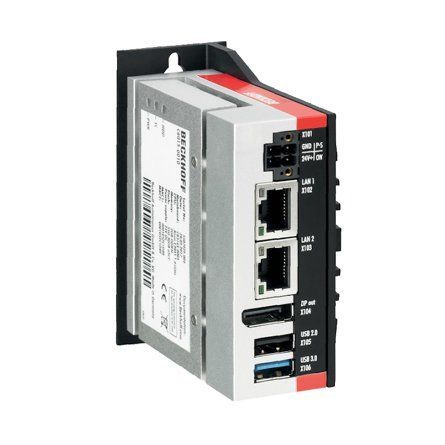
- Upgrading Autoflow TwinCAT2 to Win10 and TwinCAT3 + (<div class="annotatedImageDiv" typeof=" … Autoflows from A2001 to A2015 were initially produced with TwinCAT2 software. This has now been superseded with TwinCAT3 which then has the benefit of compatibility with version 6 front end software.
The original PC cannot be used because
*It is not powerful enough to run v6 front end
*The operating system cannot be upgraded to Windows 10
*It cannot be upgraded to TwinCAT3
The Beckhoff C6015 PC has been chosen to be the replacement PC. It is compact, yet powerful enough to run the v6 front end and TwinCAT in the same
. It has an upgrade to 1.9Ghz 4 core processor.
Because it has a limited 40Gb SSD memory, a compact 64Gb memory stick is inserted into the USB 3.0 port. This acts as a separate drive for the DDRIVE dynamic storage for all machine setup. The internat drive is for the Operating System only. This mimics the current Autoflow setup of a remote Camera PC, hence the camera PC can be retired after the upgrade
era PC, hence the camera PC can be retired after the upgrade<br/>) - Autoflow Maintenance - Gripper + (<nowiki>The following preventative m …
The following preventative maintenance tasks should be carried out regularly on the machine. The frequency depends on the machine use, but as a guide: i-Weekly<br />20 Hrs/Week Monthly</pre></div></nowiki>)2-3 Shifts Weekly
40 Hrs/Week Bi-Weekly
20 Hrs/Week Monthly - Autoflow Maintenance - Infeed + (<nowiki>The following preventative m …
The following preventative maintenance tasks should be carried out regularly on the machine. The frequency depends on the machine use, but as a guide: kly<br />20 Hrs/Week Monthly</pre></div><br/></nowiki>)2-3 Shifts Weekly
40 Hrs/Week Bi-Weekly
20 Hrs/Week Monthly - R0000712E Rotary Trunking + ('''<u>Tools Required</u>''' … '''Tools Required''' Standard set Hex keys Standard socket set Countersink bit and drill Copper/hide hammer Standard hss drill set '''Parts Required''' D0006210 pre assembled energy chain D0003929 Access panel D0003930 Circular guide D0003985 Upper circular guard D0007817 Circular guard D0001171 plug bracket P0001023 6mm y adapter x 9 P0000401 non return valveug bracket P0001023 6mm y adapter x 9 P0000401 non return valve)
- R0015037 Bench Assemble SY Assembly Part 2 + ('''<u>Tools Required</u>''' S … '''Tools Required''' Standard Hex Key set Standard Spanner set 1 Meter straight edge Feeler Gauges '''Parts Required''' B0000044 Linear Rail MSB25 260mm Long (AMT) x 2 B0000046 Slide Base Bearing Block (Straight Grease Nipple) x 4 B0000173 blanking cap x 10 B0000234 Straight Grease Nipple M6 ST/ST x 4 B0000245 Needle Bearing 12 D 16 D 10 Long (ENA) x 12 B0001060 Grease Fitting M6x0.75 to Ø4 x 4 B0001061 Grease fitting M6 x 1 to 4mm x 4 B0001123 Double angular contact bearing 6 I/D 17 O/D 9 long x 2 B0001185 Leadscrew nut Igus x 1 C0001005 Stepper Motor AS1050 x 1 D0005184 Guide Roller x 6 D0005186 Guide Pin Washer x 6 D0015172 Centralise Plate (with SY) x 1 D0015173 Saw SY Saddle Brace x 1 D0015174 Roller Fence (With SY) x 2 D0015175 Saw Saddle Carriage Block x 2 D0015176 Cylinder Mount Block x 2 D0015178 Z Block x 2 D0015207 Outer Bearing Housing x 1 D0015208 Leadscrew Bearing Block x 1 D0015209 Leadscrew Attachment Bracket x 1 D0015222 SY Grease Manifold x 2 D0015240 Collar Clamp: SY Axis ZX5 x 1 D0015316 Leadscrew Bearing Block Cover x 1 D0015415 Turret Pickup Arm ZX5 x 2 D0015416 Bracket: Turret Stop RH ZX5 x 1 D0015417 Bracket: Turret Stop LH ZX5 x 1 D0015698 Flag Block x 1 D0015777 Leadscrew SY x 1 D0016336 SY table blower x 1 E0000336 Sensor: M8; 2mm, PNP N/O, M8 conn x 1 H0005185 Shaft 12mm: 90.5 Saw Fence Roller Pin x 6 M0001209 Bracket m8 proximity sensor 90 degree x 1 P0000200 Elbow Adaptor 6mm - M5 x 7 P0001127 Guide cylinder 20 x 30 compact x 2 P0001157 Turret Stop: 6 Station Right Handed Somatec x 1 P0001158 Turret Stop: 6 Station Left Handed Somatec x 1matec x 1 P0001158 Turret Stop: 6 Station Left Handed Somatec x 1)
- R0015301 Fit terminal holders and Ethercat boxes + ('''<u>Tools Required</u>''' Standard screwdriver set Standard hex key set '''<u>Parts Required</u>''' E0000519 Relay x 8 A0000160 Relay base x 8 C0001018 Ethercat box x 8 D0010806 Mounting plate x 8)
- R0015041 Bench Assemble Top Hood Assembly + ('''<u>Tools Required</u>'''
… '''Tools Required'''
Standard hex key set
Standard spanner set
Standard Hss drill set
Standard tap set
Acoustic foam cutting board and straight edge
Utility Blade
'''Parts Required'''
Pre wired light, beacon and network cable from electrical department
C0001152 Camera: HikVision DS-2CD2343G0-I-2.8mm x 1
C0001239 Micro SD Card 32Gb Class 10 x 1
D0000770 Door Hinge (M0016) x 2
D0001877 Saw Top Door Mk4 x 1
D0004641 Hinge Pin Block (D7445) x 1
D0004642 Flap Counterbalance Bar x 1
D0004645 Safety Flap Hinge Pin x 1
D0004679 Flap Stiffening Bar x 1
D0004705 Flap Hinge Bar x 1
D0004747B top door screen x 1
D0004807 Flap x 1
D0007445 Hinge Pin Block OH (D4641) x 1
D0016251 Saw Hood Switch Mount Plate (Bernstein) x 1
E0000275 Button: Base Fixing 1 N/C x 1
E0001072 Emergency Stop Module Bevelled 1NO 1NC x 1
E0001569 Guard Lock Switch: Bernstein Radius Actuator (Key) x 1
H0004643 4mm Axxis Clear 145mm x 690mm x 1
M0000002 12mm Grey Acoustic Foam with Black PVC Facing x 1 (consumable stock )
M0000036 Sign - Ear Protection x 1
M0000048 Gas Spring 15mm x 100mm x 1
M0000539 Handle Black Nylon 200mm M8 Fixings x 1
100mm x 1 M0000539 Handle Black Nylon 200mm M8 Fixings x 1 <br/>) - R0015326 Bench Assemble Roller Backfences + ('''<u>Tools Required</u>'''
… '''Tools Required'''
Standard hex key set
1 meter straight edge
Feeler gauges
Bearing dolly for B0000245 Needle Bearing
'''Parts Required'''
B0000245 Needle Bearing 12 D 16 D 10 Long (ENA) x 20
D0005183 Roller Backfence (D7443) x 1
D0005184 Guide Roller x 10
D0005186 Guide Pin Washer x 10
D0007443 Roller Backfence OH (D5183) x 1
H0005185 Shaft 12mm: 90.5 Saw Fence Roller Pin x 10
3) x 1 H0005185 Shaft 12mm: 90.5 Saw Fence Roller Pin x 10 <br/>) - R0015037 Bench Assemble SY Assembly + ('''<u>Tools Required</u>'''
… '''Tools Required'''
Standard Hex Key set
Standard Spanner set
1 Meter straight edge
Feeler Gauges
'''Parts Required'''
B0000044 Linear Rail MSB25 260mm Long (AMT) x 2
B0000046 Slide Base Bearing Block (Straight Grease Nipple) x 4
B0000173 blanking cap x 10
B0000234 Straight Grease Nipple M6 ST/ST x 4
B0000245 Needle Bearing 12 D 16 D 10 Long (ENA) x 12
B0001060 Grease Fitting M6x0.75 to Ø4 x 4
B0001061 Grease fitting M6 x 1 to 4mm x 4
B0001123 Double angular contact bearing 6 I/D 17 O/D 9 long x 2
B0001185 Leadscrew nut Igus x 1
C0001005 Stepper Motor AS1050 x 1
D0005184 Guide Roller x 6
D0005186 Guide Pin Washer x 6
D0015172 Centralise Plate (with SY) x 1
D0015173 Saw SY Saddle Brace x 1
D0015174 Roller Fence (With SY) x 2
D0015175 Saw Saddle Carriage Block x 2
D0015176 Cylinder Mount Block x 2
D0015178 Z Block x 2
D0015207 Outer Bearing Housing x 1
D0015208 Leadscrew Bearing Block x 1
D0015209 Leadscrew Attachment Bracket x 1
D0015222 SY Grease Manifold x 2
D0015240 Collar Clamp: SY Axis ZX5 x 1
D0015316 Leadscrew Bearing Block Cover x 1
D0015415 Turret Pickup Arm ZX5 x 2
D0015416 Bracket: Turret Stop RH ZX5 x 1
D0015417 Bracket: Turret Stop LH ZX5 x 1
D0015698 Flag Block x 1
D0015777 Leadscrew SY x 1
D0016336 SY table blower x 1
E0000336 Sensor: M8; 2mm, PNP N/O, M8 conn x 1
H0005185 Shaft 12mm: 90.5 Saw Fence Roller Pin x 6
M0001209 Bracket m8 proximity sensor 90 degree x 1
P0000200 Elbow Adaptor 6mm - M5 x 7
P0001127 Guide cylinder 20 x 30 compact x 2
P0001157 Turret Stop: 6 Station Right Handed Somatec x 1
P0001158 Turret Stop: 6 Station Left Handed Somatec x 1
1 P0001158 Turret Stop: 6 Station Left Handed Somatec x 1 <br/>) - R0002916 Install Machine Trunking + (04/09/2025 Moved to Confluance Click [https://stuga-ltd.atlassian.net/wiki/external/MTM4YmQ3NmY0NjBiNDFkYWFlZDI4MDhjOThmMTZhZjU Here] <br/>)
- Stuertz Infeed - Freeing Roller under Gripper Arm + ('''Applies to: A2026-A2030 Autoflow Mk4 wi … '''Applies to: A2026-A2030 Autoflow Mk4 with Jetta Locking motors'''
In certain circumstances, the forward clamp roller arm has stuck itself under the gripper arm. Freeing from this situation requires a set process because the GZ axis motor is braked and probably in an overload condition
nfident in using TwinCAT on the VM machine to navigate to settings</div> </div><br/>) - R0015284 Frame ancillaries + (<u>'''Tools Required'''</u> … '''Tools Required''' 115mm disc cutter Standard Hex key set Standard spanner set Standard tape measure Standard Tap set Standard HSS drill set '''Parts Required''' A0001060 Support bracket :Cable basket Tray x 5 A0001061 Retainer: Wire Basket Cable Tray x 7 A0001065 Wire cable tray 3m length x 2.5 D0015611 Reference Levelling Bracket x 2ble tray 3m length x 2.5 D0015611 Reference Levelling Bracket x 2)
- R0015290 Bench Assemble Top guard + (<u>'''Tools Required'''</u>
… '''Tools Required'''
Standard hex key set
Acoustic foam cutting edge and Back board
Stanley blade
Standard HSS drill set
Standard tap set
Step drill
'''Parts Required'''
D0001352 Printer Shelf TLP2844-Z x 1
D0004719E Cut Bar Guard Mk5 (5476E) x 1
E0000249 Sounder Beacon x 1
M0000002 12mm Grey Acoustic Foam with Black PVC Facing x 1
M0001127 Cable Tie Base (m6) x 1
with Black PVC Facing x 1 M0001127 Cable Tie Base (m6) x 1 <br/>) - R0015294 Fitment of wire basket and feed pipes + (19/09/2025 Moved to Confluance Click [https://stuga-ltd.atlassian.net/wiki/external/MGRmNThkNzU1OGUwNDlkY2FiYTU0NTFhYjY3NDFlYTg Here])
- TB0444 Renewing CF Card on TwinCAT2 Systems + (<u>Problem</u> These machines … Problem These machines use a CX5020 PC with a 2Gb CF card running TwinCAT2 PLC system. The CF card can fail, which is effectively the windows operating system. The CF card has a very small capacity, so needs to be created from an image. This TB outlines the steps in the process to ensure a successful conclusion. 1. Create a new CF card at stuga using the beckhoff imaging tool on a CX5020 2. Boot up with the CX5020 3. Ensure PLC is set to Enable on start-up (default is config mode) 4. Rename the PC 5. Install TeamViewer host v10 or less from a USB stick 6. If you have a copy of the version of winMulti it was running, copy this in to the c:\ multi folder. If not, a “'''''new version install'''''” will be needed so copy in data from the g:\builds\PC Installs\Autoflow\Multi folder 7. Set up and customer specific network parameters to ensure TeamViewer will work when it is plugged in on site 8. Send to customer Once on site, follow procedure A if the winMulti version is preserved, or B if it is a '''''new version install'''''eserved, or B if it is a '''''new version install''''')
- B0000025 B0001175 Belt Identification + (A Guide to correctly identify the variant of drive belt required for ZX5, ZX4 ,ZX3 S-65 and Flowline saw modules Belts will vary across blade sizes and Pully diameters Key indicator is pulley size, over blade size)
- Changing the Flowline Ops Password + (A password can be set up within FlowlineOps that limits access to the Edit Machining and Edit Profiles buttons, This tutorial will explain how to setup or change this password.)
- Correcting Linearity with Rack Offset File + (Accuracy problem on A2001 was traced to a … Accuracy problem on A2001 was traced to a non-linear rack. This tutorial demonstrates how to test the linearity of a rack and the systems in place to correct the linearity. machine in the 20 year history that has needed these alterations</div> </div>)
- Commissioning - Z-Block Calibration + (Commonly used during sawing on Z transoms, … Commonly used during sawing on Z transoms, the Z block operation is used to fasten the profile, making sure it does not move during sawing. There are 6 possible states the z block can be in. Each of these can have a different length of protrusion for different profiles. 12 x M8 Screws 12 x M8 Nuts 12 x wire numbers 1 - 6ws 12 x M8 Nuts 12 x wire numbers 1 - 6)
- Z Transom Width Measurement + (Difficulty can be had when trying to accurately measure the width of a Z transom profile section. This guide will show you how to accurately measure the width of the Z section to within 0.1mm which is required when setting up Y notching accurately)
- R0019264 Autoflow Mk 4,1 Infeed Safe moving equipment + (Due to unbalanced nature of Autoflow 4.1 infeed frame, The following Guidance is for use of supplied parts within Assembly R0019264 for allowing safe movement of Infeed frame)
- Placing a TwinCAT3 Machine Under Source Control + (<div class="icon-instructions caution-i … Click [https://stuga.dokit.app/wiki/Changing_Version_Control_to_Visual_Studio here] for the latest procedure For many years, the source code for the PLCs has resided on the G:\drive and then a copy on each and every one of the PCs used to edit the code, so at least one on each machine. This is a recipe for disaster because maintaining all the copies and version numbers is incredibly difficult and adds a lot of time overhead to fixes and changes. This has worked because there has been only one developer, but this is set to change in future as more programmers will be trained and tracking versions becomes more difficult From 2020, the PLC code version control has been improved by using an industry standard source control system called "Git" along with "BitBucket" to store the PLC code in the cloud. The program "SourceTree" is used to commit, push and pull the changes [https://www.atlassian.com/git/tutorials/what-is-version-control Click here] for an introduction to version control using Git This tutorial is a step by step guide to setting up an existing machine or diagnostic PC to a standard uses on all Stuga machines to enable quick, easy and stress free version control.standard uses on all Stuga machines to enable quick, easy and stress free version control.)
- J0001000H Autoflow Mk4 Mechanical installation-Alignment + (Information to clarify correct process for installation of J0001000H Autoflow Mk4 Levelling tolerance of 0.004" /0.1mm over 300mm (1 division on engineers level) must be adhered to)
- Autocut Piece Jammed + (Let's say a small piece has become wedged … Let's say a small piece has become wedged between the eject table and the outfeed table frame.
ach into the machine until it is safe to do so - Press ESTOP</div> </div><br/>) - TB0301 Autoflow Saw Head Reinforcement - Additional Enhancements + (On Autoflow 2 Sawing Centres following 5 y … On Autoflow 2 Sawing Centres following 5 years of use., it has been found that the internal saw centre framework can lose its rigidity. this is probably due to "bruising" or denting of the aluminium joints introducing a slight amount of play. This is exacerbated by the design where it is attached and driven on from the base up A retrofit kit of parts has previously been created to allow additional reinforcement to be introduced within the structural framework. This kit builds upon the first kit to provide further accuracy enhancements by #Adding left right stability with additional slide rails at the top of the subframe #Adding front / back stability by moving the SY axis leadscrew to the same height as the saw table ====Parts required: ==== R0010272 Kit: Saw Frame Rigidity Pt 2 This kit consists of 2 carriage assemblies, specifically designed to provide further rigidity to the top of the Saw Head Assembly. In addition, 2 mounting blocks required to relocate the Saw Y Axis Assembly are also included. This allows the Saw Y Axis Assembly to continue to operate accurately, but improves the life of associated components. See also [[TB0259 Autoflow Saw Head Reinforcement]][[TB0259 Autoflow Saw Head Reinforcement]])
- Move SR Datum Sensor to Higher Level R0019217 + (On a Mk4 Autoflow, The SR axis daum sensor … On a Mk4 Autoflow, The SR axis daum sensor is originally located at the rear and to the base of the SR axis. This area is prone to offcuts, so a new location has been designed at the top, with the following design parameters
*Easy to retrofit
*Sensor is protected in a case
*Short distance to connection box
*Uses existing mounting holes
*Easy to adjust and maintain
*Sensing end location should be vertical onto a plate, not horizontal on to a radiused surface
*Can use E0000336 2mm range sensor reliably
*Incorporate a front fence to help deflect offcuts down the chute and to protect the sensor
The parts are supplied in Kit R0019217B
illustrated here are from a Right to Left feed machine. Parts are unhanded so can be fitted to either hand machine</div> </div><br/>) - 500mm Saw Blade Upgrade + (Step by step guide of how to carry out the … Step by step guide of how to carry out the 400mm to 500mm saw blade upgrade including long reach clamps. Time to complete is very dependant on condition of the machine, ie rusted or rounded off bolts which may need to be drilled out and holes re-tapped. Replace all screws with Loctite except grub screws on taper lock pulleys, grub screws for shafts on clamp pads and slit strip retaining screws or where a locking nut is used on cylinder rods.re a locking nut is used on cylinder rods.)
- Adding TwinSAFE projects to AMI Motors + (The AMI8xxx-3100 motor series is a TwinSAF … The AMI8xxx-3100 motor series is a TwinSAFE enabled motor. To enable this motor to work with a non-TwinSAFE system, a TWINSAFE project needs to be placed into the Safety Logic circuit on board the motor. This dokit describes this process.
====Prerequisites==== *TwinCAT machine project connected, scanned and debugged *Drive Manager 2 Project installed *AMI motors connected and powered up *Latest Device Description (ESI) updates - see Updating Device Description Tables *AMI Motor TwinSAFE Project from [https://stugaltd.monday.com/boards/4881973586 Software Versions Board] For instructions on how to create the AMI Motor twinSAFE project from scratch, see [[AMI TwinSAFE Workaround - Safety Project Creation]]
[[AMI TwinSAFE Workaround - Safety Project Creation]]<br/>) - Decommissioning - Autoflow Mk4 1 + (The Autoflow Mk4.1 machine has been design … The Autoflow Mk4.1 machine has been designed to separate into modules for safe transport
The '''infeed table''' gripper carriage and conveyor split into two sections
The '''machining head''' and '''saw''' split apart like a cam shell. They are joined with a dowel system in joining blocks at the base
The '''outfeed''' splits in to a rear bed and front tray
See Also [[Safe Moving of Top Heavy Machine Modules]]
[[Safe Moving of Top Heavy Machine Modules]]<br/>) - R0019228 Autoflow R Axis Ring Seal Protection + (The Autoflow R axis uses a slewing ring which has a seal that is subject to ingress of swarf. Over time, this seal can become dislodged, resulting in a major failure of the machine.)
- Guide to Fitting Eject Push Sensors on ZX Machines + (The Eject Push bar on the Saw Outfeed on t … The Eject Push bar on the Saw Outfeed on the ZX machines does not have sensors fitted to monitor the position of the cylinders. This causes an issue when the bar is obstructed and either does not fully extend or not fully extract. The cycle is not aware of the position of the cylinders and the machine will continue to run, often resulting in a collision. Not having sensors fitted also means that the Eject Push cycle is run via a timer. However, using a timer means that the system does not know the actual position of the cylinders. Having sensors fitted to the cylinders will allow us to have a cycle that monitors the position of the cylinders and we can determine the cycle has finished before allowing another operation to proceed. We can also use the sensors as feedback to stop the machine if the cycle fails. This will result in fewer collisions and damage to parts or products.
s and damage to parts or products. <br/>) - Beckhoff AX8000 Flowline Upgrade + (The Flowline range (Mk3, ZX3, ZX4) are Stu … The Flowline range (Mk3, ZX3, ZX4) are Stuga built and designed machines for prepping and cutting uPVC windows and doors. The Flowline is the first machine of the Stuga 'U' shaped machines which has prepping and cutting working in the same machine package. The Flowline is still a fantastic machine for the industry, however, due to the age of the machines and older control systems becoming obsolescent, we have had to find an upgrade route that does not only keep the machine going, but also provides improvements from the original model and up-to-date technology to future proof the machine. The upgrade that we have developed for the Flowline is supplied from an automation supplier named Beckhoff. We also use Beckhoff on our new build machines. This gives us better lead times, more understanding of the products and better diagnostics/ support for our customers. The drive system that we use is called the AX8000 series. These drives are a compact multi axis servo system that use an EtherCAT interface and STO safety functions. These servo drives, coupled with Beckhoff AM8*** series OCT servo motors provide quicker installations and all round performance increases from any system we have previously used. To drive all of the new system, we are using a Beckhoff IPC controller that runs TwinCAT 3. This links into the system via EtherCAT. All of the machine can now link together via EtherCAT to provide quick and stable communications. This tutorial will give you step by step guides on the physical upgrade requirements needed when upgrading a Flowline Mk3 to a Flowline Mk3 with Beckhoff AX8000 Control. Each step will provide you with written information and pictures to guide you through the upgrade. Each step will contain necessary information which will also provide you with rationale for the design and an idea of the benefits over using different methods. Please always feel free to provide Stuga with any feedback on this document or its contents.feedback on this document or its contents.)
- ZX5 MH Infeed Basic IO Test and Setup + (The MH infeed on a ZX5 is a module which c … The MH infeed on a ZX5 is a module which can be tested individually away from the fully installed machine. Once build stage is complete, to be able to test individually, the Infeed Module needs: - To be connected to mains power & be powered on - An air supply to the main blue line - Network connection (Network Cube) - HDMI & Keyboard dongle to be plugged into the Beckhoff PLC inside the cabinet. Input and output activation when testing the sole module is done through the Twincat project rather than through WinMulti The above is only required If the Machine is not fully installed and connected with power air and network already. The below guide is specifically for a fully installed and connected infeed.ically for a fully installed and connected infeed.)
- ZX5 Alignment Check + (The ZX5 machine can be tricky to align as there are many adjustments designed into the table to offset manufacturing tolerances. This step by step guide follows the correct protocol to ensure the starting point and sequence of alignment is correct)
- TB0422 Commissioning ZX5 Software 2018 + (The first step in commissioning a new mach … The first step in commissioning a new machine is to get the basic software setup correctly installed. Because the software is designed to be very flexible across many machine types, the simplest way to do this is to copy from a recently built similar machine.opy from a recently built similar machine.)
- Upgrade - R0000173 Conveyor Motor + (The original style of conveyor is used on many machines, but the motor that powers it is no longer available. This guide will allow a different motor/gearbox to be used.)
- X252 Forward Clamp Out Sensor Setup Stuertz Infeed + (The out sensor used for the vorlaufwagen c … The out sensor used for the vorlaufwagen cannot be a standard reed switch because the cylinder that drives this output is a telescoping version. It is impossible to detect the out position. Therefore, a sensor is fitted that must be programmed to set a high output when it detects the full range has been reached The sensor is a [https://www.pepperl-fuchs.com/global/en/classid_53.htm?view=productdetails&prodid=42559#overview Pepperl+Fuchs VDM28-8-L] Datasheet can be downloaded [https://files.pepperl-fuchs.com/webcat/navi/productInfo/45/452859n.pdf?v=20220926110229 here] '''Function''' The distance measurement device contains one transmitter and one receiver incorporated into a single housing. The transmitter light is reflected back to the receiver from a target. The sensor determines the distance to the target and triggers a switching function or supplies the relevant measured value for processing. '''Assembly instructions''' The sensor can be mounted by means of through holes or by using a mounting bracket or mounting clamp Ensure that the surface is level in order to prevent the housing from becoming distorted when the fittings are tightened. It is advisable to secure the nuts and screws using spring washers in order to prevent the sensor from being incorrectly adjusted. '''Connection''' Connect the device in accordance with the connection diagram in the datasheet. '''Adjustment''' The green LED lights up when the operating voltage is switched on. Adjust the sensor so that the laser point is on the gripper bodyso that the laser point is on the gripper body)
- Fitting R0019199 Upgrade: Autoflow Slewing Ring Guard Kit + (This area is prone to collect sharp - cornered offcuts which can pull the seal from the SR axis bearing. The kit will help prevent damage. Use Kit R0019199 Upgrade: Autoflow Slewing Ring Guard Kit <br/>)
- Alignment guide using wire line + (This dokit is to help with the use of a wi … This dokit is to help with the use of a wire line to set alignment correctly on mechanical build up. Using a wire line correctly will ensure a very accurate straight line is achieved . Accuracy of + - 1 mm over any distance can be achieved using the following method. Using one incorrectly can also easily be done.! The steps shown can be applied to all types of alignment , when you have a vertical face on components that require aligning. face on components that require aligning.)
- ZX3 Counterweight Installation + (This guide explains how to install the counterweight assembly on the current ZX3 ring)
- Units of Measure modification CIM50 + (This guide is to show how to amend units o … This guide is to show how to amend units of measure of existing stock items. If a new product is created please ensure the Units of measure is always set up correctly from the beginning . The CIM50 guide for Units of Measure setup is [https://cimservices.sharepoint.com/:w:/s/Cim50PartnerMarketing/EZhA_HF6SFJLmkVO5WANYXIBZdMx4hbVnuY3cdIF78p7lg?rtime=FcNQz7GE2Ug here]4hbVnuY3cdIF78p7lg?rtime=FcNQz7GE2Ug here])
- Client Installation of Sage and Cim50 + (This is a step by step guide on how to install Sage50 and Cim50 to a client device Sage must be installed first in order for the link to Cim50 to work as intended)
- A2001 - Light Curtain Timer +
- Dokit - Editing Work Instructions + (This tutorial shows you how to edit the co … This tutorial shows you how to edit the content of a work instruction, allowing you to
*Add New Steps
*Add numbering and bullets to the text
*Add and crop Photos
*Annotate photos with arrows, numbers and text
*Change step sequence and insert steps
*Add Call-outs and warnings
*Add Links to other websites or other Dokit pages
=Warnings=
a fa-exclamation-triangle"></i></div> <div class="icon-instructions-text">...Do not publish anything inflammatory, offensive or illegal</div> </div><br/>) - Safety Circuit Principles + (Moved to Confluence 13/12/2025 [https://stuga-ltd.atlassian.net/wiki/spaces/~5570585b7bb5d1bc31430e886883cbc774c182/pages/86442039/Safety+Circuit+Principles Safety Circuit Principles])
- Upgrade Autoflow to Windows 11 + ('''Update 2024''' - Upgrades now consist o … '''Update 2024''' - Upgrades now consist of a new Windows 11 PC with VM for the front end and a C6017 PC for the back end.
Upgrading an Autoflow to Windows 11 involves upgrading two PCS
#The Beckhoff control PC - replaced with a C0001225-KIT
#The Camera PC - replaced with a C0000422-KIT with a VM setup. this now becomes the front end PC
===For Historical reference, these are the pre-2024 notes: === ''Upgrading an Autoflow to Windows 10 on site involves upgrading two PCS'' #''The Beckhoff control PC'' #''The Camera PC'' ''
'' The Beckhoff PC is not upgradable so needs to be completely replaced. We use the miniature [https://www.beckhoff.com/english.asp?industrial_pc/c6017.htm Beckhoff C6017] for this ''It is not cost effective to upgrade and old camera PC, so a new one is supplied'' ===''Notes''=== *''The Beckhoff PC is now powerful enough to run the front end and back end.'' *''The camera PC is there to replace the camera PC on site and contains the storage for the machine cameras'' *''Because the Beckhoff PC has limited hard drive space, the DDRIVE will be on the cameraPC''hard drive space, the DDRIVE will be on the cameraPC'') - TwinCat Connection Faults + (We are quite often faced with multiple Axi … We are quite often faced with multiple Axis/Door Open/ Estop faults all being reported at the same time. More often than not this is caused by a bad connection on the TwinCat system somewhere. If there is any dropout of connection at any point in the system it will result in this error. You could spend some time crawling about on your hands and knees, opening electrical cabinets and trying to find the fault manualy, but by using TwinCat we can save some time and effort, and pinpoint the cause almost immediately.and pinpoint the cause almost immediately.)

 Français
 English
 Deutsch
 Español
 Italiano
 Português