| [version en cours de rédaction] | [version en cours de rédaction] |
| (9 révisions intermédiaires par 2 utilisateurs non affichées) | |||
| Ligne 7 : | Ligne 7 : | ||
|Duration=2 | |Duration=2 | ||
|Duration-type=day(s) | |Duration-type=day(s) | ||
| − | |Tags= | + | |Tags=Confluence |
}} | }} | ||
{{Introduction | {{Introduction | ||
| − | |Introduction=<translate>This upgrade replaces the crank arm assemblies on Z065, Z066 and Z067 with a direct drive system to improve reliability</translate> | + | |Introduction=<translate>This upgrade replaces the crank arm assemblies on Z065, Z066 and Z067 with a direct drive system to improve reliability |
| + | |||
| + | This procedure involves mechanical fitting, electrical wiring and help from a TwinCAT3 competent engineer at HQ for software changes | ||
| + | |||
| + | {{Warning|...The drives must be programmed before parts sent out}}{{Warning|...Motors must be rewired for Delta and NOT Star}} | ||
| + | <br /></translate> | ||
}} | }} | ||
{{Materials}} | {{Materials}} | ||
{{EPI}} | {{EPI}} | ||
{{Tuto Step | {{Tuto Step | ||
| − | |Step_Title=<translate>Program | + | |Step_Title=<translate>06/10/2025 Moved to Confluence</translate> |
| + | |Step_Content=<translate>https://stuga-ltd.atlassian.net/wiki/x/s4CFAg</translate> | ||
| + | }} | ||
| + | {{Tuto Step | ||
| + | |Step_Title=<translate>*IF EATON DRIVES ONLY* Program Drives before they leave</translate> | ||
|Step_Content=<translate>Running frequency | |Step_Content=<translate>Running frequency | ||
| Ligne 24 : | Ligne 33 : | ||
Decel time | Decel time | ||
| − | <br /></translate> | + | |
| + | [[Programming Eaton DE Drive|https://stuga.dokit.app/wiki/Programming_Eaton_DE_Drive]]<br /></translate> | ||
| + | |Step_Picture_00=Fitting_Zx5_Crank_Upgrade_eaton_de1.JPG | ||
}} | }} | ||
{{Tuto Step | {{Tuto Step | ||
| Ligne 134 : | Ligne 145 : | ||
}} | }} | ||
{{Tuto Step | {{Tuto Step | ||
| − | |Step_Title=<translate>Remove 2 off | + | |Step_Title=<translate>Remove 2 off motor breakers and contactors from Module C</translate> |
|Step_Content=<translate></translate> | |Step_Content=<translate></translate> | ||
|Step_Picture_00=Fitting_Zx5_Crank_Upgrade_DSC_0314.JPG | |Step_Picture_00=Fitting_Zx5_Crank_Upgrade_DSC_0314.JPG | ||
| Ligne 140 : | Ligne 151 : | ||
}} | }} | ||
{{Tuto Step | {{Tuto Step | ||
| − | |Step_Title=<translate>Add 2 off single pole | + | |Step_Title=<translate>Add 2 off 10A single pole MCB's in Module C</translate> |
|Step_Content=<translate>Tidy wires away for the spare 2 phases</translate> | |Step_Content=<translate>Tidy wires away for the spare 2 phases</translate> | ||
| + | |Step_Picture_00=Fitting_Zx5_Crank_Upgrade_DSC_0317.JPG | ||
}} | }} | ||
{{Tuto Step | {{Tuto Step | ||
| − | |Step_Title=<translate>Add 2 off | + | |Step_Title=<translate>Add 2 off drives to Module C</translate> |
| − | |Step_Content=<translate>May need to move trunking or mount directly to side of enclosure.</translate> | + | |Step_Content=<translate>May need to move trunking or mount directly to side of enclosure. |
| + | |||
| + | |||
| + | Drive can be WEG or EATON</translate> | ||
| + | |Step_Picture_00=Fitting_Zx5_Crank_Upgrade_DSC_0321.JPG | ||
}} | }} | ||
{{Tuto Step | {{Tuto Step | ||
| − | |Step_Title=<translate> | + | |Step_Title=<translate>Remove breaker and contactor from Module E</translate> |
|Step_Content=<translate></translate> | |Step_Content=<translate></translate> | ||
}} | }} | ||
{{Tuto Step | {{Tuto Step | ||
| − | |Step_Title=<translate> | + | |Step_Title=<translate>Add 10A single pole MCB in Module E</translate> |
|Step_Content=<translate></translate> | |Step_Content=<translate></translate> | ||
| + | |Step_Picture_00=Fitting_Zx5_Crank_Upgrade_DSC_0322.JPG | ||
}} | }} | ||
{{Tuto Step | {{Tuto Step | ||
| − | |Step_Title=<translate>Add 1 Off | + | |Step_Title=<translate>Add 1 Off drive to Module E</translate> |
| − | |Step_Content=<translate></translate> | + | |Step_Content=<translate>May need to move trunking or mount directly to side of enclosure. |
| + | |||
| + | |||
| + | Drive can be WEG or EATON</translate> | ||
| + | |Step_Picture_00=Fitting_Zx5_Crank_Upgrade_DSC_0326.JPG | ||
}} | }} | ||
{{Tuto Step | {{Tuto Step | ||
| − | |Step_Title=<translate>For each | + | |Step_Title=<translate>For each WEG drive</translate> |
| − | |Step_Content=<translate> | + | |Step_Content=<translate>* Live wire |
| − | + | * Neutral wire | |
| − | * | + | * Earth wire |
| − | *Neutral | + | * 0v supply |
| − | *Earth | + | * FWD and REV Signals |
| − | * | + | * Motor cables wire directly into bottom of the drive |
| − | * | ||
<br /></translate> | <br /></translate> | ||
| − | |Step_Picture_00= | + | |Step_Picture_00=Fitting_Zx5_Crank_Upgrade_Module_C_control_wiring_for_Eaton_drives.JPG |
| − | |Step_Picture_00_annotation | + | |Step_Picture_00_annotation={"version":"2.4.6","objects":[{"type":"image","version":"2.4.6","originX":"left","originY":"top","left":84,"top":-3,"width":332,"height":363,"fill":"rgb(0,0,0)","stroke":null,"strokeWidth":0,"strokeDashArray":null,"strokeLineCap":"butt","strokeDashOffset":0,"strokeLineJoin":"miter","strokeMiterLimit":4,"scaleX":1.24,"scaleY":1.24,"angle":0,"flipX":false,"flipY":false,"opacity":1,"shadow":null,"visible":true,"clipTo":null,"backgroundColor":"","fillRule":"nonzero","paintFirst":"fill","globalCompositeOperation":"source-over","transformMatrix":null,"skewX":0,"skewY":0,"crossOrigin":"","cropX":0,"cropY":0,"src":"https://stuga.dokit.app/images/e/e1/Fitting_Zx5_Crank_Upgrade_Module_C_control_wiring_for_Eaton_drives.JPG","filters":[]}],"height":450,"width":600} |
| − | + | |Step_Picture_01=Fitting_Zx5_Crank_Upgrade_Module_E_control_wiring_for_Eaton_drive.JPG | |
| − | + | |Step_Picture_01_annotation={"version":"2.4.6","objects":[{"type":"image","version":"2.4.6","originX":"left","originY":"top","left":103,"top":0,"width":260,"height":357,"fill":"rgb(0,0,0)","stroke":null,"strokeWidth":0,"strokeDashArray":null,"strokeLineCap":"butt","strokeDashOffset":0,"strokeLineJoin":"miter","strokeMiterLimit":4,"scaleX":1.26,"scaleY":1.26,"angle":0,"flipX":false,"flipY":false,"opacity":1,"shadow":null,"visible":true,"clipTo":null,"backgroundColor":"","fillRule":"nonzero","paintFirst":"fill","globalCompositeOperation":"source-over","transformMatrix":null,"skewX":0,"skewY":0,"crossOrigin":"","cropX":0,"cropY":0,"src":"https://stuga.dokit.app/images/e/eb/Fitting_Zx5_Crank_Upgrade_Module_E_control_wiring_for_Eaton_drive.JPG","filters":[]}],"height":450,"width":600} | |
| − | + | |Step_Picture_02=Fitting_Zx5_Crank_Upgrade_CRANK_D_AND_E.JPG | |
| − | + | |Step_Picture_03=Fitting_Zx5_Crank_Upgrade_CRANK_E.JPG | |
| − | | | ||
| − | | | ||
}} | }} | ||
{{Tuto Step | {{Tuto Step | ||
| Ligne 188 : | Ligne 206 : | ||
}} | }} | ||
{{Tuto Step | {{Tuto Step | ||
| − | |Step_Title=<translate>Latest | + | |Step_Title=<translate>Latest Front End software installed</translate> |
| − | |Step_Content=<translate>* | + | |Step_Content=<translate>* Backup Old multi folder |
| − | + | * Copy in new winMulti version to c:\multi overwriting what is there</translate> | |
| − | |||
| − | |||
| − | |||
| − | |||
| − | * | ||
| − | |||
| − | |||
| − | |||
| − | |||
|Step_Picture_00=Fitting_Zx5_Crank_Upgrade_Annotation_2019-10-16_140117.jpg | |Step_Picture_00=Fitting_Zx5_Crank_Upgrade_Annotation_2019-10-16_140117.jpg | ||
|Step_Picture_01=Fitting_Zx5_Crank_Upgrade_Annotation_2019-10-16_140536.jpg | |Step_Picture_01=Fitting_Zx5_Crank_Upgrade_Annotation_2019-10-16_140536.jpg | ||
| Ligne 207 : | Ligne 216 : | ||
{{Tuto Step | {{Tuto Step | ||
|Step_Title=<translate>Map new Links</translate> | |Step_Title=<translate>Map new Links</translate> | ||
| − | |Step_Content=<translate><br /> | + | |Step_Content=<translate>Overwrite existing links if any exist |
| − | + | ||
| − | + | <br />See the wiring for MC2C and MC2E in Step 22 for the link IORefs and locations</translate> | |
| − | + | |Step_Picture_00=Fitting_Zx5_Crank_Upgrade_Annotation_2019-10-16_141758.jpg | |
| − | + | }} | |
| − | + | {{Tuto Step | |
| − | + | |Step_Title=<translate>Activate Configuration</translate> | |
| − | | | + | |Step_Content=<translate>And restart in run mode when prompted</translate> |
| − | | | + | }} |
| − | + | {{Tuto Step | |
| − | + | |Step_Title=<translate>Add new IO Refs to IODef.mul</translate> | |
| − | | | + | |Step_Content=<translate>Ask HQ to download a relevant IODef.mul file |
| − | | | + | |
| − | + | ||
| − | + | Failing this, the following IO refs need to be added<syntaxhighlight> | |
| − | + | OuC_CrankFWD,273,2,0,0,False,False,3,8,-,False,0 | |
| − | + | OuC_CrankREV,274,2,0,0,False,False,3,9,-,False,0 | |
| − | + | OuD_CrankFWD,275,2,0,0,False,False,3,10,-,False,0 | |
| − | + | OuD_CrankREV,276,2,0,0,False,False,3,11,-,False,0 | |
| − | + | OuE_CrankFWD,277,2,0,0,False,True,64,0,-,False,0 | |
| − | + | OuE_CrankREV,278,2,0,0,False,True,64,1,-,False,0 | |
| − | + | ||
| − | + | </syntaxhighlight> | |
| − | + | ||
| − | + | ||
| − | + | And these removed</translate> | |
| − | |||
| − | |||
| − | |||
| − | |||
| − | |||
| − | |||
| − | |||
| − | |||
| − | |||
| − | |||
| − | |||
| − | |||
}} | }} | ||
{{Tuto Step | {{Tuto Step | ||
| Ligne 252 : | Ligne 249 : | ||
}} | }} | ||
{{Tuto Step | {{Tuto Step | ||
| − | |Step_Title=<translate>Test</translate> | + | |Step_Title=<translate>Programme WEG drives</translate> |
| − | |Step_Content=<translate></translate> | + | |Step_Content=<translate>Follow link below for information on programming WEG drives: |
| + | |||
| + | |||
| + | [[WEG Inverter Setup]]</translate> | ||
| + | }} | ||
| + | {{Tuto Step | ||
| + | |Step_Title=<translate>Test Function</translate> | ||
| + | |Step_Content=<translate># Ensure all Out and home sensors are working and correctly oriented. Home is towards rear of machine, Fwd or Out is towards front. | ||
| + | # Ensure the clutches are set to slip if the crank bottoms out | ||
| + | # Test direction of all cranks (Fwd is towards front). Switch phases on motors if direction needs to change. The PLC has hard code to switch the outputs off when the sensors are covered | ||
| + | |||
| + | Key Pointers | ||
| + | |||
| + | *End stops should be set so the rack can never run off the pinion - always a full tooth engaged | ||
| + | *Each crank motion stops when the input is seen, and then decelerates. Therefore, set the crank input position to allow for this deceleration before hitting end stop. Normally about 30mm | ||
| + | *The crank clutches should be set to slip before damage is done to the crank end stops in the event that the sensors do not work</translate> | ||
}} | }} | ||
{{Notes}} | {{Notes}} | ||
Version actuelle datée du 7 octobre 2025 à 17:11
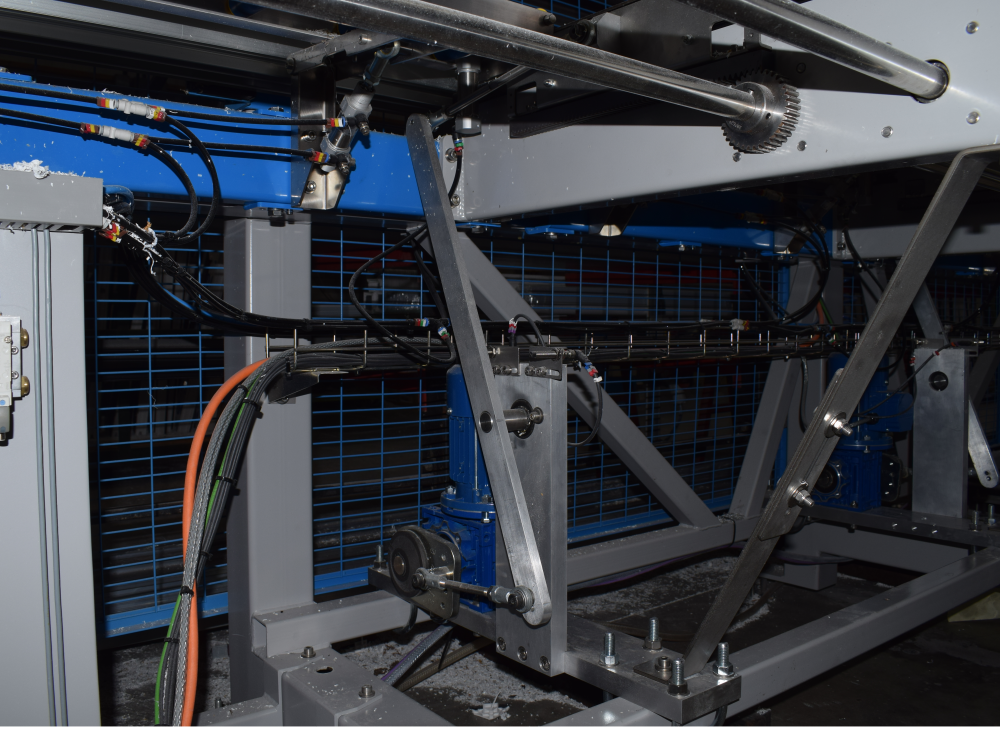
Fitting the crank upgrade to Z065, Z066, Z067

Difficulté
Difficile
Durée
2 jour(s)
Sommaire
- 1 Introduction
- 2 Étape 1 - 06/10/2025 Moved to Confluence
- 3 Étape 2 -
- 4 Étape 3 - Remove Link arm connecting to rack and pinion
- 5 Étape 4 - Remove pivot shaft and arm
- 6 Étape 5 - Undo clutch and remove Cam
- 7 Étape 6 - Add sprocket to clutch
- 8 Étape 7 - Fix idler plate to upright
- 9 Étape 8 - Fix split sprocket onto drive shaft
- 10 Étape 9 - Drill and pin split sprocket to shaft
- 11 Étape 10 - Add chain minimum length sprocket to sprocket
- 12 Étape 11 - Fit Module C Crank Home sensor plate to Arm 5
- 13 Étape 12 - Fit Module C Crank Out sensor plate to Arm 5
- 14 Étape 13 - Fit Module D Crank Home sensor plate to Arm 5
- 15 Étape 14 - Fit Module D Crank Out sensor plate to Arm 5
- 16 Étape 15 - Fit Module E Crank Out sensor plate to Arm 5
- 17 Étape 16 - Fit Module E Crank Home sensor plate to Arm 5
- 18 Étape 17 - Remove 2 off motor breakers and contactors from Module C
- 19 Étape 18 - Add 2 off 10A single pole MCB's in Module C
- 20 Étape 19 - Add 2 off drives to Module C
- 21 Étape 20 - Remove breaker and contactor from Module E
- 22 Étape 21 - Add 10A single pole MCB in Module E
- 23 Étape 22 - Add 1 Off drive to Module E
- 24 Étape 23 - For each WEG drive
- 25 Étape 24 - Wire Sensor Cables to EtherCAT boxes
- 26 Étape 25 - Latest Front End software installed
- 27 Étape 26 - Map new Links
- 28 Étape 27 - Activate Configuration
- 29 Étape 28 - Add new IO Refs to IODef.mul
- 30 Étape 29 - Latest Front End software installed
- 31 Étape 30 - Programme WEG drives
- 32 Étape 31 - Test Function
- 33 Commentaires
Introduction
This upgrade replaces the crank arm assemblies on Z065, Z066 and Z067 with a direct drive system to improve reliability
This procedure involves mechanical fitting, electrical wiring and help from a TwinCAT3 competent engineer at HQ for software changes
Étape 1 - 06/10/2025 Moved to Confluence
Étape 2 -
IF EATON DRIVES ONLY* Program Drives before they leave
Running frequency
Control mode
Accel time
Decel time

Étape 3 - Remove Link arm connecting to rack and pinion
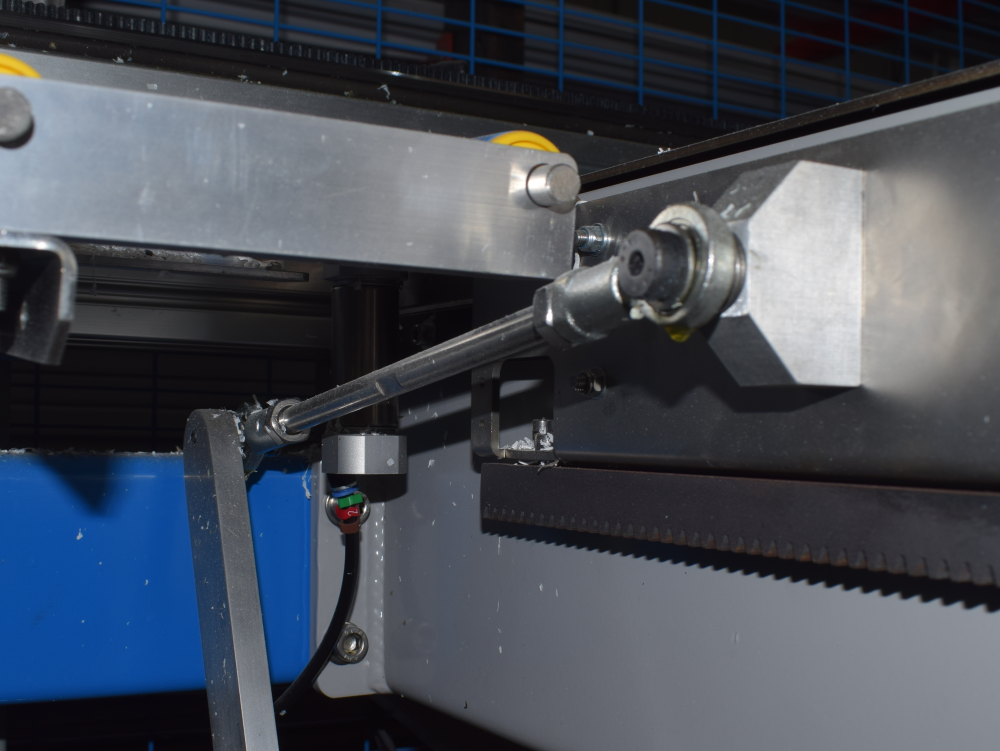
Étape 4 - Remove pivot shaft and arm


Étape 5 - Undo clutch and remove Cam


Étape 6 - Add sprocket to clutch
B0001166


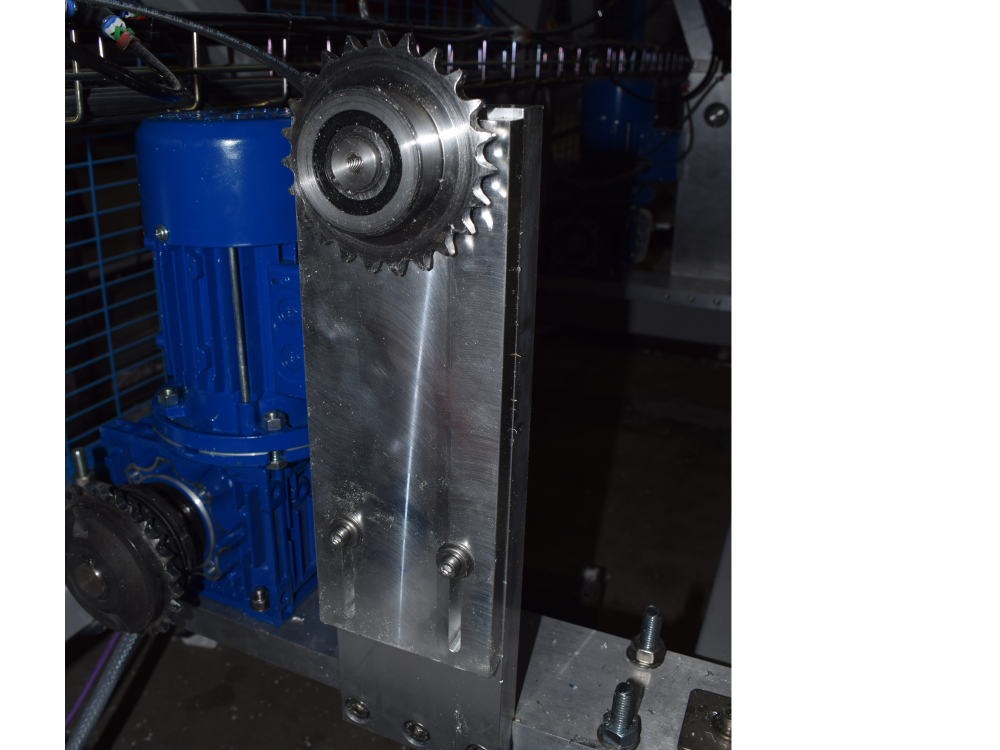
Étape 7 - Fix idler plate to upright
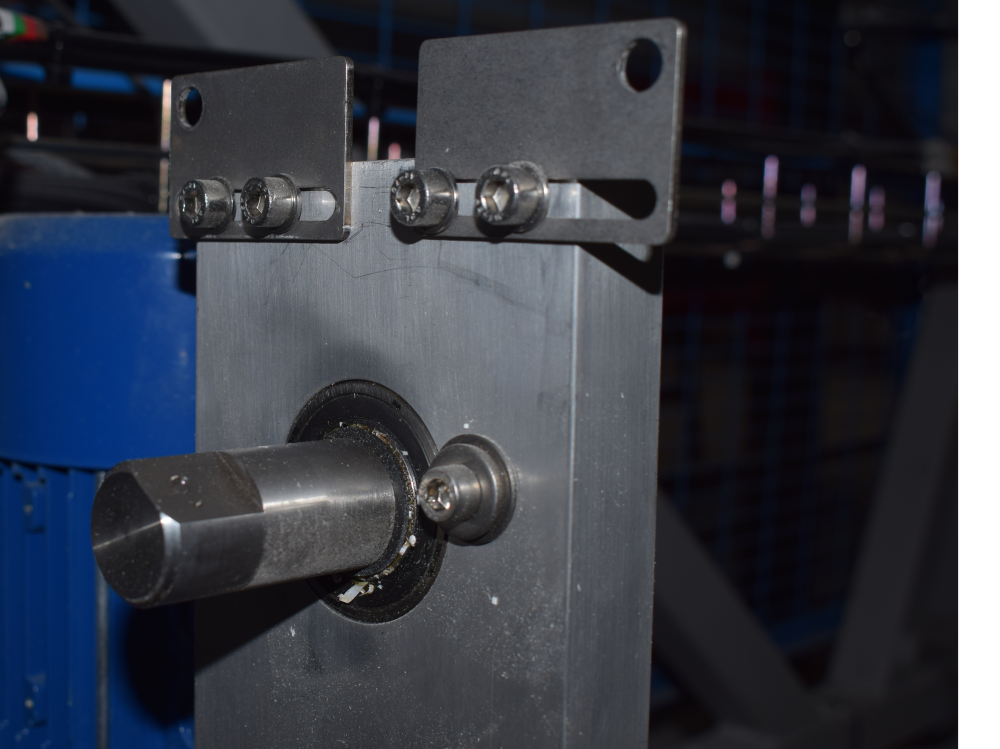
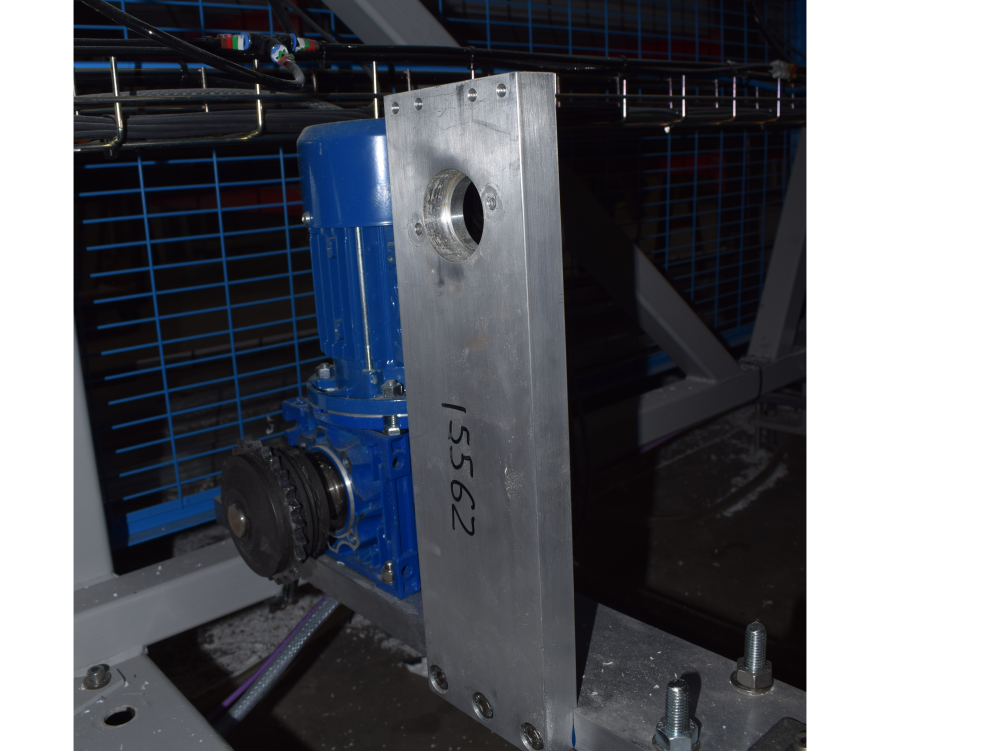
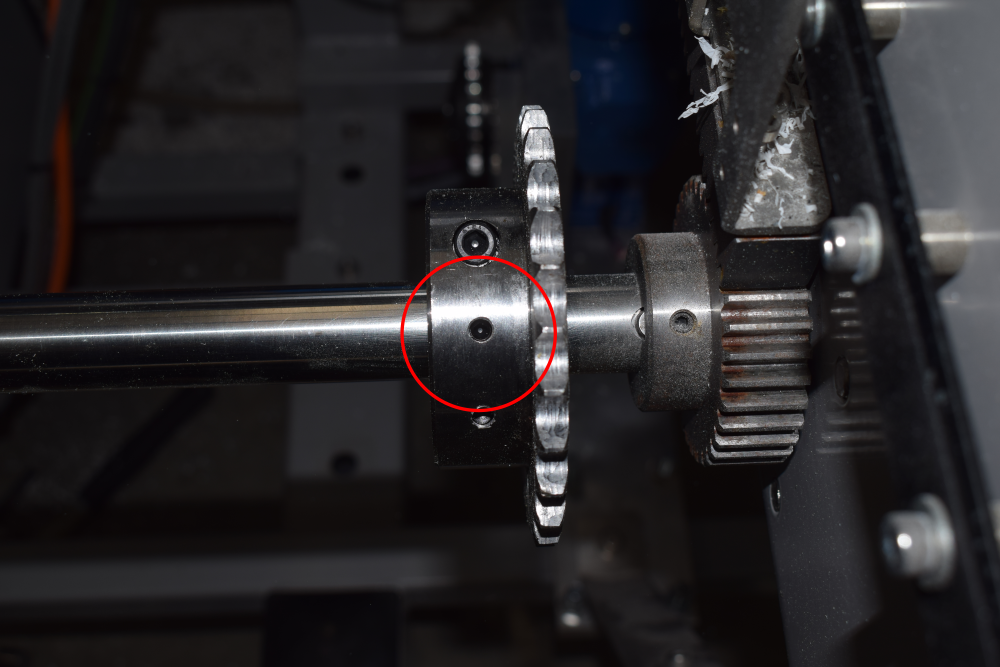
Étape 8 - Fix split sprocket onto drive shaft


Étape 9 - Drill and pin split sprocket to shaft
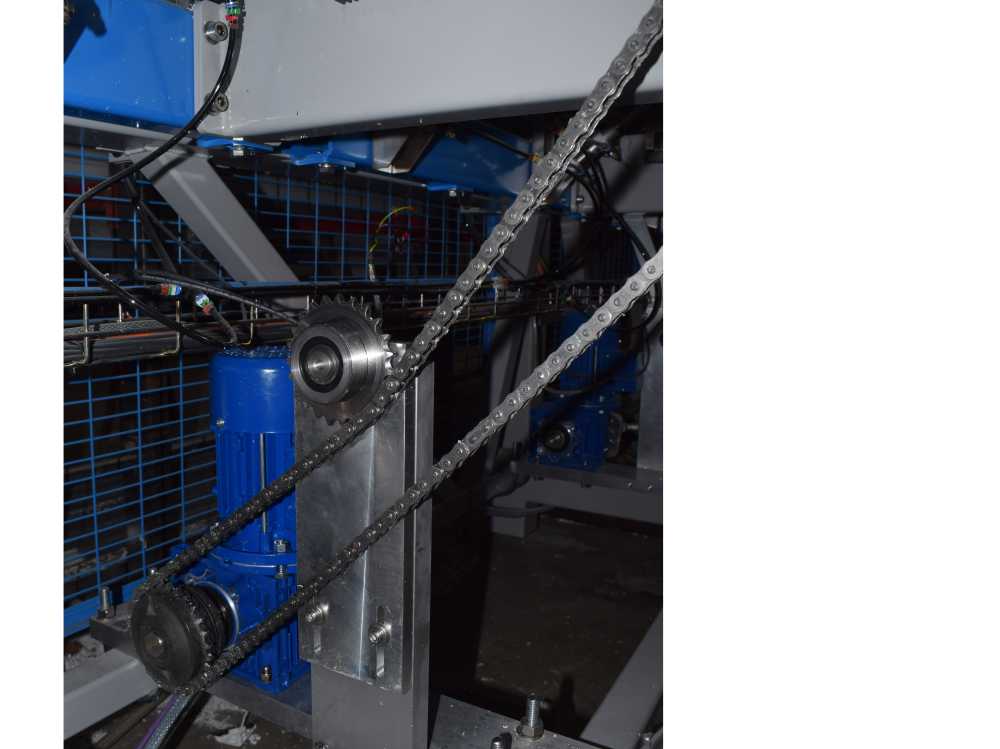
Étape 10 - Add chain minimum length sprocket to sprocket
Use idler to create tension
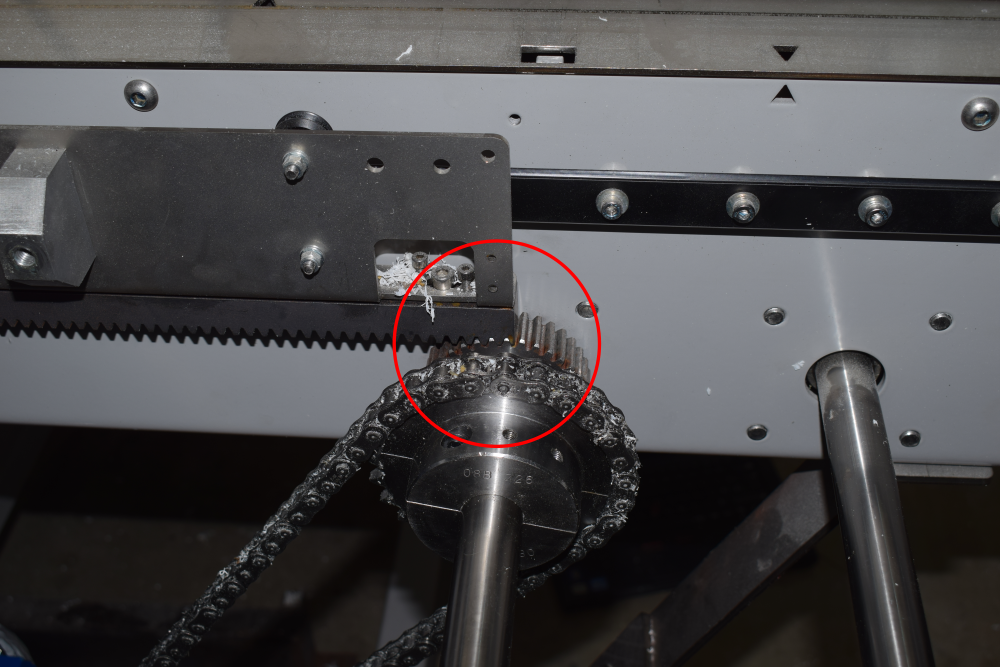
Étape 11 - Fit Module C Crank Home sensor plate to Arm 5
Sensor cables run to rear Module C cabinet - EtherCAT fieldbus boxes
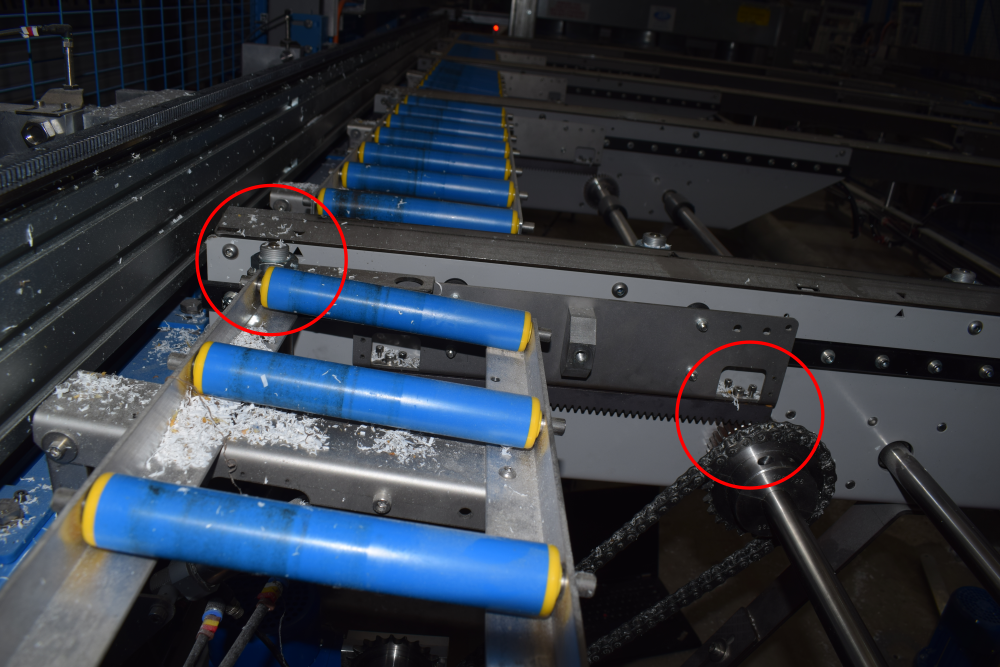

Étape 12 - Fit Module C Crank Out sensor plate to Arm 5
This one has an extension that may or not be required. See Module D Crank Out Sensor for more info.
Sensor cables run to rear Module C cabinet - EtherCAT fieldbus boxes
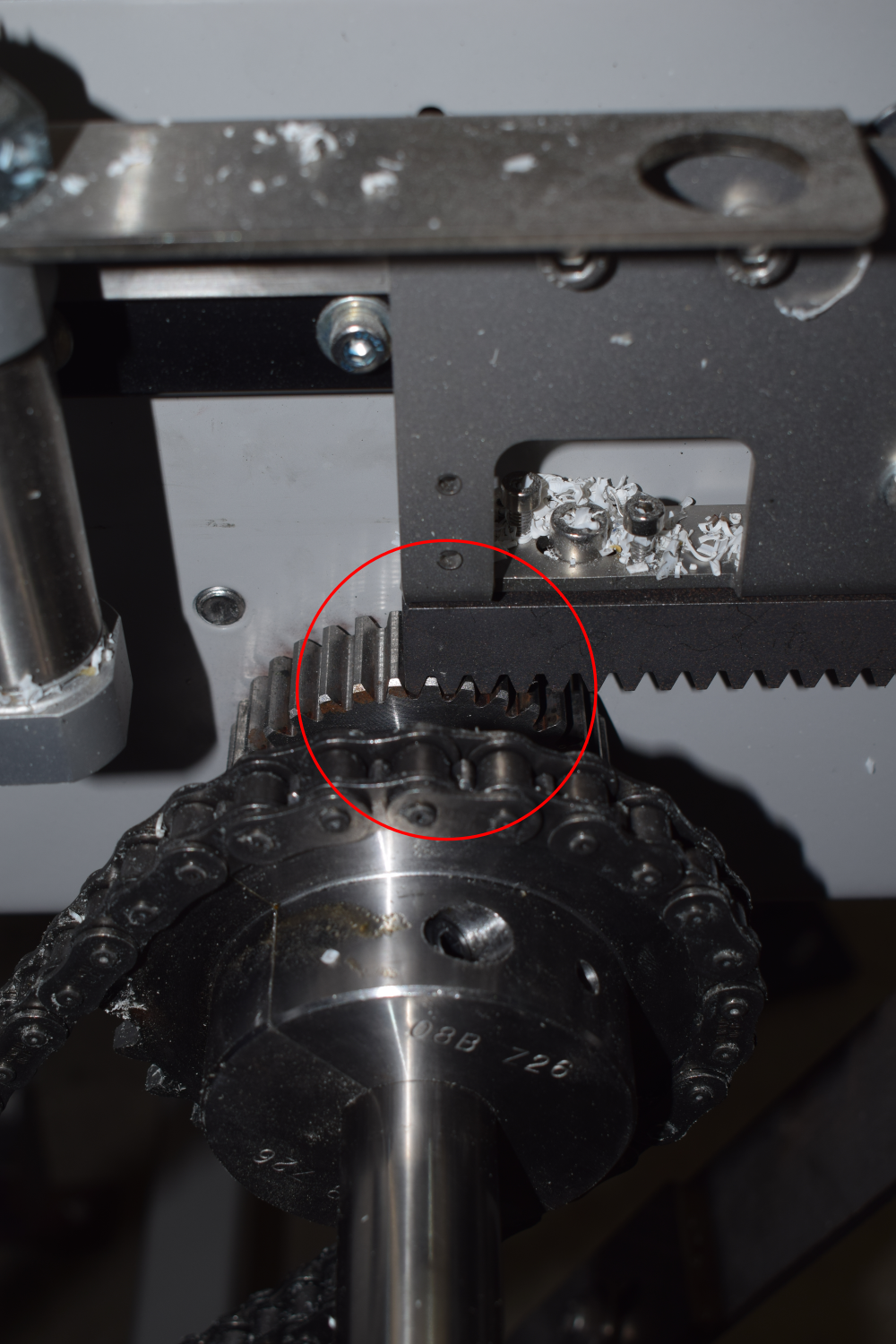
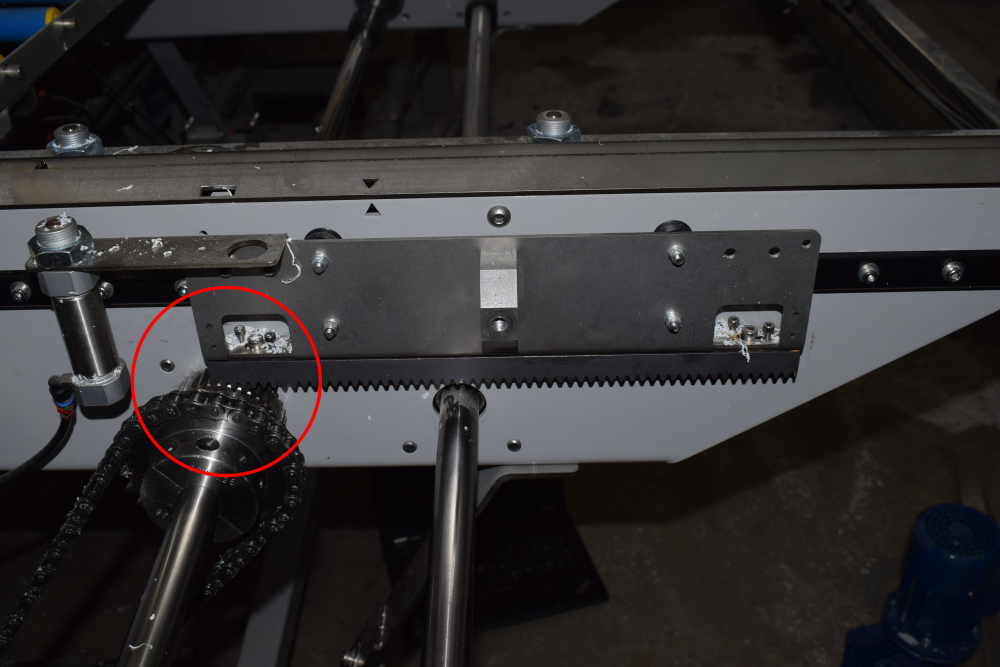

Étape 13 - Fit Module D Crank Home sensor plate to Arm 5
Sensor cables run to rear Module C cabinet - EtherCAT fieldbus boxes

Étape 14 - Fit Module D Crank Out sensor plate to Arm 5
This one has an extension
Sensor cables run to rear Module C cabinet - EtherCAT fieldbus boxes


Étape 15 - Fit Module E Crank Out sensor plate to Arm 5
Sensor cables run to rear Module E cabinet - EtherCAT fieldbus boxes


Étape 16 - Fit Module E Crank Home sensor plate to Arm 5
This one has an extension
Sensor cables run to rear Module E cabinet - EtherCAT fieldbus boxes


Étape 17 - Remove 2 off motor breakers and contactors from Module C


Étape 18 - Add 2 off 10A single pole MCB's in Module C
Tidy wires away for the spare 2 phases

Étape 19 - Add 2 off drives to Module C
May need to move trunking or mount directly to side of enclosure.
Drive can be WEG or EATON

Étape 20 - Remove breaker and contactor from Module E
Étape 21 - Add 10A single pole MCB in Module E

Étape 22 - Add 1 Off drive to Module E
May need to move trunking or mount directly to side of enclosure.
Drive can be WEG or EATON

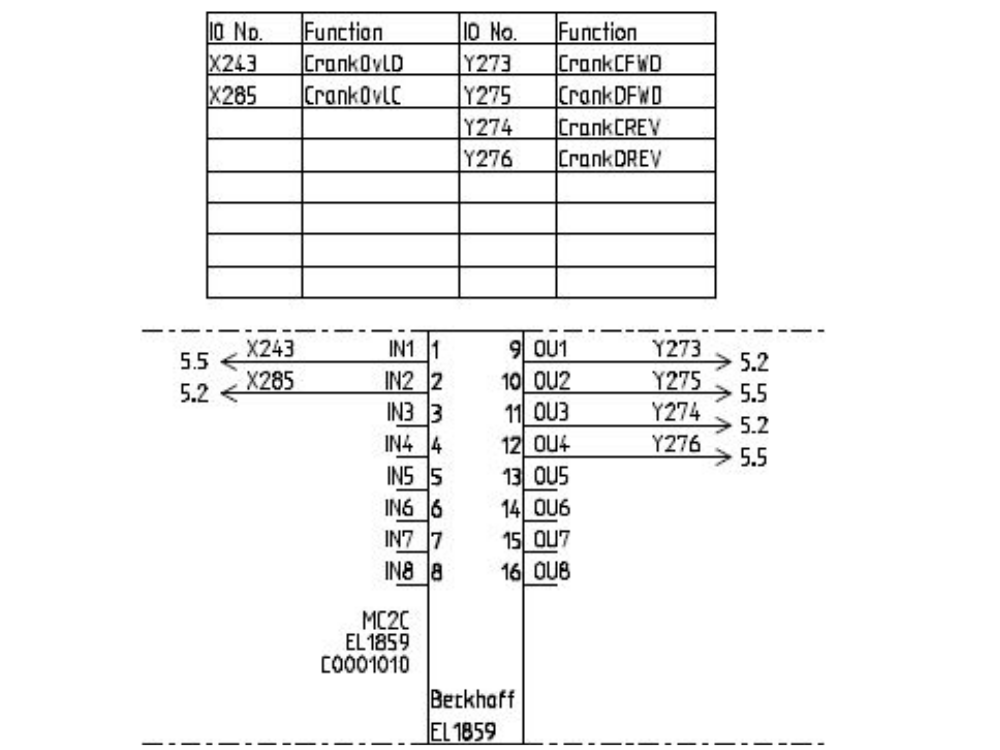
Étape 23 - For each WEG drive
- Live wire
- Neutral wire
- Earth wire
- 0v supply
- FWD and REV Signals
- Motor cables wire directly into bottom of the drive


Étape 24 - Wire Sensor Cables to EtherCAT boxes
Module C and D cranks to back of Module C cabinet
Module E crank to back of Module E cabinet


Étape 25 - Latest Front End software installed
- Backup Old multi folder
- Copy in new winMulti version to c:\multi overwriting what is there


Étape 26 - Map new Links
Overwrite existing links if any exist
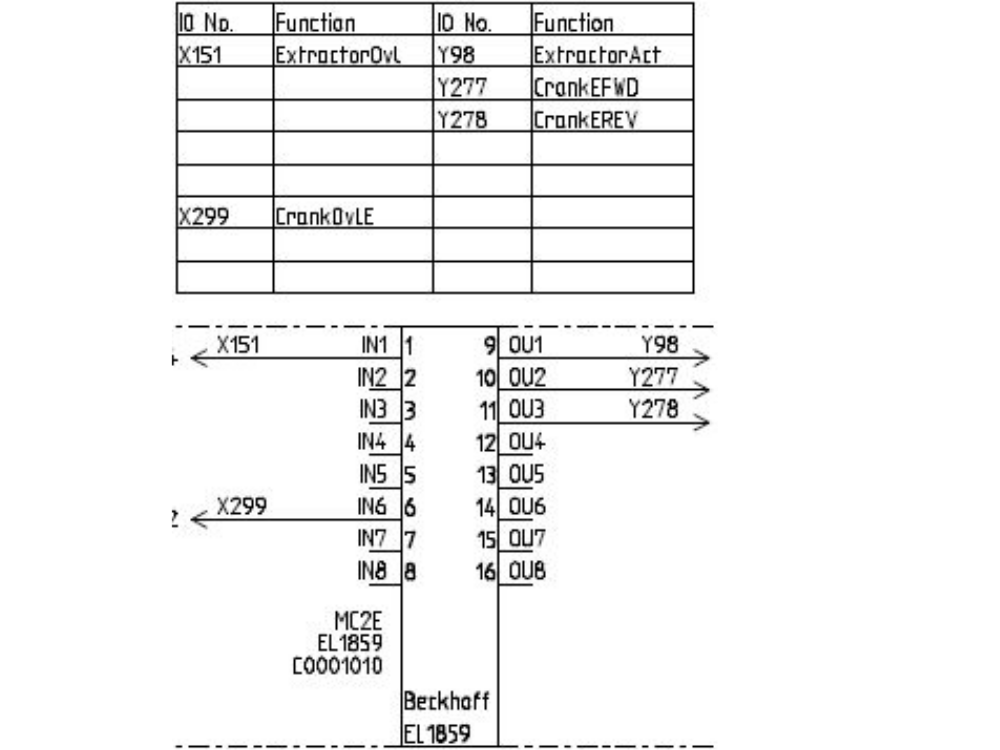
See the wiring for MC2C and MC2E in Step 22 for the link IORefs and locations

Étape 27 - Activate Configuration
And restart in run mode when prompted
Étape 28 - Add new IO Refs to IODef.mul
Ask HQ to download a relevant IODef.mul file
OuC_CrankFWD,273,2,0,0,False,False,3,8,-,False,0
OuC_CrankREV,274,2,0,0,False,False,3,9,-,False,0
OuD_CrankFWD,275,2,0,0,False,False,3,10,-,False,0
OuD_CrankREV,276,2,0,0,False,False,3,11,-,False,0
OuE_CrankFWD,277,2,0,0,False,True,64,0,-,False,0
OuE_CrankREV,278,2,0,0,False,True,64,1,-,False,0
And these removed
Étape 29 - Latest Front End software installed
- Backup Old multi folder
- Copy in new winMulti version to c:\multi overwriting what is there
Étape 30 - Programme WEG drives
Follow link below for information on programming WEG drives:
Étape 31 - Test Function
- Ensure all Out and home sensors are working and correctly oriented. Home is towards rear of machine, Fwd or Out is towards front.
- Ensure the clutches are set to slip if the crank bottoms out
- Test direction of all cranks (Fwd is towards front). Switch phases on motors if direction needs to change. The PLC has hard code to switch the outputs off when the sensors are covered
Key Pointers
- End stops should be set so the rack can never run off the pinion - always a full tooth engaged
- Each crank motion stops when the input is seen, and then decelerates. Therefore, set the crank input position to allow for this deceleration before hitting end stop. Normally about 30mm
- The crank clutches should be set to slip before damage is done to the crank end stops in the event that the sensors do not work
Draft
 Français
 English
 Deutsch
 Español
 Italiano
 Português