How to test the function of a Beckhoff axis during commissioning


Difficulté
Moyen
Durée
2 heure(s)
Introduction
07/08/25 Moved to Confluence
Étape 1 - Changing Reference Mode
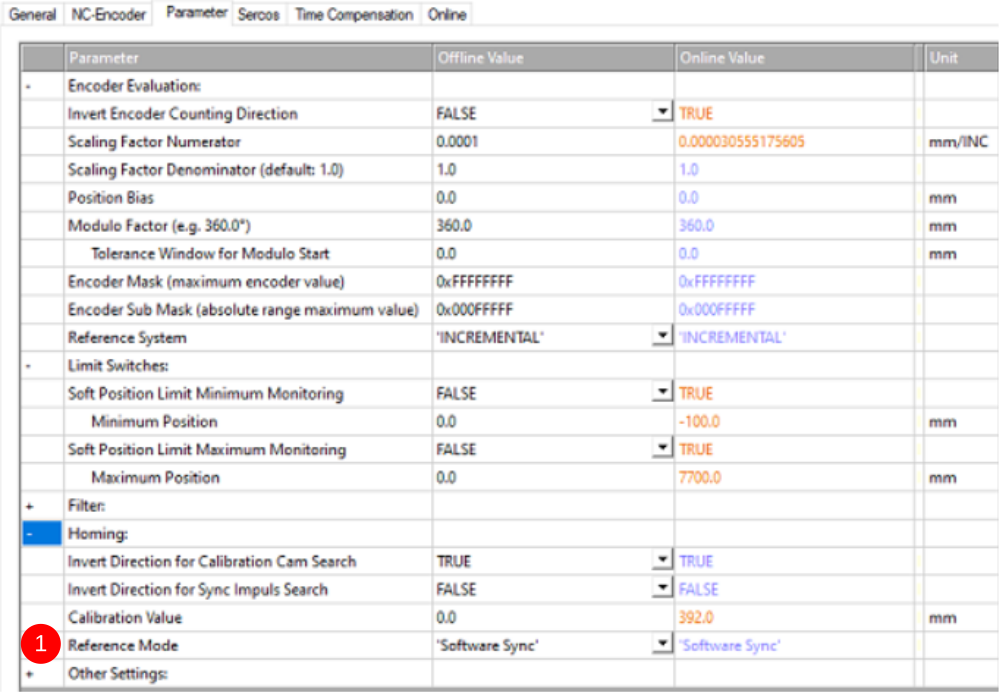
- When using a Beckhoff system the GX, Y, Z, SX and SR Axes need to be set to 'Software Sync'. This is a more accurate method of datuming, meaning that the datum will be more consistent as when set to other reference methods, the datum can change by up to 10mm depending on the physical position of the datum switch.
- To change this, stay in the same 'Parameters' tab in the 'Homing' section and follow the same process as above, this time changing the 'Reference mode' (1) to 'Software Sync'.
- Repeat for all the above axes
- Save all' and 'Activate configuration'.
- Reopen WinMulti and test the homing directions again to double check.
Étape 2 -
Draft
 Français
 English
 Deutsch
 Español
 Italiano
 Português