| [version en cours de rédaction] | [version en cours de rédaction] |
(Page créée avec « {{Tuto Details |Description=<translate>A description of the sclick file and error codes</translate> |Categories=Software, Specification |Tags=sclick }} <translate>= Overvi... ») |
|||
| Ligne 1 : | Ligne 1 : | ||
{{Tuto Details | {{Tuto Details | ||
| + | |Main_Picture=Sclick_file_contents.png | ||
| + | |Main_Picture_annotation={"version":"2.4.6","objects":[{"type":"image","version":"2.4.6","originX":"left","originY":"top","left":-3,"top":-9,"width":642,"height":692,"fill":"rgb(0,0,0)","stroke":null,"strokeWidth":0,"strokeDashArray":null,"strokeLineCap":"butt","strokeDashOffset":0,"strokeLineJoin":"miter","strokeMiterLimit":4,"scaleX":2.47,"scaleY":2.47,"angle":0,"flipX":false,"flipY":false,"opacity":1,"shadow":null,"visible":true,"clipTo":null,"backgroundColor":"","fillRule":"nonzero","paintFirst":"fill","globalCompositeOperation":"source-over","transformMatrix":null,"skewX":0,"skewY":0,"crossOrigin":"","cropX":0,"cropY":0,"src":"https://stuga.dokit.app/images/8/84/Sclick_file_contents.png","filters":[]}],"height":450,"width":600} | ||
|Description=<translate>A description of the sclick file and error codes</translate> | |Description=<translate>A description of the sclick file and error codes</translate> | ||
|Categories=Software, Specification | |Categories=Software, Specification | ||
|Tags=sclick | |Tags=sclick | ||
}} | }} | ||
| − | <translate>= Overview = | + | <translate>=Overview= |
| − | When winSaw | + | When winSaw is activated from the desktop, there are a lot of initialisation files to load and a lot of potential areas for the software to fail. Reasons could be corrupt files, errors in data, operating system failures,etc |
To help identify where these problems are, the software outputs a number to a file called "sclick.txt" which logs what it is attempting to do | To help identify where these problems are, the software outputs a number to a file called "sclick.txt" which logs what it is attempting to do | ||
| + | |||
| + | {{#annotatedImageLight:Fichier:Sclick file and error codes- Saw Image.png|0=855px|hash=|jsondata=|mediaClass=Image|type=frameless|align=center|src=https://stuga.dokit.app/images/e/e2/Sclick_file_and_error_codes-_Saw_Image.png|href=./Fichier:Sclick file and error codes- Saw Image.png|resource=./Fichier:Sclick file and error codes- Saw Image.png|caption=|size=855px}} | ||
<br />{{#annotatedImageLight:Fichier:Sclick file contents.png|0=642px|hash=|jsondata=|mediaClass=Image|type=frameless|align=center|src=https://stuga.dokit.app/images/8/84/Sclick_file_contents.png|href=./Fichier:Sclick file contents.png|resource=./Fichier:Sclick file contents.png|caption=|size=642px}}Knowledge of these codes will allow you to trace what a startup / initialisation problem could be, as the final code in the list will be the issue that caused the initialisation to fail | <br />{{#annotatedImageLight:Fichier:Sclick file contents.png|0=642px|hash=|jsondata=|mediaClass=Image|type=frameless|align=center|src=https://stuga.dokit.app/images/8/84/Sclick_file_contents.png|href=./Fichier:Sclick file contents.png|resource=./Fichier:Sclick file contents.png|caption=|size=642px}}Knowledge of these codes will allow you to trace what a startup / initialisation problem could be, as the final code in the list will be the issue that caused the initialisation to fail | ||
| − | = Codes = | + | =Codes= |
{| class="wikitable" | {| class="wikitable" | ||
|+ | |+ | ||
| Ligne 111 : | Ligne 115 : | ||
|}</translate> | |}</translate> | ||
{{PageLang | {{PageLang | ||
| + | |Language=en | ||
|SourceLanguage=none | |SourceLanguage=none | ||
|IsTranslation=0 | |IsTranslation=0 | ||
| − | |||
}} | }} | ||
{{AddComments}} | {{AddComments}} | ||
Version actuelle datée du 25 juin 2020 à 14:53
A description of the sclick file and error codes

Sommaire
Overview
When winSaw is activated from the desktop, there are a lot of initialisation files to load and a lot of potential areas for the software to fail. Reasons could be corrupt files, errors in data, operating system failures,etc
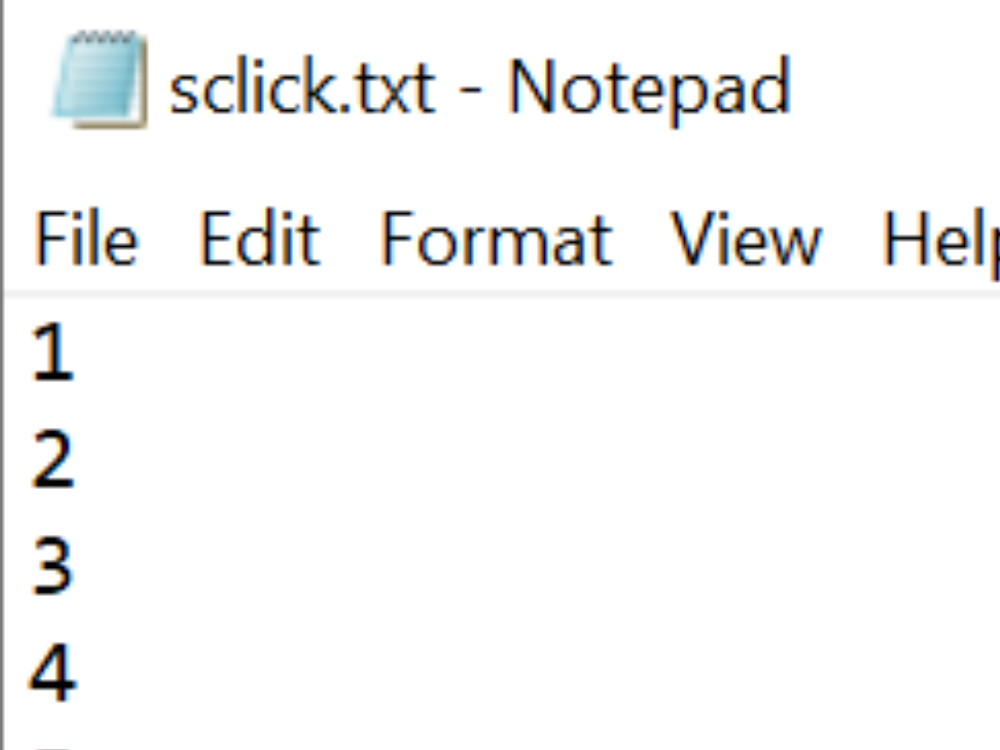
To help identify where these problems are, the software outputs a number to a file called "sclick.txt" which logs what it is attempting to do


Knowledge of these codes will allow you to trace what a startup / initialisation problem could be, as the final code in the list will be the issue that caused the initialisation to fail
Codes
| Code | Description | Notes |
|---|---|---|
| 1 | Check if App already running | |
| 2 | Open main screen and locate | |
| 3 | Set interval timer | |
| 4 | Set front end version | |
| 5 | initialise main program | |
| 51 | Load Master Dir text | |
| 52 | Create internal variables | |
| 53 | Load Profiles | |
| 54 | Load colours | |
| 5401 | Load AH Adjustments | |
| 541 | Create machine database | |
| 333 | Load Offcuts | |
| 55 | Load Gaps | |
| 56 | Load messages | |
| 57 | Load IO Definition | |
| 575 | Load laser correction file | |
| 58 | Set directory structure | |
| 59 | Housekeep old "finished" autoqueue batches | |
| 591 | Housekeep old archive files | |
| 592 | Start Autoqueue | |
| 6 | Add Initialise Button | |
| 11 | Initialise pressed | |
| 12 | initialise machine |
Draft
 Français
 English
 Deutsch
 Español
 Italiano
 Português