|
|
| Ligne 10 : |
Ligne 10 : |
| | }} | | }} |
| | {{Introduction | | {{Introduction |
| − | |Introduction=<translate></translate> | + | |Introduction=<translate>14/08/25 Moved to Confluence |
| | + | |
| | + | Click [https://stuga-ltd.atlassian.net/wiki/external/YzFiODc3ODY3NjVlNDZmZjg1ODJhOGJkZTQzZWU1MjA here]</translate> |
| | }} | | }} |
| | {{Materials}} | | {{Materials}} |
| | {{EPI}} | | {{EPI}} |
| | {{Tuto Step | | {{Tuto Step |
| − | |Step_Title=<translate>Gather Information - Gear Box</translate> | + | |Step_Title=<translate></translate> |
| − | |Step_Content=<translate>Check Axis.mul and look at the line
| |
| − | | |
| − | SR,7,1,1,'''''291833.500''''',1,200,500,500,125.1,90.0,InF_SRHome,3,20,5,0.0,5.0,10.0,0.000,
| |
| − | | |
| − | | |
| − | Gear ratio
| |
| − | | |
| − | 291833.500 100:1
| |
| − | | |
| − | 145602.000 50:1</translate>
| |
| − | }}
| |
| − | {{Tuto Step
| |
| − | |Step_Title=<translate>Gather Information - Drive used</translate>
| |
| − | |Step_Content=<translate>'''AX8206 Drive'''
| |
| − | | |
| − | or
| |
| − | | |
| − | '''AX5003 Drive'''</translate>
| |
| − | }}
| |
| − | {{Tuto Step
| |
| − | |Step_Title=<translate>Gather Information - Motor Being used</translate>
| |
| − | |Step_Content=<translate>It should be a AM8032-E
| |
| − | | |
| − | | |
| − | '''The AM8032-E has torque constant of 0.8 N/A'''
| |
| − | | |
| − | <br />{{Warning|...If not seek advice}}<br /></translate>
| |
| − | }}
| |
| − | {{Tuto Step
| |
| − | |Step_Title=<translate>Aim</translate>
| |
| − | |Step_Content=<translate>We are aiming to deliver a torque of no more than 56 Nm
| |
| − | | |
| − | For
| |
| − | | |
| − | 100:1 the motors maximum delivered torque 0.56 Nm
| |
| − | | |
| − | or
| |
| − | | |
| − | 50:1 the motors maximum delivered torque 1.12 Nm</translate>
| |
| − | }}
| |
| − | {{Tuto Step
| |
| − | |Step_Title=<translate>Regenerate Projects</translate>
| |
| − | |Step_Content=<translate>#Put old projects into a clearly named folder
| |
| − | #Create a new empty folder with the name of the machine.
| |
| − | #Open Project "From Target" to the new folder
| |
| − | #Check the mappings are present
| |
| − | #Add a Drive Manager project</translate>
| |
| − | }}
| |
| − | {{Tuto Step
| |
| − | |Step_Title=<translate>For a AX5003 Drive</translate>
| |
| − | |Step_Content=<translate>Use drive manager to get to the parameters.
| |
| − | | |
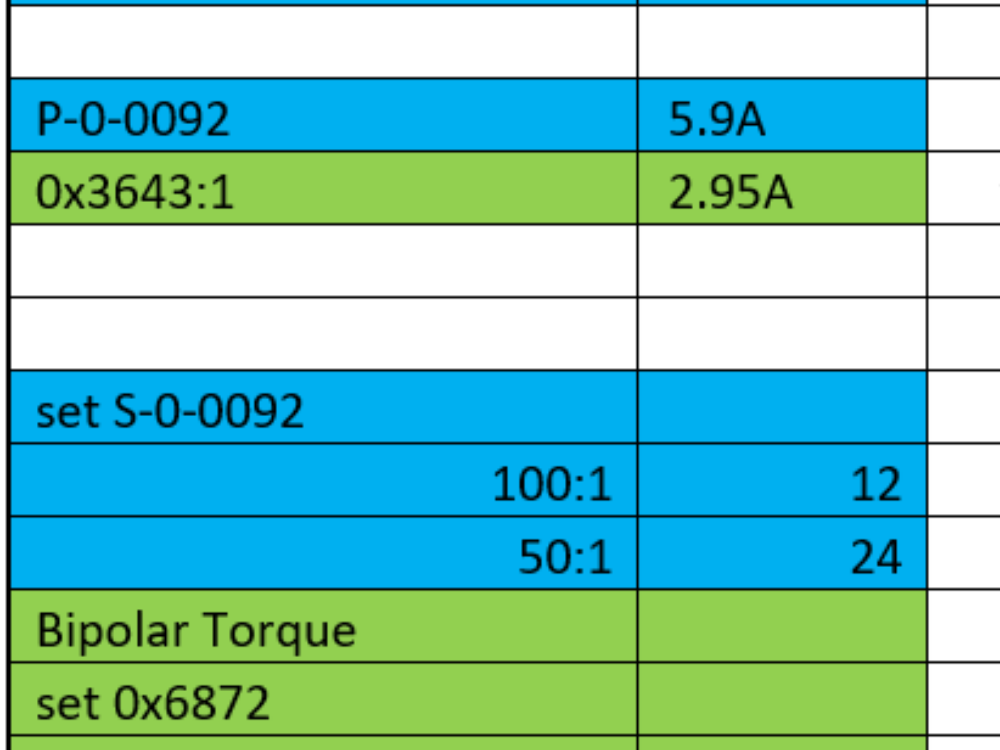
| − | Check the value of P-0-092 this value should be 5.9A (if not seek help)
| |
| − | | |
| − | Change the value of S-0-0092 to
| |
| − | | |
| − | 12% for 100:1
| |
| − | | |
| − | or
| |
| − | | |
| − | 24% for 50:1
| |
| − | | |
| − | | |
| − | If you have an old drive manager you may have to enter:
| |
| − | | |
| − | The value may be in .1 scale hence factor of 10 and also could be in HEX
| |
| − | | |
| − | 120 or 0C00,
| |
| − | | |
| − | 240 or F000 </translate>
| |
| − | }}
| |
| − | {{Tuto Step
| |
| − | |Step_Title=<translate>For AX8206 Drive</translate>
| |
| − | |Step_Content=<translate>Check channel B 0x3643:1 s/b 2.95A
| |
| − | | |
| − | Change 0x6872 to
| |
| − | | |
| − | | |
| − | 24% for 100:1
| |
| − | | |
| − | or
| |
| − | | |
| − | 48% for 50:1</translate>
| |
| − | }}
| |
| − | {{Tuto Step
| |
| − | |Step_Title=<translate>For Both Drives</translate>
| |
| − | |Step_Content=<translate>#Add to startup parameters
| |
| − | #Download to drive
| |
| − | #Save project
| |
| − | #Activate
| |
| − | #Update control board</translate>
| |
| − | }}
| |
| − | {{Tuto Step
| |
| − | |Step_Title=<translate>Crib Table example</translate>
| |
| | |Step_Content=<translate></translate> | | |Step_Content=<translate></translate> |
| − | |Step_Picture_00=SR_Axis_Torque_Adjustment_TorqueCrib.png
| |
| | }} | | }} |
| | {{Notes}} | | {{Notes}} |

 Français
 English
 Deutsch
 Español
 Italiano
 Português