|
|
| (7 révisions intermédiaires par le même utilisateur non affichées) |
| Ligne 1 : |
Ligne 1 : |
| | {{Tuto Details | | {{Tuto Details |
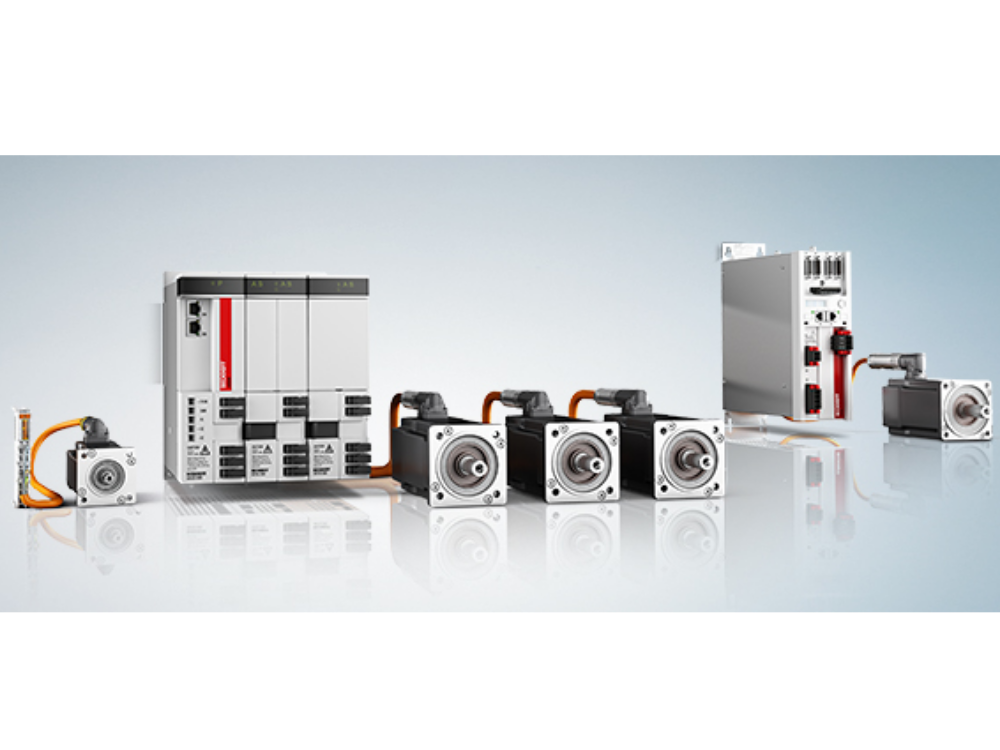
| | + | |Main_Picture=Commissioning_a_Beckhoff_Axis_servo_drives_axxxxx.jpg |
| | + | |Main_Picture_annotation={"version":"2.4.6","objects":[{"type":"image","version":"2.4.6","originX":"left","originY":"top","left":-1,"top":93,"width":570,"height":259,"fill":"rgb(0,0,0)","stroke":null,"strokeWidth":0,"strokeDashArray":null,"strokeLineCap":"butt","strokeDashOffset":0,"strokeLineJoin":"miter","strokeMiterLimit":4,"scaleX":1.06,"scaleY":1.06,"angle":0,"flipX":false,"flipY":false,"opacity":1,"shadow":null,"visible":true,"clipTo":null,"backgroundColor":"","fillRule":"nonzero","paintFirst":"fill","globalCompositeOperation":"source-over","transformMatrix":null,"skewX":0,"skewY":0,"crossOrigin":"","cropX":0,"cropY":0,"src":"https://stuga.dokit.app/images/2/2d/Commissioning_a_Beckhoff_Axis_servo_drives_axxxxx.jpg","filters":[]}],"height":450,"width":600} |
| | |Description=<translate>How to test the function of a Beckhoff axis during commissioning</translate> | | |Description=<translate>How to test the function of a Beckhoff axis during commissioning</translate> |
| | |Categories=Maintenance | | |Categories=Maintenance |
| Ligne 8 : |
Ligne 10 : |
| | }} | | }} |
| | {{Introduction | | {{Introduction |
| − | |Introduction=<translate>{{Dont|...Any stepper motor drives will need the EP7041 drive to be programmed first}}</translate> | + | |Introduction=<translate>07/08/25 Moved to [https://stuga-ltd.atlassian.net/wiki/external/MDUwNjIyY2UyZDcxNGRjMjk1NTI3ZDFkMDE4NjRmMmY Confluence]{{Dont|...Any stepper motor drives will need the EP7041 drive to be programmed first}}</translate> |
| | }} | | }} |
| | {{Materials}} | | {{Materials}} |
| | {{EPI}} | | {{EPI}} |
| | {{Tuto Step | | {{Tuto Step |
| − | |Step_Title=<translate>Set any stepper motor drives</translate> | + | |Step_Title=<translate></translate> |
| − | |Step_Content=<translate>Any stepper drives connected using an EP7041 will need to be set up according to the procedure</translate>
| |
| − | }}
| |
| − | {{Tuto Step
| |
| − | |Step_Title=<translate>Check Axis IDs</translate>
| |
| − | |Step_Content=<translate>Ensure the axis.mul file is set up with the same axis Ids as the TwinCAT project
| |
| − | | |
| − | Second number in axes.mul file</translate>
| |
| − | }}
| |
| − | {{Tuto Step
| |
| − | |Step_Title=<translate>Software</translate>
| |
| − | |Step_Content=<translate>The following software setup needs to be done
| |
| − | | |
| − | * TwinCAT project setup with all io and axes linked
| |
| − | * Estop system reset
| |
| − | * Air on
| |
| − | * winMulti running in setup mode</translate>
| |
| − | }}
| |
| − | {{Tuto Step
| |
| − | |Step_Title=<translate>Ensure axis is enabled</translate>
| |
| − | |Step_Content=<translate>* All 3 Enable signals
| |
| − | * 100% Override
| |
| − | * Axis Ready</translate>
| |
| − | }}
| |
| − | {{Tuto Step
| |
| − | |Step_Title=<translate>Set Rough Absolute position</translate>
| |
| − | |Step_Content=<translate>On the functions tab, set the absolute position by eye.
| |
| − | | |
| − | This ensures the axis is in the correct place for test positioning
| |
| − | | |
| − | <nowiki>**</nowiki> Diagram for axis directions and distances **</translate>
| |
| − | }}
| |
| − | {{Tuto Step
| |
| − | |Step_Title=<translate>Check Axis Direction - move slowly and short distance</translate>
| |
| − | |Step_Content=<translate>X and SX axis - positive is out of machine towards outfeed
| |
| − | | |
| − | Y axis - positive towards rear
| |
| − | | |
| − | Z axis - positive is up
| |
| − | | |
| − | R axis - positive is rotation downwards when looking from front of machine
| |
| − | | |
| − | SR Axis - positive is always anticlockwise looking from top
| |
| − | | |
| − | SY Axis - positive is
| |
| − | | |
| − | | |
| − | Relative move on axis slowly plus and minus to test direction
| |
| − | | |
| − | Direction changed in axes.mul, the parameter after the scaling factor
| |
| − | | |
| − | {{Warning|...Exit winmulti before changing direction in axes.mul. Save aes.mul then restart winMulti}}</translate>
| |
| − | }}
| |
| − | {{Tuto Step
| |
| − | |Step_Title=<translate>Check Scaling</translate>
| |
| − | |Step_Content=<translate>There is a possibility that the scaling factor could be different on the machine. this depends on how similar the setup was on the machine that the axes.mul was copied from.
| |
| − | | |
| − | Changes in gearboxes or motors will affect the scaling factor#
| |
| − | | |
| − | | |
| − | Simply mark the axis, move it a known distance and ensure it is correct.
| |
| − | | |
| − | Scaling changed using the formula
| |
| − | | |
| − | | |
| − | [https://stuga.dokit.app/wiki/How_to_Calculate_a_Scaling_Factor new scaling factor = old scaling * distance moved / distance required]</translate>
| |
| − | }}
| |
| − | {{Tuto Step
| |
| − | |Step_Title=<translate>Ensure the movement is clear</translate>
| |
| − | |Step_Content=<translate>* X and SX - No tools left in track overnight
| |
| − | * Z axis supports removed and air balanced
| |
| − | *</translate>
| |
| − | }}
| |
| − | {{Tuto Step
| |
| − | |Step_Title=<translate>Reversing move - High Speed</translate>
| |
| − | |Step_Content=<translate>Reversing move on axis.
| |
| − | | |
| − | Set speed to the maximum for each axis
| |
| − | | |
| − | Target positions to stay well within the limitations (you have only guessed the actual position)</translate>
| |
| − | }}
| |
| − | {{Tuto Step
| |
| − | |Step_Title=<translate>Move all axes in reversing mode</translate>
| |
| − | |Step_Content=<translate>Shakedown to ensure all axes move smoothly at full speed</translate>
| |
| − | }}
| |
| − | {{Tuto Step
| |
| − | |Step_Title=<translate>Set the Reference Mode</translate>
| |
| − | |Step_Content=<translate>Set to Software Sync</translate>
| |
| − | }}
| |
| − | {{Tuto Step
| |
| − | |Step_Title=<translate>Following Error and Velocity Loop</translate>
| |
| − | |Step_Content=<translate>For AX5000 Drives
| |
| − | | |
| − | Following error 'Intern'
| |
| − | | |
| − | | |
| − | S-0-101 0.8 loop Action time</translate>
| |
| − | }}
| |
| − | {{Tuto Step
| |
| − | |Step_Title=<translate>Test Datum Direction</translate>
| |
| | |Step_Content=<translate></translate> | | |Step_Content=<translate></translate> |
| | }} | | }} |

 Français
 English
 Deutsch
 Español
 Italiano
 Português