| [version en cours de rédaction] | [version en cours de rédaction] |
| (Une révision intermédiaire par le même utilisateur non affichée) | |||
| Ligne 18 : | Ligne 18 : | ||
}} | }} | ||
}} | }} | ||
| + | {{EPI}} | ||
{{Tuto Step | {{Tuto Step | ||
|Step_Title=<translate>Remove the lower guard access plate</translate> | |Step_Title=<translate>Remove the lower guard access plate</translate> | ||
| Ligne 32 : | Ligne 33 : | ||
{{Tuto Step | {{Tuto Step | ||
|Step_Title=<translate>Focus</translate> | |Step_Title=<translate>Focus</translate> | ||
| − | |Step_Content=<translate>Place a clean, white profile in the clamps and adjust the Y axis position so the laser dot can be seen below it | + | |Step_Content=<translate>Place a clean, white profile or sheet of paper in the clamps and adjust the Y axis position so the laser dot can be seen below it |
Focus the laser to make the dot as small as possible on the base of the profile</translate> | Focus the laser to make the dot as small as possible on the base of the profile</translate> | ||
| Ligne 42 : | Ligne 43 : | ||
{{Tuto Step | {{Tuto Step | ||
|Step_Title=<translate>Sensitivity</translate> | |Step_Title=<translate>Sensitivity</translate> | ||
| − | |Step_Content=<translate> | + | |Step_Content=<translate>Finally the laser receiver sensitivity needs to be checked. Unscrew the adjusting screw (AntiClockwise) until the GREEN Led goes RED. . |
| + | |||
| + | Then turn screw (Clockwise) until RED Led goes back to GREEN then turn a further 5 full turns the same way, the receiver sensitivity is now set</translate> | ||
|Step_Picture_00=Item-Laser_Focusing_Spanner_IMG_1271.jpg | |Step_Picture_00=Item-Laser_Focusing_Spanner_IMG_1271.jpg | ||
|Step_Picture_00_annotation={"version":"2.4.6","objects":[{"type":"image","version":"2.4.6","originX":"left","originY":"top","left":0,"top":0,"width":320,"height":240,"fill":"rgb(0,0,0)","stroke":null,"strokeWidth":0,"strokeDashArray":null,"strokeLineCap":"butt","strokeDashOffset":0,"strokeLineJoin":"miter","strokeMiterLimit":4,"scaleX":1.88,"scaleY":1.88,"angle":0,"flipX":false,"flipY":false,"opacity":1,"shadow":null,"visible":true,"clipTo":null,"backgroundColor":"","fillRule":"nonzero","paintFirst":"fill","globalCompositeOperation":"source-over","transformMatrix":null,"skewX":0,"skewY":0,"crossOrigin":"","cropX":0,"cropY":0,"src":"https://stuga.dokit.app/images/2/22/Item-Laser_Focusing_Spanner_IMG_1271.jpg","filters":[]},{"type":"wfarrow2line","version":"2.4.6","originX":"center","originY":"center","left":143,"top":151.5,"width":186,"height":203,"fill":"rgba(255,0,0,0)","stroke":"#FF0000","strokeWidth":4,"strokeDashArray":null,"strokeLineCap":"round","strokeDashOffset":0,"strokeLineJoin":"miter","strokeMiterLimit":4,"scaleX":1,"scaleY":1,"angle":0,"flipX":false,"flipY":false,"opacity":1,"shadow":null,"visible":true,"clipTo":null,"backgroundColor":"","fillRule":"nonzero","paintFirst":"fill","globalCompositeOperation":"source-over","transformMatrix":null,"skewX":0,"skewY":0,"x1":-93,"x2":93,"y1":-101.5,"y2":101.5,"x2a":85.38723625163647,"y2a":81.34942114698433,"x2b":73.59035807669147,"y2b":92.15838341565316},{"type":"wfarrow2circle","version":"2.4.6","originX":"center","originY":"center","left":50,"top":50,"width":16,"height":16,"fill":"#aaa","stroke":"#666","strokeWidth":0,"strokeDashArray":null,"strokeLineCap":"butt","strokeDashOffset":0,"strokeLineJoin":"miter","strokeMiterLimit":4,"scaleX":1,"scaleY":1,"angle":0,"flipX":false,"flipY":false,"opacity":0.5,"shadow":null,"visible":true,"clipTo":null,"backgroundColor":"","fillRule":"nonzero","paintFirst":"fill","globalCompositeOperation":"source-over","transformMatrix":null,"skewX":0,"skewY":0,"radius":8,"startAngle":0,"endAngle":6.283185307179586},{"type":"wfarrow2circle","version":"2.4.6","originX":"center","originY":"center","left":236,"top":253,"width":16,"height":16,"fill":"#aaa","stroke":"#666","strokeWidth":0,"strokeDashArray":null,"strokeLineCap":"butt","strokeDashOffset":0,"strokeLineJoin":"miter","strokeMiterLimit":4,"scaleX":1,"scaleY":1,"angle":0,"flipX":false,"flipY":false,"opacity":0.5,"shadow":null,"visible":true,"clipTo":null,"backgroundColor":"","fillRule":"nonzero","paintFirst":"fill","globalCompositeOperation":"source-over","transformMatrix":null,"skewX":0,"skewY":0,"radius":8,"startAngle":0,"endAngle":6.283185307179586}],"height":450,"width":600} | |Step_Picture_00_annotation={"version":"2.4.6","objects":[{"type":"image","version":"2.4.6","originX":"left","originY":"top","left":0,"top":0,"width":320,"height":240,"fill":"rgb(0,0,0)","stroke":null,"strokeWidth":0,"strokeDashArray":null,"strokeLineCap":"butt","strokeDashOffset":0,"strokeLineJoin":"miter","strokeMiterLimit":4,"scaleX":1.88,"scaleY":1.88,"angle":0,"flipX":false,"flipY":false,"opacity":1,"shadow":null,"visible":true,"clipTo":null,"backgroundColor":"","fillRule":"nonzero","paintFirst":"fill","globalCompositeOperation":"source-over","transformMatrix":null,"skewX":0,"skewY":0,"crossOrigin":"","cropX":0,"cropY":0,"src":"https://stuga.dokit.app/images/2/22/Item-Laser_Focusing_Spanner_IMG_1271.jpg","filters":[]},{"type":"wfarrow2line","version":"2.4.6","originX":"center","originY":"center","left":143,"top":151.5,"width":186,"height":203,"fill":"rgba(255,0,0,0)","stroke":"#FF0000","strokeWidth":4,"strokeDashArray":null,"strokeLineCap":"round","strokeDashOffset":0,"strokeLineJoin":"miter","strokeMiterLimit":4,"scaleX":1,"scaleY":1,"angle":0,"flipX":false,"flipY":false,"opacity":1,"shadow":null,"visible":true,"clipTo":null,"backgroundColor":"","fillRule":"nonzero","paintFirst":"fill","globalCompositeOperation":"source-over","transformMatrix":null,"skewX":0,"skewY":0,"x1":-93,"x2":93,"y1":-101.5,"y2":101.5,"x2a":85.38723625163647,"y2a":81.34942114698433,"x2b":73.59035807669147,"y2b":92.15838341565316},{"type":"wfarrow2circle","version":"2.4.6","originX":"center","originY":"center","left":50,"top":50,"width":16,"height":16,"fill":"#aaa","stroke":"#666","strokeWidth":0,"strokeDashArray":null,"strokeLineCap":"butt","strokeDashOffset":0,"strokeLineJoin":"miter","strokeMiterLimit":4,"scaleX":1,"scaleY":1,"angle":0,"flipX":false,"flipY":false,"opacity":0.5,"shadow":null,"visible":true,"clipTo":null,"backgroundColor":"","fillRule":"nonzero","paintFirst":"fill","globalCompositeOperation":"source-over","transformMatrix":null,"skewX":0,"skewY":0,"radius":8,"startAngle":0,"endAngle":6.283185307179586},{"type":"wfarrow2circle","version":"2.4.6","originX":"center","originY":"center","left":236,"top":253,"width":16,"height":16,"fill":"#aaa","stroke":"#666","strokeWidth":0,"strokeDashArray":null,"strokeLineCap":"butt","strokeDashOffset":0,"strokeLineJoin":"miter","strokeMiterLimit":4,"scaleX":1,"scaleY":1,"angle":0,"flipX":false,"flipY":false,"opacity":0.5,"shadow":null,"visible":true,"clipTo":null,"backgroundColor":"","fillRule":"nonzero","paintFirst":"fill","globalCompositeOperation":"source-over","transformMatrix":null,"skewX":0,"skewY":0,"radius":8,"startAngle":0,"endAngle":6.283185307179586}],"height":450,"width":600} | ||
| + | |Step_Picture_01=Training_Laser_on_Ecoline_Laser_setup_LS6.jpg | ||
}} | }} | ||
{{Tuto Step | {{Tuto Step | ||
Version actuelle datée du 1 août 2025 à 11:46
The laser on an Ecoline needs to be specially set up to measure the profile accurately


Difficulté
Moyen
Durée
10 minute(s)
Introduction
The laser needs to be focused on the work area and not the receiver
The smaller the dot for the profile to break/make the more accurate the laser- Pièces et outils
Pièces et outils
Laser Focusing Spanner 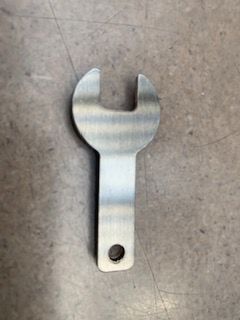

9mm spanner supplied with B0000360
Étape 1 - Remove the lower guard access plate


Étape 2 - Remove the laser dust cover
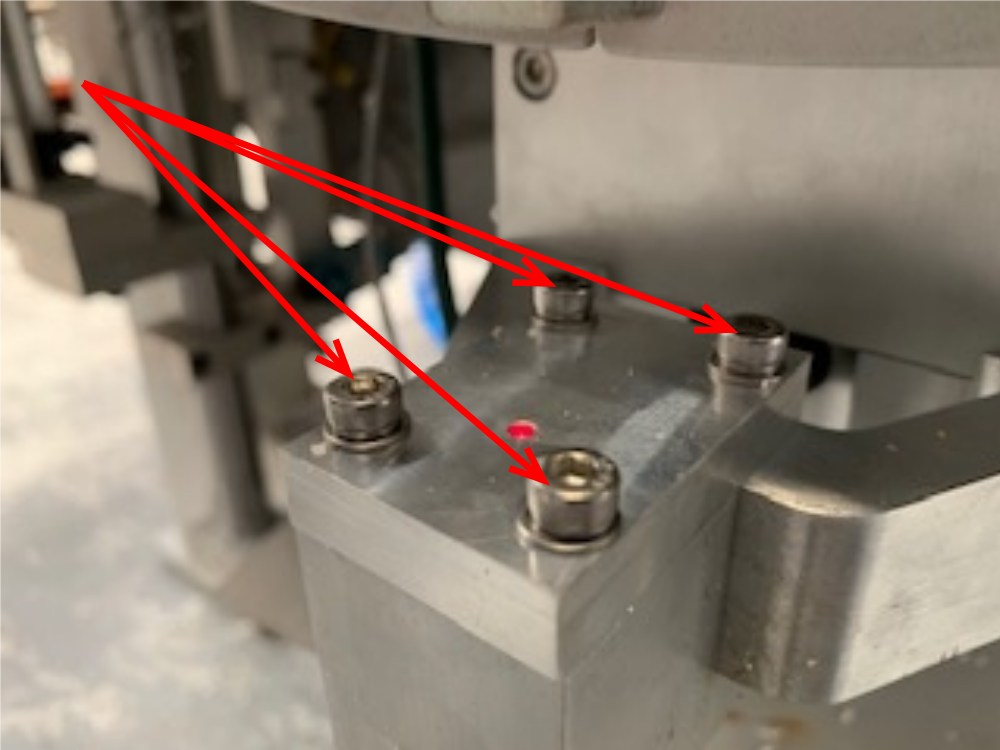
Étape 3 - Focus
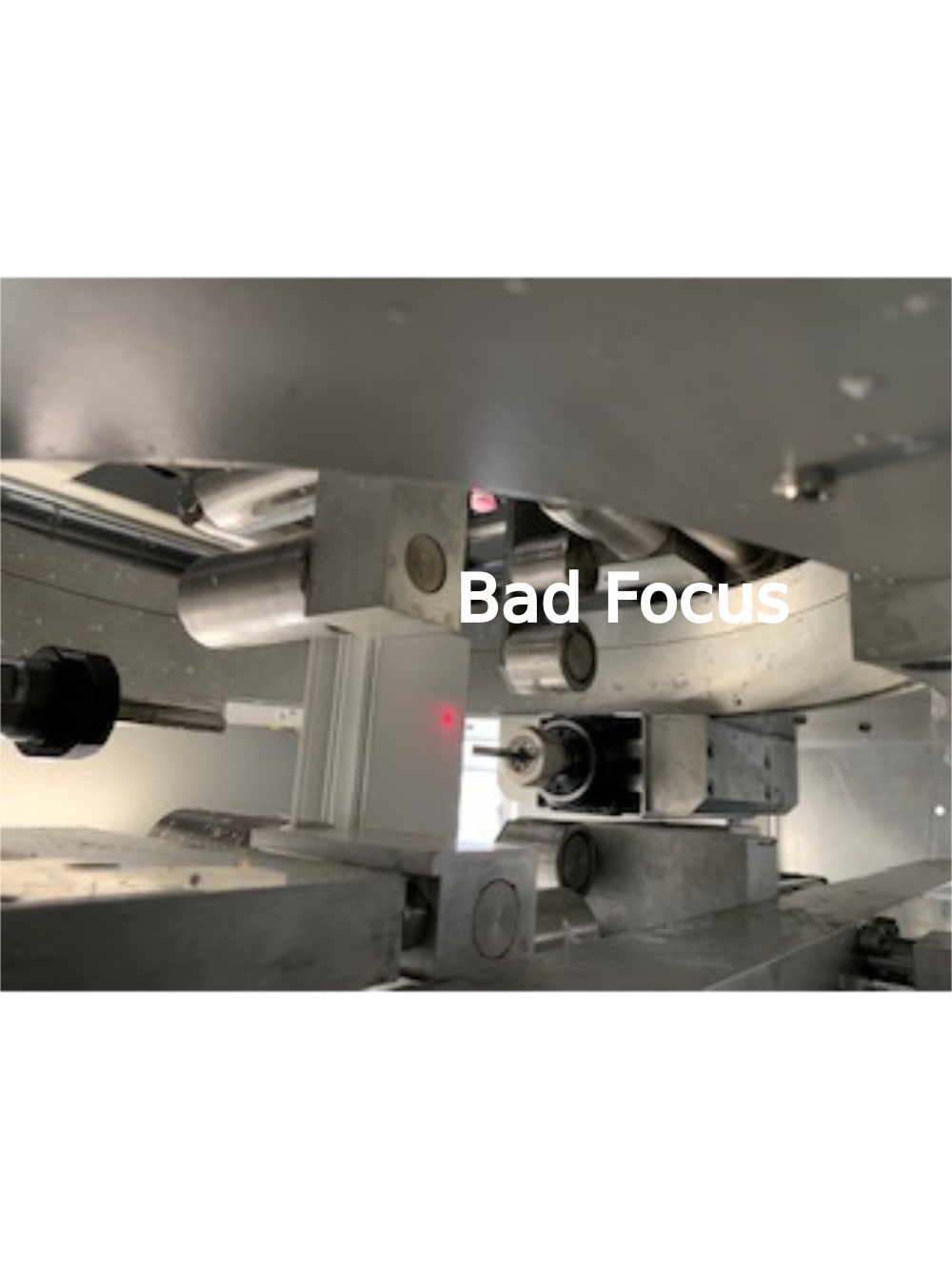
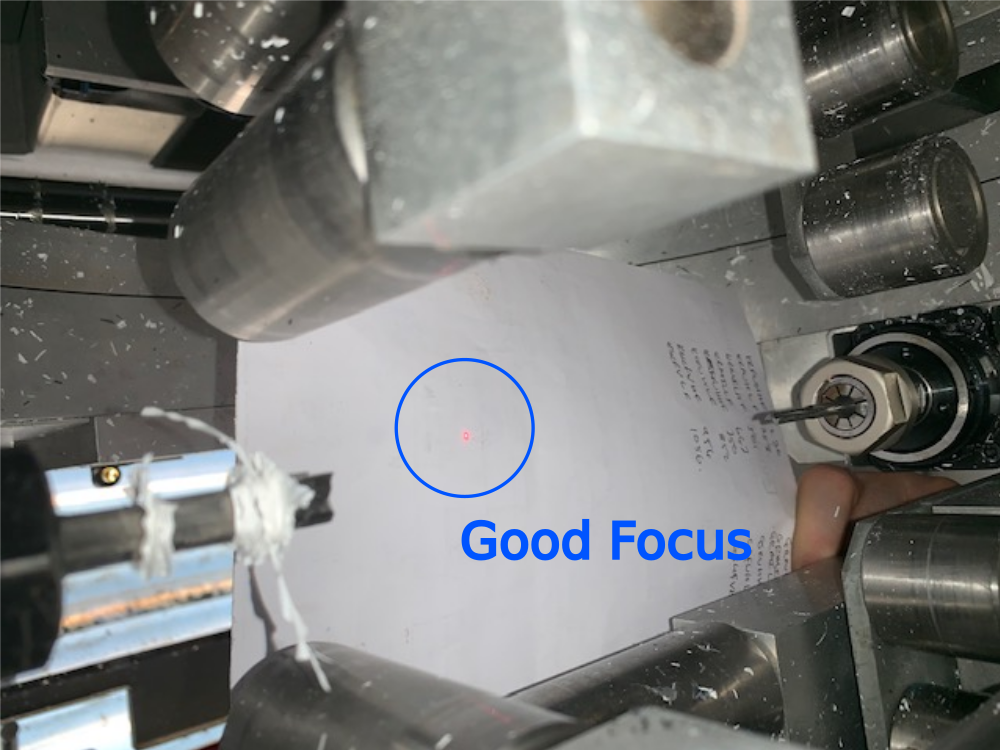
Place a clean, white profile or sheet of paper in the clamps and adjust the Y axis position so the laser dot can be seen below it
Focus the laser to make the dot as small as possible on the base of the profile
Étape 4 - Sensitivity
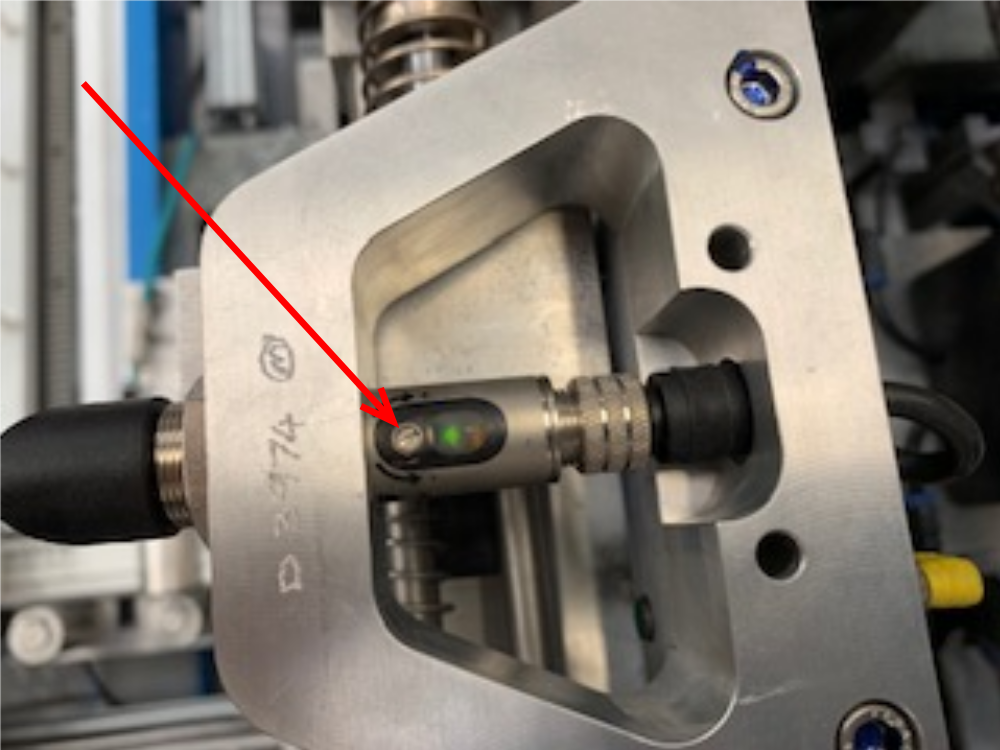
Finally the laser receiver sensitivity needs to be checked. Unscrew the adjusting screw (AntiClockwise) until the GREEN Led goes RED. .
Then turn screw (Clockwise) until RED Led goes back to GREEN then turn a further 5 full turns the same way, the receiver sensitivity is now set

Étape 5 - Replace Dust cover

Étape 6 - Replace lower guard
Draft
 Français
 English
 Deutsch
 Español
 Italiano
 Português