|
|
| Ligne 5 : |
Ligne 5 : |
| | |Categories=Software | | |Categories=Software |
| | }} | | }} |
| − | <translate>=Label Format File= | + | <translate> |
| − | The label format file is a text file and ends in .zft.
| + | 21/07/2025 Moved to confluence |
| | | | |
| − | The software uses 4 zft files
| + | [https://stuga-ltd.atlassian.net/wiki/external/MjQ5MGRmODYwYTNmNDdjNThhZDRhYmMwNWFiZTNhNjI Please click here]</translate> |
| − | | |
| − | {| class="wikitable"
| |
| − | |+
| |
| − | !Name
| |
| − | !Function
| |
| − | !Notes
| |
| − | |-
| |
| − | |PRNFMT.zft
| |
| − | |Main label format
| |
| − | |The reference to this file can be changed with the parameter
| |
| − | pieceFormat= in the file params.saw
| |
| − | | |
| − | The default name is PRNFMT.zft
| |
| − | |-
| |
| − | |offcut.zft
| |
| − | |Offcut label format
| |
| − | |The reference to this file can be changed with the parameter
| |
| − | offcutFormat= in the file params.saw
| |
| − | | |
| − | The default name is offcut.zft
| |
| − | |-
| |
| − | |remake.zft
| |
| − | |Remake label format - a second label that is produced alongside each remake label
| |
| − | |
| |
| − | |-
| |
| − | |waste.zft
| |
| − | |Waste label format (for a piece that is too short to be a stored offcut)
| |
| − | |
| |
| − | |}
| |
| − | {{Info|...The file formats are loaded when the control software (winMulti or winSaw) are started. The label is formatted and stored when the batch is loaded, so you cannot modify the label format "on the fly"}}<br />
| |
| − | | |
| − | =Format Fields=
| |
| − | To get the correct label information on the label, a method of field substitution is used. The software searches for field codes in the label format that begin and end with “$$”.
| |
| − | {| class="wikitable" border="1" cellspacing="0" cellpadding="0" width="501"
| |
| − | | width="75" valign="top" |'''''Field'''''
| |
| − | | width="347" valign="top" |'''''Description'''''
| |
| − | |-
| |
| − | | width="75" valign="top" |$$XLAB1$$
| |
| − | | width="347" valign="top" |Line 1 from PRN File
| |
| − | |-
| |
| − | | width="75" valign="top" |$$XLAB2$$
| |
| − | | width="347" valign="top" |Line 2 from PRN File
| |
| − | |-
| |
| − | | width="75" valign="top" |$$XLAB3$$
| |
| − | | width="347" valign="top" |Line 3 from PRN File
| |
| − | |-
| |
| − | | width="75" valign="top" |$$XLAB4$$
| |
| − | | width="347" valign="top" |Line 4 from PRN File
| |
| − | |-
| |
| − | | width="75" valign="top" |$$XLAB5$$
| |
| − | | width="347" valign="top" |Line 5 from PRN File
| |
| − | |-
| |
| − | | width="75" valign="top" |$$XLAB6$$
| |
| − | | width="347" valign="top" |Line 6 from PRN File
| |
| − | |-
| |
| − | | width="75" valign="top" |$$XLAB7$$
| |
| − | | width="347" valign="top" |Line 7 from PRN File
| |
| − | |-
| |
| − | | width="75" valign="top" |$$XLAB8$$
| |
| − | | width="347" valign="top" |Line 8 from PRN File
| |
| − | |-
| |
| − | | width="75" valign="top" |$$COLOUR$$
| |
| − | | width="347" valign="top" |Profile colour
| |
| − | |-
| |
| − | | width="75" valign="top" |$$ID1$$
| |
| − | | width="347" valign="top" |first 20 characters of the 40 character id field in the piece record
| |
| − | |-
| |
| − | | width="75" valign="top" |$$ID2$$
| |
| − | | width="347" valign="top" |second 20 characters of id filed (done like this so the id field can go on 2 lines)
| |
| − | |-
| |
| − | | width="75" valign="top" |$$LENGTH$$
| |
| − | | width="347" valign="top" |string representation of piece length – one decimal point
| |
| − | |-
| |
| − | | width="75" valign="top" |$$MITRE$$
| |
| − | | width="347" valign="top" |string representation of mitre characters (eg \ /, [ ], < ], etc)
| |
| − | |-
| |
| − | | width="75" valign="top" |$$PROFILE$$
| |
| − | | width="347" valign="top" |profile code
| |
| − | |-
| |
| − | |$$BINNO$$
| |
| − | |Slot Number
| |
| − | |-
| |
| − | | width="75" valign="top" |$$TROLNO$$
| |
| − | | width="347" valign="top" |Trolley Number
| |
| − | |-
| |
| − | | width="75" valign="top" |$$BARCODE$$
| |
| − | | width="347" valign="top" |Batch / Piece identification number ( 8 characters of batch name, 4 characters of piece number) – exactly as the number in SAMOUT
| |
| − | |-
| |
| − | | width="75" valign="top" |$$WELDER$$
| |
| − | | width="347" valign="top" |Uses the id field for a welder barcode. This uses the barcodeLength parameter to take the number of digits to use from the left to right, then barcodeTrim trims leading characters from the left.
| |
| − | |-
| |
| − | |$$BATCHNO$$
| |
| − | |Batch number
| |
| − | |-
| |
| − | |$$PIECENO$$
| |
| − | |Piece number
| |
| − | |-
| |
| − | |$$OFFLENGTH$$
| |
| − | $$OFFCUTLENGTH$$
| |
| − | |Offcut Length
| |
| − | |}
| |
| − | The label format is a standard ZPL format with the above fields in. All details of the zpl follow in the ZPL programming language manual.
| |
| − | | |
| − | https://www.zebra.com/content/dam/zebra/manuals/printers/common/programming/zpl-zbi2-pm-en.pdf | |
| − | <br />
| |
| − | | |
| − | =Example=
| |
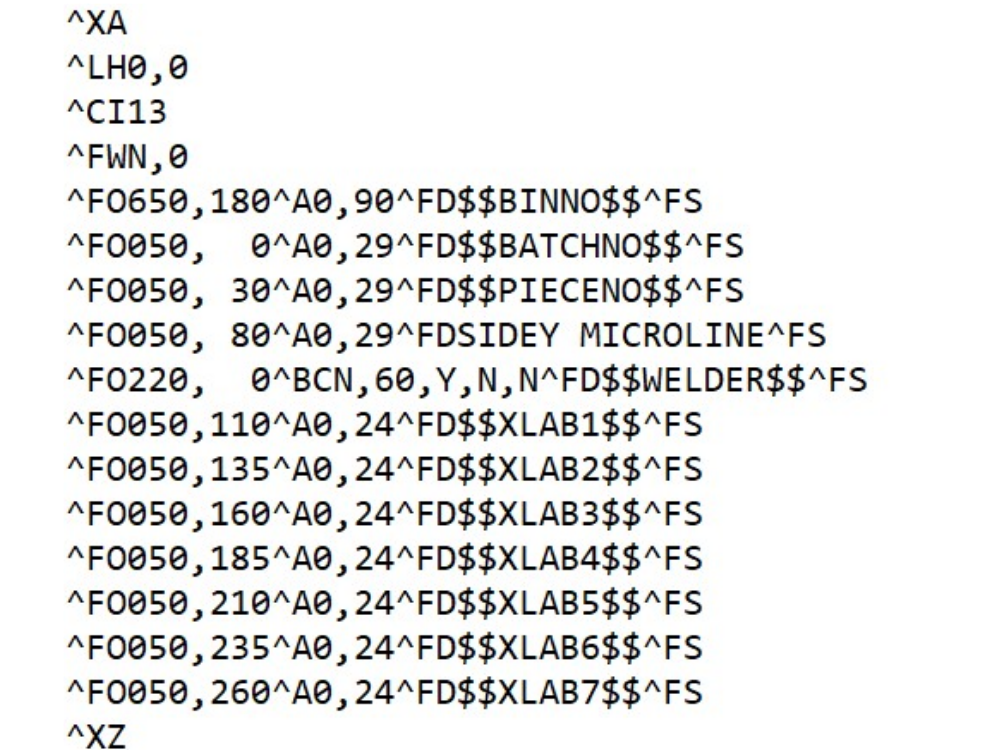
| − | Here is the PRNFMT.ZFT file:<br /><syntaxhighlight>
| |
| − | ^XA
| |
| − | ^LH10,10
| |
| − | ^FWN,0
| |
| − | ^FO165,10^AS^FDBatch: $$BATCHNO$$ Piece:$$PIECENO$$^FS
| |
| − | ^FO20, 0^AV^FD$$BINNO$$^FS
| |
| − | ^FO20, 75^AF^FD$$XLAB1$$^FS
| |
| − | ^FO20,105^AF^FD$$XLAB2$$^FS
| |
| − | ^FO20,135^AF^FD$$XLAB3$$^FS
| |
| − | ^FO20,165^AF^FD$$XLAB4$$^FS
| |
| − | ^FO20,195^AF^FD$$XLAB5$$^FS
| |
| − | ^FO20,225^AF^FD$$XLAB6$$^FS
| |
| − | ^FO20,255^AF^FD$$XLAB7$$^FS
| |
| − | ^XZ
| |
| − | </syntaxhighlight>
| |
| − | | |
| − | *^XA and ^XZ start and end the format
| |
| − | *^LH positions the start of the label
| |
| − | *^FWN,0 Sets the rotation and left justifies all text fields
| |
| − | *^FOn,n positions a text field
| |
| − | *^Ax Selects a font
| |
| − | *^FD defines the data string for the field – can be straight text or a $$ field substitution
| |
| − | *^FS denotes the end of the field definition
| |
| − | | |
| − | = Barcodes =
| |
| − | Use the ^BCN ZPL code for barcodes:<syntaxhighlight>
| |
| − | ^FO220, 0^BCN,60,Y,N,N^FD$$WELDER$$^FS
| |
| − | </syntaxhighlight>This above example prints a 6mm tall barcode at 22,0 containing the welder barcode
| |
| − | | |
| − | =Testing Tip=
| |
| − | Testing the format can be a very time consuming task, as the software needs to be fully restarted and then the batch reloaded each time a change is made.
| |
| − | | |
| − | Changes are normally tiny positional changes of field position and size and take several iterations
| |
| − | | |
| − | Luckily, there is an [http://labelary.com/viewer.html online ZPL translator / viewer] that is ideal for checking your format changes before committing to the machine.{{#annotatedImageLight:Fichier:Labelary Screenshot.png|0=600px|hash=|jsondata=|mediaClass=Image|type=frameless|align=center|src=https://stuga.dokit.app/images/6/67/Labelary_Screenshot.png|href=./Fichier:Labelary Screenshot.png|resource=./Fichier:Labelary Screenshot.png|caption=|size=600px}}
| |
| − | | |
| − | | |
| − | Copy and paste the ZPL contents in to the box and click Redraw. In the above screenshot, I have replaced $$BINNO$$ with "99" so that the output makes sense - this can be done with any of the fields</translate>
| |
| | {{PageLang | | {{PageLang |
| | |Language=en | | |Language=en |

 Français
 English
 Deutsch
 Español
 Italiano
 Português