|
|
| Ligne 6 : |
Ligne 6 : |
| | |Tags=449, file, batch | | |Tags=449, file, batch |
| | }} | | }} |
| − | <translate>=1. File Format= | + | <translate>Moved to [https://stuga-ltd.atlassian.net/wiki/external/NTlmOTNkYmM2OWM4NDU0YjhkOTliMzg5M2E4ZDU3ZWU Confluence]</translate> |
| − | The file is ASCII and consists of various types of records. Each starts with an identifying letter and ends with CR, LF. The fields are separated by a comma. The contents depends on the record type.
| |
| − | | |
| − | Structure<syntaxhighlight>
| |
| − | Batch record {
| |
| − | Load records {
| |
| − | Piece records {
| |
| − | Operations records {
| |
| − | }
| |
| − | }
| |
| − | Remainder record
| |
| − | }
| |
| − | </syntaxhighlight>
| |
| − | | |
| − | | |
| − | The batch record is written at the start of the batch and contains general header information. Load records are written whenever stock details change; they contain all information required to load the correct stock. Piece records contain sawing information and other details relevant to each cut piece. Operation lines are written where there is additional machining work to be carried out, e.g. drilling, notching, routing. There may be many operation lines per piece.
| |
| − | {| class="wikitable" border="0" cellspacing="0" cellpadding="0"
| |
| − | | width="134" valign="top" |'''Field'''
| |
| − | | width="64" valign="top" |'''Format'''
| |
| − | | width="151" valign="top" |'''Example'''
| |
| − | | width="322" valign="top" |'''Notes'''
| |
| − | |-
| |
| − | | width="134" valign="top" |'''<u>Batch Record</u>'''
| |
| − | | width="64" valign="top" |
| |
| − | | width="151" valign="top" |
| |
| − | | width="322" valign="top" |
| |
| − | |-
| |
| − | | width="134" valign="top" |Record Type
| |
| − | | width="64" valign="top" |1A
| |
| − | | width="151" valign="top" |B
| |
| − | | width="322" valign="top" |
| |
| − | |-
| |
| − | | width="134" valign="top" |Batch No
| |
| − | | width="64" valign="top" |8A
| |
| − | | width="151" valign="top" |12JN9101
| |
| − | | width="322" valign="top" |Specified in computer
| |
| − | |-
| |
| − | | width="134" valign="top" |Status
| |
| − | | width="64" valign="top" |1A
| |
| − | | width="151" valign="top" |S
| |
| − | | width="322" valign="top" |Manufacturing stage
| |
| − | |-
| |
| − | | width="134" valign="top" |'''<u>Load Record</u>'''
| |
| − | | width="64" valign="top" |
| |
| − | | width="151" valign="top" |
| |
| − | | width="322" valign="top" |
| |
| − | |-
| |
| − | | width="134" valign="top" |Record Type
| |
| − | | width="64" valign="top" |1A
| |
| − | | width="151" valign="top" |L
| |
| − | | width="322" valign="top" |
| |
| − | |-
| |
| − | | width="134" valign="top" |Stock No
| |
| − | | width="64" valign="top" |10A
| |
| − | | width="151" valign="top" |AB1000
| |
| − | | width="322" valign="top" |Profile stock number
| |
| − | |-
| |
| − | | width="134" valign="top" |Colour
| |
| − | | width="64" valign="top" |5A
| |
| − | | width="151" valign="top" |WHITE
| |
| − | | width="322" valign="top" |Profile colour
| |
| − | |-
| |
| − | | width="134" valign="top" |Pairing
| |
| − | | width="64" valign="top" |N
| |
| − | | width="151" valign="top" |1
| |
| − | | width="322" valign="top" |1 = single, 2 = pair (singles only)
| |
| − | |-
| |
| − | | width="134" valign="top" |Length
| |
| − | | width="64" valign="top" |5N
| |
| − | | width="151" valign="top" |60000
| |
| − | | width="322" valign="top" |Stock Length
| |
| − | |-
| |
| − | | width="134" valign="top" |Quantity
| |
| − | | width="64" valign="top" |3N
| |
| − | | width="151" valign="top" |012
| |
| − | | width="322" valign="top" |Number of pairs or singles to load
| |
| − | |-
| |
| − | | width="134" valign="top" |'''<u>Piece Record</u>'''
| |
| − | | width="64" valign="top" |
| |
| − | | width="151" valign="top" |
| |
| − | | width="322" valign="top" |
| |
| − | |-
| |
| − | | width="134" valign="top" |Record Type
| |
| − | | width="64" valign="top" |1A
| |
| − | | width="151" valign="top" |P
| |
| − | | width="322" valign="top" |
| |
| − | |-
| |
| − | | width="134" valign="top" |Length
| |
| − | | width="64" valign="top" |5N
| |
| − | | width="151" valign="top" |10000
| |
| − | | width="322" valign="top" |Cut length
| |
| − | |-
| |
| − | | width="134" valign="top" |Sawcut
| |
| − | | width="64" valign="top" |2A
| |
| − | | width="151" valign="top" |<>
| |
| − | | width="322" valign="top" |<nowiki>Two of | [ ] \ / < ></nowiki>
| |
| − | |-
| |
| − | | width="134" valign="top" |Trolley No
| |
| − | | width="64" valign="top" |2N
| |
| − | | width="151" valign="top" |02
| |
| − | | width="322" valign="top" |Trolley Number
| |
| − | |-
| |
| − | | width="134" valign="top" |Slot No
| |
| − | | width="64" valign="top" |2N
| |
| − | | width="151" valign="top" |17
| |
| − | | width="322" valign="top" |Position on trolley
| |
| − | |-
| |
| − | | width="134" valign="top" |Identification
| |
| − | | width="64" valign="top" |40A
| |
| − | | width="151" valign="top" |ASD100/001/F^A1
| |
| − | | width="322" valign="top" |Job / Item / Position in window
| |
| − | |-
| |
| − | | width="134" valign="top" |Cut Angle L
| |
| − | | width="64" valign="top" |4N
| |
| − | | width="151" valign="top" |0900
| |
| − | | width="322" valign="top" |Angle at left end
| |
| − | |-
| |
| − | | width="134" valign="top" |Cut Angle R
| |
| − | | width="64" valign="top" |4N
| |
| − | | width="151" valign="top" |0900
| |
| − | | width="322" valign="top" |Angle at right end
| |
| − | |-
| |
| − | | width="134" valign="top" |Piece No
| |
| − | | width="64" valign="top" |12N
| |
| − | | width="151" valign="top" |000000000112
| |
| − | | width="322" valign="top" |Unique piece number. Should start a 1 for the first piece in the batch and increment up.
| |
| − | |-
| |
| − | | width="134" valign="top" |'''<u>Operation Record</u>'''
| |
| − | | width="64" valign="top" |
| |
| − | | width="151" valign="top" |
| |
| − | | width="322" valign="top" |
| |
| − | |-
| |
| − | | width="134" valign="top" |Record Type
| |
| − | | width="64" valign="top" |1A
| |
| − | | width="151" valign="top" |O
| |
| − | | width="322" valign="top" |
| |
| − | |-
| |
| − | | width="134" valign="top" |Position
| |
| − | | width="64" valign="top" |5N
| |
| − | | width="151" valign="top" |02340
| |
| − | | width="322" valign="top" |Distance from start of piece
| |
| − | |-
| |
| − | | width="134" valign="top" |Tooling Code
| |
| − | | width="64" valign="top" |8A
| |
| − | | width="151" valign="top" |DFR
| |
| − | | width="322" valign="top" |Operation name
| |
| − | |-
| |
| − | | width="134" valign="top" |Param 1
| |
| − | | width="64" valign="top" |3N
| |
| − | | width="151" valign="top" |0
| |
| − | | width="322" valign="top" | }
| |
| − | |-
| |
| − | | width="134" valign="top" |Param 2
| |
| − | | width="64" valign="top" |3N
| |
| − | | width="151" valign="top" |0
| |
| − | | width="322" valign="top" | } Currently unused
| |
| − | |-
| |
| − | | width="134" valign="top" |Param 3
| |
| − | | width="64" valign="top" |3N
| |
| − | | width="151" valign="top" |0
| |
| − | | width="322" valign="top" | }
| |
| − | |-
| |
| − | | width="134" valign="top" |'''<u>Remainder Record</u>'''
| |
| − | | width="64" valign="top" |
| |
| − | | width="151" valign="top" |
| |
| − | | width="322" valign="top" |
| |
| − | |-
| |
| − | | width="134" valign="top" |Record Type
| |
| − | | width="64" valign="top" |1A
| |
| − | | width="151" valign="top" |R
| |
| − | | width="322" valign="top" |
| |
| − | |-
| |
| − | | width="134" valign="top" |Length
| |
| − | | width="64" valign="top" |5N
| |
| − | | width="151" valign="top" |00100
| |
| − | | width="322" valign="top" |Length of offcut
| |
| − | |-
| |
| − | | width="134" valign="top" |Sawcut
| |
| − | | width="64" valign="top" |2A
| |
| − | | width="151" valign="top" |<nowiki>||</nowiki>
| |
| − | | width="322" valign="top" |Cut type if req.
| |
| − | |-
| |
| − | | width="134" valign="top" |Destination
| |
| − | | width="64" valign="top" |1A
| |
| − | | width="151" valign="top" |W
| |
| − | | width="322" valign="top" |W = Waste, S = Store
| |
| − | |-
| |
| − | | width="134" valign="top" |Piece No
| |
| − | | width="64" valign="top" |12N
| |
| − | | width="151" valign="top" |000000000000
| |
| − | | width="322" valign="top" |Unique piece no
| |
| − | |}
| |
| − | '''Format Notes'''
| |
| − | | |
| − | a) All lengths are in tenths of mm.
| |
| − | | |
| − | b) Angles in tenths of a degree
| |
| − | | |
| − | c) Pieces are included, even if there are no operations
| |
| − | | |
| − | d) Numeric fields have leading zeros. Alphanumeric fields are left justified an padded with spaces.
| |
| − | | |
| − | e) The Piece No is used for tracking. It cross-references with the number printed on a label. This can be input by a user or scanned with a bar-code reader.
| |
| − | | |
| − | f) If pair cutting, there will still be one record per piece. The identification numbers still have to be carried, and there may be operations to carry out.
| |
| − | | |
| − | g) There will be one (two for pairs) remainder records per bar, even if the length is zero.
| |
| − | | |
| − | h) The parameters for operation lines depend on the type of operation.
| |
| − | | |
| − | i) To minimise wastage, alternating from arrowhead to square cuts should be avoided.
| |
| − | | |
| − | | |
| − | '''File Name'''
| |
| − | | |
| − | The file name output by software supplier will be “bbbbbbbb.449” where “bbbbbbbb” is the batch number. Note that the batch number should be read from the batch record.
| |
| − | | |
| − | Programming Notes
| |
| − | | |
| − | To allow for future enhancements, any program reading this file should follow these guidelines.
| |
| − | | |
| − | a) Allow for possibility of more than one batch record, allowing batch records to be concatenated.
| |
| − | | |
| − | b) Allow fields to be of variable length.
| |
| − | | |
| − | c) Ignore any extra fields.
| |
| − | | |
| − | d) If the saw cannot cut arbitrary angles, the angle to cut may be obtained from the ‘Saw Cut’ field.
| |
| − | | |
| − | Records that are not required may be ignored.
| |
| − | | |
| − | | |
| − | | |
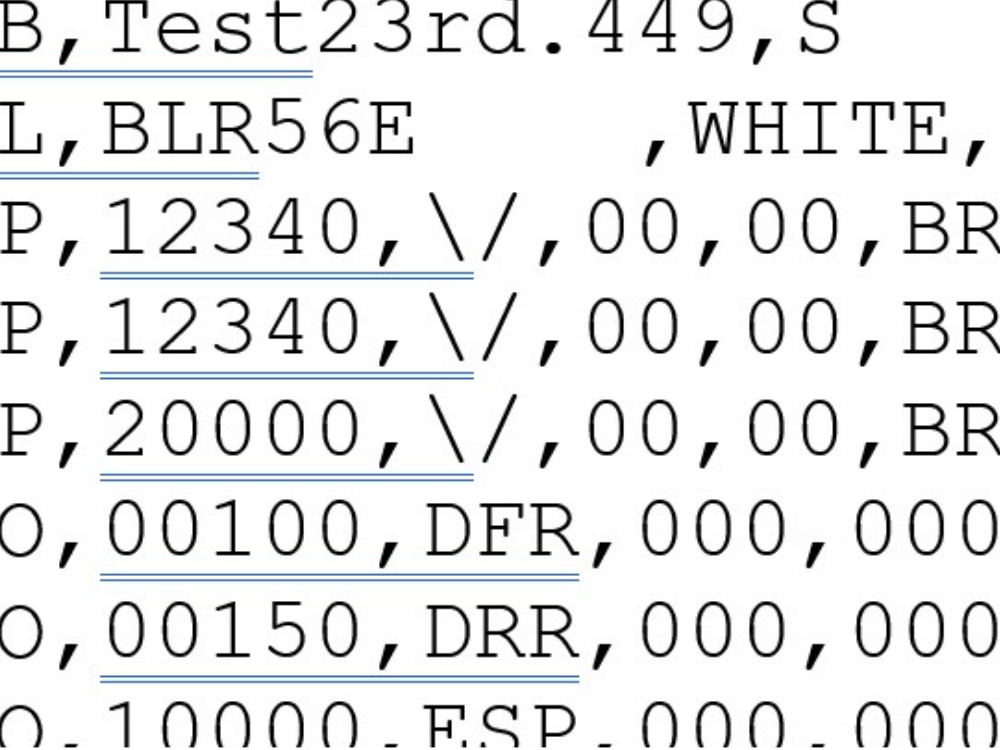
| − | '''Example File'''<syntaxhighlight>
| |
| − | B,Test23rd.449,S
| |
| − | L,BLR56E ,WHITE,1,60000,001
| |
| − | P,12340,\/,00,00,BR129A/001/F_A1 ,0450,0450,000000002685
| |
| − | P,12340,\/,00,00,BR129A/001/F_A1 ,0450,0450,000000002686
| |
| − | P,20000,\/,00,00,BR129A/001/F_A1 ,0450,0450,000000002687
| |
| − | O,00100,DFR,000,000,000
| |
| − | O,00150,DRR,000,000,000
| |
| − | O,10000,ESP,000,000,000
| |
| − | O,19830,DRR,000,000,000
| |
| − | O,19880,DFR,000,000,000
| |
| − | P,20000,\/,00,00,BR129A/001/F_A1 ,0450,0450,000000002688
| |
| − | R,47160,[],S,100000000437
| |
| − | </syntaxhighlight>
| |
| − | | |
| − | | |
| − | The above file illustrates loading a single bar of 6000 mm, cutting 4 pieces, one of which has 4 operation lines - 2 drain entry slots, 2 drain exit slots and an espag prep in the middle. An offcut of 4176mm is stored.
| |
| − | | |
| − | ==2. Profile Orientation==
| |
| − | All profiles follow these rules:
| |
| − | <br />
| |
| − | | |
| − | *Large face always goes to the bottom, outside of frame to rear
| |
| − | *Eurogroove always goes to the rear
| |
| − | *Leg on Z sashes / transoms always at bottom
| |
| − | {{#annotatedImageLight:Fichier:Stuga Batch Cutting List Profile Orientation.png|0=1094px|hash=|jsondata=|mediaClass=Image|type=frameless|align=center|src=https://stuga.dokit.app/images/5/54/Stuga_Batch_Cutting_List_Profile_Orientation.png|href=./Fichier:Stuga Batch Cutting List Profile Orientation.png|resource=./Fichier:Stuga Batch Cutting List Profile Orientation.png|caption=|size=1094px}}{{Pin|...The operation position should always be given from the left hand end.}}{{#annotatedImageLight:Fichier:Stuga Batch Cutting List Operation Position.png|0=1094px|hash=|jsondata=|mediaClass=Image|type=frameless|align=center|src=https://stuga.dokit.app/images/b/b1/Stuga_Batch_Cutting_List_Operation_Position.png|href=./Fichier:Stuga Batch Cutting List Operation Position.png|resource=./Fichier:Stuga Batch Cutting List Operation Position.png|caption=|size=1094px}}<br />
| |
| − | | |
| − | ==3. Operations==
| |
| − | The machining centre has a very flexible method for programming operations. The operations take the form of a CNC program stored on the machining centre. The programs are referred to by a tooling code. An operation can be as simple as a spot for a friction stay or as complicated as a 5 point door lock prep. The window designing package simply has to output the tooling code and the position along the bar. The machining centre handles all the profile related positional and size information. Each operation has a standard start position. The list of tooling codes for a particular system will be supplied to the window design software company by Stuga at least two months before the machine installation date. Certain standards are used to name the tooling codes.
| |
| − | | |
| − | ===3.1 Drainage===
| |
| − | The tool codes for the drainage operations are the same for every profile. Each profile will have up to six different types of drainage.
| |
| − | <br />
| |
| − | {| class="wikitable" border="1" cellspacing="0" cellpadding="0"
| |
| − | | width="175" valign="top" |Drainage Type
| |
| − | | width="84" valign="top" |Tool Code
| |
| − | |-
| |
| − | | width="175" valign="top" |Drain Front Rebate
| |
| − | | width="84" valign="top" |DFB
| |
| − | |-
| |
| − | | width="175" valign="top" |Drain Rear Rebate
| |
| − | | width="84" valign="top" |DRR
| |
| − | |-
| |
| − | | width="175" valign="top" |Drain Front Bead
| |
| − | | width="84" valign="top" |DFB
| |
| − | |-
| |
| − | | width="175" valign="top" |Drain Rear Bead
| |
| − | | width="84" valign="top" |DRB
| |
| − | |-
| |
| − | | width="175" valign="top" |Drain Top Face
| |
| − | | width="84" valign="top" |DTF
| |
| − | |-
| |
| − | | width="175" valign="top" |Drain Bottom Face
| |
| − | | width="84" valign="top" |DBF
| |
| − | |}
| |
| − | | |
| − | | |
| − | | |
| − | 3.1.1 Outer Frame{{#annotatedImageLight:Fichier:Stuga Batch Cutting List Specification Outer Drainage.png|0=917px|hash=|jsondata=|mediaClass=Image|type=frameless|align=center|src=https://stuga.dokit.app/images/d/d2/Stuga_Batch_Cutting_List_Specification_Outer_Drainage.png|href=./Fichier:Stuga Batch Cutting List Specification Outer Drainage.png|resource=./Fichier:Stuga Batch Cutting List Specification Outer Drainage.png|caption=|size=917px}}
| |
| − | | |
| − | | |
| − | | |
| − | 3.1.2 T Transom{{#annotatedImageLight:Fichier:Stuga Batch Cutting List Specification Transom Drainage.png|0=736px|hash=|jsondata=|mediaClass=Image|type=frameless|align=center|src=https://stuga.dokit.app/images/3/3d/Stuga_Batch_Cutting_List_Specification_Transom_Drainage.png|href=./Fichier:Stuga Batch Cutting List Specification Transom Drainage.png|resource=./Fichier:Stuga Batch Cutting List Specification Transom Drainage.png|caption=|size=736px}}
| |
| − | | |
| − | | |
| − | | |
| − | 3.1.3 Z Transom{{#annotatedImageLight:Fichier:Stuga Batch Cutting List Specification Z Transom Drainage.png|0=1054px|hash=|jsondata=|mediaClass=Image|type=frameless|align=center|src=https://stuga.dokit.app/images/7/7f/Stuga_Batch_Cutting_List_Specification_Z_Transom_Drainage.png|href=./Fichier:Stuga Batch Cutting List Specification Z Transom Drainage.png|resource=./Fichier:Stuga Batch Cutting List Specification Z Transom Drainage.png|caption=|size=1054px}}
| |
| − | | |
| − | | |
| − | | |
| − | 3.1.4 T Sash{{#annotatedImageLight:Fichier:Stuga Batch Cutting List Specification T Sash Drainage.png|0=1094px|hash=|jsondata=|mediaClass=Image|type=frameless|align=center|src=https://stuga.dokit.app/images/e/e9/Stuga_Batch_Cutting_List_Specification_T_Sash_Drainage.png|href=./Fichier:Stuga Batch Cutting List Specification T Sash Drainage.png|resource=./Fichier:Stuga Batch Cutting List Specification T Sash Drainage.png|caption=|size=1094px}}
| |
| − | | |
| − | | |
| − | | |
| − | | |
| − | | |
| − | 3.1.5 Z Sash{{#annotatedImageLight:Fichier:Stuga Batch Cutting List Specification Z Sash Drainage.png|0=1094px|hash=|jsondata=|mediaClass=Image|type=frameless|align=center|src=https://stuga.dokit.app/images/5/5a/Stuga_Batch_Cutting_List_Specification_Z_Sash_Drainage.png|href=./Fichier:Stuga Batch Cutting List Specification Z Sash Drainage.png|resource=./Fichier:Stuga Batch Cutting List Specification Z Sash Drainage.png|caption=|size=1094px}}
| |
| − | | |
| − | | |
| − | The start position of drain operations is the leading side of the drain slot as it enters the machine. This makes calculating the operation position a little more difficult, but it allows the slot to be cut in one pass, greatly increasing the efficiency of the Flowline.
| |
| − | | |
| − | ===3.2 Espags===
| |
| − | The espag prep is normally done in one operation. As a company normally has one espag and one shootbolt hardware on each profile, the tooling codes are normally:
| |
| − | | |
| − | | |
| − | ESP - Espag
| |
| − | | |
| − | SHB - Shootbolt
| |
| − | | |
| − | | |
| − | The start position of the operation is the centre of the prep.
| |
| − | <br />
| |
| − | | |
| − | ===3.3 Trickle Vents===
| |
| − | Each vent hardware will have a different tooling code. The start position is in the centre of the operation.
| |
| − | | |
| − | ===3.4 Door Handles / Gearboxes===
| |
| − | The door handle prep including gearboxes is done in one operation. The start position is the spindle centerline.
| |
| − | | |
| − | For each distinct door lock there are two tooling codes for the two possible directions that the operation can face. There are four possible door formats (open in / open out coupled with left hand or right hand hung) which can be made with the two tooling codes. It will depend on the profile type as well as the door orientation as to which direction an operation will face.
| |
| − | | |
| − | | |
| − | | |
| − | '''Use a P suffix for ‘positive’ doors and the distance to the handle centerline will be measured as''' {{#annotatedImageLight:Fichier:Stuga Batch Cutting List Specification Door P.png|0=1094px|hash=|jsondata=|mediaClass=Image|type=frameless|align=center|src=https://stuga.dokit.app/images/b/ba/Stuga_Batch_Cutting_List_Specification_Door_P.png|href=./Fichier:Stuga Batch Cutting List Specification Door P.png|resource=./Fichier:Stuga Batch Cutting List Specification Door P.png|caption=|size=1094px}}
| |
| − | | |
| − | | |
| − | eg tooling code will be doorP
| |
| − | | |
| − | | |
| − | | |
| − | '''Use an N suffix for ‘negative’ doors and the distance to the handle centerline will be measured as is''' {{#annotatedImageLight:Fichier:Stuga Batch Cutting List Specification Door N.png|0=1094px|hash=|jsondata=|mediaClass=Image|type=frameless|align=center|src=https://stuga.dokit.app/images/c/ca/Stuga_Batch_Cutting_List_Specification_Door_N.png|href=./Fichier:Stuga Batch Cutting List Specification Door N.png|resource=./Fichier:Stuga Batch Cutting List Specification Door N.png|caption=|size=1094px}}
| |
| − | | |
| − | | |
| − | | |
| − | eg tooling code will be doorN
| |
| − | | |
| − | ===3.5 Door Keep Preps===
| |
| − | As with the doors, the door keeps are machined in one whole operation. For each pair of door preps there will be an equivalent pair of keep preps (if required)
| |
| − | | |
| − | ===3.6 V Notches and Y Notches===
| |
| − | V Notches are classed as operations and have a standard code. Y notches are the half of a V notch added to the end of a reverse butt prep to give the full V notch when welded.
| |
| − | | |
| − | | |
| − | Format:
| |
| − | | |
| − | NotchCode followed by depth of notch in 10<sup>ths </sup>mm
| |
| − | | |
| − | | |
| − | Notch Codes
| |
| − | {| class="wikitable" border="1" cellspacing="0" cellpadding="0"
| |
| − | | width="241" valign="top" |Description
| |
| − | | width="96" valign="top" |Code
| |
| − | | width="320" valign="top" |View from top
| |
| − | |-
| |
| − | | width="241" valign="top" |Full V notch in front
| |
| − | | |
| − | | width="96" valign="top" |VFnnn
| |
| − | | width="320" valign="top" |{{#annotatedImageLight:Fichier:Stuga Batch Cutting List Specification Image.png|0=440px|hash=|jsondata=|mediaClass=Image|type=frameless|align=center|src=https://stuga.dokit.app/images/b/b9/Stuga_Batch_Cutting_List_Specification_Image.png|href=./Fichier:Stuga Batch Cutting List Specification Image.png|resource=./Fichier:Stuga Batch Cutting List Specification Image.png|caption=|size=440px}}
| |
| − | |-
| |
| − | | width="241" valign="top" |Full V notch in rear
| |
| − | | |
| − | | width="96" valign="top" |VRnnn
| |
| − | | width="320" valign="top" |{{#annotatedImageLight:Fichier:Stuga Batch Cutting List Specification V Rear.png|0=440px|hash=|jsondata=|mediaClass=Image|type=frameless|align=center|src=https://stuga.dokit.app/images/c/c0/Stuga_Batch_Cutting_List_Specification_V_Rear.png|href=./Fichier:Stuga Batch Cutting List Specification V Rear.png|resource=./Fichier:Stuga Batch Cutting List Specification V Rear.png|caption=|size=440px}}
| |
| − | |-
| |
| − | | width="241" valign="top" |Y notch in front right
| |
| − | | |
| − | | width="96" valign="top" |YFRnnn
| |
| − | | width="320" valign="top" |{{#annotatedImageLight:Fichier:Stuga Batch Cutting List Specification YFR.png|0=440px|hash=|jsondata=|mediaClass=Image|type=frameless|align=center|src=https://stuga.dokit.app/images/2/2b/Stuga_Batch_Cutting_List_Specification_YFR.png|href=./Fichier:Stuga Batch Cutting List Specification YFR.png|resource=./Fichier:Stuga Batch Cutting List Specification YFR.png|caption=|size=440px}}
| |
| − | |-
| |
| − | | width="241" valign="top" |Y notch in front left
| |
| − | | |
| − | | width="96" valign="top" |YFLnnn
| |
| − | | width="320" valign="top" |{{#annotatedImageLight:Fichier:Stuga Batch Cutting List Specification YFL.png|0=440px|hash=|jsondata=|mediaClass=Image|type=frameless|align=center|src=https://stuga.dokit.app/images/6/69/Stuga_Batch_Cutting_List_Specification_YFL.png|href=./Fichier:Stuga Batch Cutting List Specification YFL.png|resource=./Fichier:Stuga Batch Cutting List Specification YFL.png|caption=|size=440px}}
| |
| − | |-
| |
| − | | width="241" valign="top" |Y notch in rear right
| |
| − | | |
| − | | width="96" valign="top" |YRRnnn
| |
| − | | width="320" valign="top" |{{#annotatedImageLight:Fichier:Stuga Batch Cutting List Specification YRR.png|0=440px|hash=|jsondata=|mediaClass=Image|type=frameless|align=center|src=https://stuga.dokit.app/images/9/96/Stuga_Batch_Cutting_List_Specification_YRR.png|href=./Fichier:Stuga Batch Cutting List Specification YRR.png|resource=./Fichier:Stuga Batch Cutting List Specification YRR.png|caption=|size=440px}}
| |
| − | |-
| |
| − | | width="241" valign="top" |Y notch in rear left
| |
| − | | |
| − | | width="96" valign="top" |YRLnnn
| |
| − | | width="320" valign="top" |{{#annotatedImageLight:Fichier:Stuga Batch Cutting List Specification YRL.png|0=440px|hash=|jsondata=|mediaClass=Image|type=frameless|align=center|src=https://stuga.dokit.app/images/1/11/Stuga_Batch_Cutting_List_Specification_YRL.png|href=./Fichier:Stuga Batch Cutting List Specification YRL.png|resource=./Fichier:Stuga Batch Cutting List Specification YRL.png|caption=|size=440px}}
| |
| − | |}
| |
| − | | |
| − | | |
| − | The position should be given to the point of the notch from the loading end (ie left-hand end in above diagrams). This will mean that Y notches will either have a position of zero or (part length).
| |
| − | | |
| − | | |
| − | Points to note:
| |
| − | | |
| − | *The Stuga Flowline has two separate blades that can be worked independently. A Y notch prep can be placed anywhere on a piece without interference to the adjacent piece.
| |
| − | *The ZX5 has 2 blades that work simultaneously to create a V notch. Y notches are made on the sawing side
| |
| − | | |
| − | ===3.7 Other Operations===
| |
| − | The Flowline is capable of an unlimited number of other operations. These can take the form of spot preps, hinge preps, casement keeps, door packers, hinge bolts, etc. These will be defined for each installation.
| |
| − | | |
| − | ==4. Bar Usage==
| |
| − | The Stuga Flowline optimises the batch for use of profile automatically as standard. The Stuga sawing centre has optimising as an optional extra. If optimising is not installed, the following rules should be followed to optimise the batch before cutting.
| |
| − | | |
| − | ===4.1. Trim Cut===
| |
| − | The saw allows a trim cut at the beginning of the bar. It is adjustable from the 'Machine Parameters' option.- For more information see the operating manual. It is usually set to 10 mm to allow for inconsistent length and squareness of profile available from the manufacturer.
| |
| − | | |
| − | ===4.2. Piece to Piece gap===
| |
| − | The machine keeps the gap in between pieces as small as possible (equal to the kerf). Because of the way cuts are made, however, some piece to piece gaps are larger. The following table lists the piece gaps, for reference when programming optimisation packages.{{#annotatedImageLight:Fichier:Stuga Batch Cutting List Specification Gaps.png|0=550px|hash=|jsondata=|mediaClass=Image|type=frameless|align=center|src=https://stuga.dokit.app/images/3/32/Stuga_Batch_Cutting_List_Specification_Gaps.png|href=./Fichier:Stuga Batch Cutting List Specification Gaps.png|resource=./Fichier:Stuga Batch Cutting List Specification Gaps.png|caption=|size=550px}}
| |
| − | | |
| − | | |
| − | As the table shows, it is most economical to avoid arrow head cuts on the left-hand side of the cut length, except when cutting another arrow-head.
| |
| − | | |
| − | ==5. Printer File Format==
| |
| − | For customers who require extra information on the labels, the link should be set up to generate a separate printer file. This file provides a reference for a label format for each piece in a batch of windows.
| |
| − | | |
| − | ===5.1 Structure===
| |
| − | The file is ASCII text:
| |
| − | <br /><syntaxhighlight>
| |
| − | Batch record {
| |
| − | Piece records {
| |
| − | Label records {
| |
| − | }
| |
| − | }
| |
| − | }
| |
| − | </syntaxhighlight>The batch record is written at the start of the batch and contains general header information exactly like the cutting list. Piece records are written exactly as the cutting list. Label records contain the bare text for printing onto the label. There can be up to 8 Label records per piece.
| |
| − | | |
| − | ===5.2 Format===
| |
| − | {| class="wikitable" border="0" cellspacing="0" cellpadding="0"
| |
| − | | width="134" valign="top" |'''Field'''
| |
| − | | width="64" valign="top" |'''Format'''
| |
| − | | width="151" valign="top" |'''Example'''
| |
| − | | width="187" valign="top" |'''Notes'''
| |
| − | |-
| |
| − | | width="134" valign="top" |'''<u>Batch Record</u>'''
| |
| − | | width="64" valign="top" |
| |
| − | | width="151" valign="top" |
| |
| − | | width="187" valign="top" |
| |
| − | |-
| |
| − | | width="134" valign="top" |Record Type
| |
| − | | width="64" valign="top" |1A
| |
| − | | width="151" valign="top" |B
| |
| − | | width="187" valign="top" |
| |
| − | |-
| |
| − | | width="134" valign="top" |Batch No
| |
| − | | width="64" valign="top" |8A
| |
| − | | width="151" valign="top" |12JN9101
| |
| − | | width="187" valign="top" |Specified in computer
| |
| − | |-
| |
| − | | width="134" valign="top" |Status
| |
| − | | width="64" valign="top" |1A
| |
| − | | width="151" valign="top" |S
| |
| − | | width="187" valign="top" |Manufacturing stage
| |
| − | |-
| |
| − | | width="134" valign="top" |'''<u>Piece Record</u>'''
| |
| − | | width="64" valign="top" |
| |
| − | | width="151" valign="top" |
| |
| − | | width="187" valign="top" |
| |
| − | |-
| |
| − | | width="134" valign="top" |Record Type
| |
| − | | width="64" valign="top" |1A
| |
| − | | width="151" valign="top" |P
| |
| − | | width="187" valign="top" |
| |
| − | |-
| |
| − | | width="134" valign="top" |Length
| |
| − | | width="64" valign="top" |5N
| |
| − | | width="151" valign="top" |10000
| |
| − | | width="187" valign="top" |Cut length
| |
| − | |-
| |
| − | | width="134" valign="top" |Sawcut
| |
| − | | width="64" valign="top" |2A
| |
| − | | width="151" valign="top" |<>
| |
| − | | width="187" valign="top" |<nowiki>Two of | [ ] \ / < ></nowiki>
| |
| − | |-
| |
| − | | width="134" valign="top" |Trolley No
| |
| − | | width="64" valign="top" |2N
| |
| − | | width="151" valign="top" |02
| |
| − | | width="187" valign="top" |Trolley Number
| |
| − | |-
| |
| − | | width="134" valign="top" |Slot No
| |
| − | | width="64" valign="top" |2N
| |
| − | | width="151" valign="top" |17
| |
| − | | width="187" valign="top" |Position on trolley
| |
| − | |-
| |
| − | | width="134" valign="top" |Identification
| |
| − | | width="64" valign="top" |40A
| |
| − | | width="151" valign="top" |ASD100/001/F^A1
| |
| − | | width="187" valign="top" |Job / Item / Position in window
| |
| − | |-
| |
| − | | width="134" valign="top" |Cut Angle L
| |
| − | | width="64" valign="top" |4N
| |
| − | | width="151" valign="top" |0900
| |
| − | | width="187" valign="top" |Angle at left end
| |
| − | |-
| |
| − | | width="134" valign="top" |Cut Angle R
| |
| − | | width="64" valign="top" |4N
| |
| − | | width="151" valign="top" |0900
| |
| − | | width="187" valign="top" |Angle at right end
| |
| − | |-
| |
| − | | width="134" valign="top" |Piece No
| |
| − | | width="64" valign="top" |12N
| |
| − | | width="151" valign="top" |000000000112
| |
| − | | width="187" valign="top" |Unique piece number
| |
| − | |-
| |
| − | | width="134" valign="top" |'''<u>Label Record</u>'''
| |
| − | | width="64" valign="top" |
| |
| − | | width="151" valign="top" |
| |
| − | | width="187" valign="top" |
| |
| − | |-
| |
| − | | width="134" valign="top" |Record Type
| |
| − | | width="64" valign="top" |1A
| |
| − | | width="151" valign="top" |X
| |
| − | | width="187" valign="top" |
| |
| − | |-
| |
| − | | width="134" valign="top" |Label Text
| |
| − | | width="64" valign="top" |80N
| |
| − | | width="151" valign="top" |Any ASCII text
| |
| − | | width="187" valign="top" |Text will be printed line by line
| |
| − | |}
| |
| − | | |
| − | | |
| − | '''Format Notes'''
| |
| − | | |
| − | a) All lengths are in tenths of mm.
| |
| − | | |
| − | b) Angles in tenths of a degree
| |
| − | | |
| − | c) Numeric fields have leading zeros. Alphanumeric fields are left justified an padded with spaces.
| |
| − | | |
| − | d) The Piece No is used for tracking. It cross-references with the piece number from the cutting list.
| |
| − | | |
| − | | |
| − | '''File Name'''
| |
| − | | |
| − | The file name output by software supplier will be “bbbbbbbb.prn” where “bbbbbbbb” is the batch number. Note that the batch number should match the batch number of the cutting list.
| |
| − | | |
| − | | |
| − | | |
| − | '''Example File'''<syntaxhighlight>
| |
| − | B,00001256.prn,S
| |
| − | P,12340,\/,00,01,BR129A/001/F_A1 ,0450,0450,000000000001
| |
| − | X, Customer: Mrs Jones
| |
| − | X, Location: Lounge
| |
| − | X, ------------------------------------------
| |
| − | X, \ 0906 mm /
| |
| − | X, \ /
| |
| − | X, --------------------------------------
| |
| − | X, Reinforcing: None
| |
| − | P,12340,\/,00,02,BR129A/001/F_A1 ,0450,0450,000000000002
| |
| − | X, Customer: Mrs Jones
| |
| − | X, Location: Lounge
| |
| − | X, ------------------------------------------
| |
| − | X, \ 1206 mm /
| |
| − | X, \ /
| |
| − | X, --------------------------------------
| |
| − | X, Reinforcing: 1000 CRS
| |
| − | P,20000,\/,00,02,BR129A/001/F_A1 ,0450,0450,000000000003
| |
| − | X, Customer: Mrs Jones
| |
| − | X, Location: Lounge
| |
| − | X, ------------------------------------------
| |
| − | X, \ 0906 mm /
| |
| − | X, \ /
| |
| − | X, --------------------------------------
| |
| − | X, Reinforcing: None
| |
| − | P,20000,\/,00,08,BR129A/001/F_A1 ,0450,0450,000000000004
| |
| − | X, Customer: Mrs Jones
| |
| − | X, Location: Lounge
| |
| − | X, ------------------------------------------
| |
| − | X, \ 1206 mm /
| |
| − | X, \ /
| |
| − | X, --------------------------------------
| |
| − | X, Reinforcing: 1000 CRS
| |
| − | </syntaxhighlight>
| |
| − | | |
| − | =6. Reiniforcing Field=
| |
| − | '''Addition - June 2022'''
| |
| − | | |
| − | Requirement is for a field to determine if reinforcing is used in order to sort the cut pieces into two sections.
| |
| − | | |
| − | Given the assumption that "Zeb" label printing will be active (ie the 3rd party software company outputs the label data), this will mean that the '''id''' field is not required for "important" data. Therefore additianal data can be added to signify the reinforcing type used.
| |
| − | | |
| − | Add the string "$R" to the id field. The software will search for this string anywhere in the field
| |
| − | P,20000,\/,00,00,BR129A/001/F_A1 $R,0450,0450,000000002687
| |
| − | | |
| − | = See Also =
| |
| − | [[Stuga Zebra Label Batch File Specification]]
| |
| − | | |
| − | [[ZFT File Format]]</translate>
| |
| | {{PageLang | | {{PageLang |
| | |Language=en | | |Language=en |

 Français
 English
 Deutsch
 Español
 Italiano
 Português